Getting started with Social Insights
The Social Insights Analyst analyzes user-generated content (UGC) from your connected Instagram account. It surfaces ranked insight cards directly on the Social Content Library page, covering top creators, emerging UGC themes, content performance, and things to watch out for.
You can also ask questions about your tagged content conversationally through Composer chat.
The Analyst is read-only today: it analyzes and recommends, and you decide what to do with what it finds.
You will learn
- What the Social Insights Analyst is and where insights appear
- What each insight card category means
- How to explore an insight further in Composer chat
- How to ask your own questions about creators, UGC, and engagement trends
- What the Analyst can and can't do today
- How to give feedback on insight quality
Before you begin
To see social insights, your account needs:
- A paid Klaviyo Social Marketing plan or an active free trial
- An Instagram Business account connected to Klaviyo with Facebook Login (see Connect Instagram to Klaviyo)
- UGC in your Social Content Library, including tags and mentions. Insight card generation requires at least 10 available, unexpired UGC items. Your brand's own posts do not count toward this minimum. Cards are generated only when there is a useful finding to surface.
The Social Insights Analyst is read-only. It doesn't post, publish, schedule, or send messages on your behalf, and it doesn't change anything in your account.
What the Social Insights Analyst is
Instagram gives you raw metrics. The Social Insights Analyst ranks, contextualizes, and explains: which creator stands out right now, what theme is emerging across multiple posts, and what might deserve your attention.
Insights are generated from your connected Instagram Business account via Meta's Graph API. Today, the Analyst analyzes your UGC, content posted by Instagram users that tag your brand, and your brand’s own posts.
Insights appear in two places:
- Insight cards on the Social Content Library page, surfaced proactively (UGC only)
- Composer chat, where you can ask questions and dig deeper (UGC and brand posts)
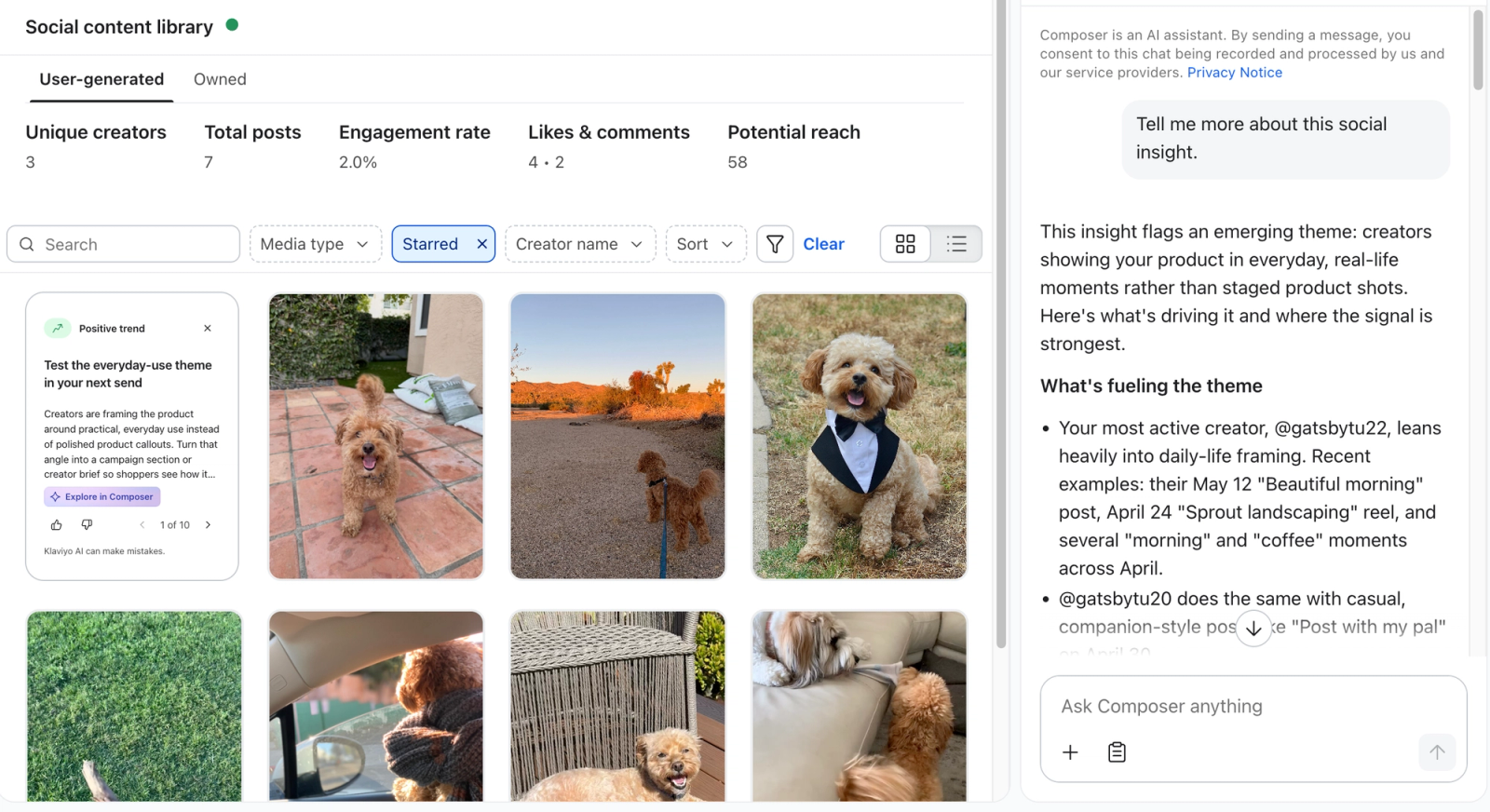
Insight cards on the Social Content Library page
- In Klaviyo, open Social in the left navigation and select Social content to open the Social Content Library.
- Select the User-generated tab, then select Grid view using the view toggle on the right. Insight cards appear alongside your tagged content in this view.
Each card includes a headline and a short explanation. Use the left and right arrows on the card to browse additional insights. To explore the supporting evidence, select Explain insight to open Composer chat.
Cards cover 6 insight types. The Top creator, Positive trend, and Negative trend badges group these types:
- Top creator. A creator who stands out for consistent tagging, engagement, or reach.
- Rising creator. A creator whose tagging or engagement is accelerating.
- Lapsed creator. A creator who used to tag you regularly and has gone quiet.
- Emerging theme. A topic or angle converging across multiple creators' content.
- Performance format. A media format or content pattern that's outperforming.
- Watchout. Negative or neutral signals worth attention.
Insights refresh on a regular cadence. New tags and posts surface in subsequent cards, so cards change as your social activity changes. Today, Insight cards only display for UGC but having insight cards available for your brand’s own content is on the roadmap.
If a card is not relevant, select its X icon (Dismiss) to hide it from the card stack.
Explore an insight in Composer chat
- Select Explain insight on a card. Composer chat opens and asks the Analyst to explain that insight, with its context already included.
- Ask a follow-up question about the finding or its supporting posts and creators. For example, from a lapsed creator card you might ask "How often did this creator tag us last year?" or "What content of theirs performed best?"
Ask your own questions in Composer chat
You do not have to wait for an insight card. Select the sparkle icon labeled Open Composer in the Klaviyo header, then ask about your creators, UGC, your brand’s own posts, themes, and engagement trends in plain language. The Analyst responds with data-grounded answers that reference specific posts and creators.
From the Social Content Library, you can also select Analyze trends to ask Composer to identify trends over the last 90 days in the content on your selected tab: User-generated or Owned.
Questions that work well today:
- "Who is my top creator right now?"
- “How is my account engagement trending over time?”
- “What types of posts perform best from my account?”
- "Is anyone tagging me regularly that I should pay attention to?"
- "What themes are emerging in my tagged content over the last 30 days?"
- "Show me creators who used to tag me a lot and have gone quiet."
- "Which product categories are landing best in my UGC?"
- "Are there any complaints showing up across multiple creators?"
Treat insights as a first read and decision aid, and verify anything you plan to act on.
What the Analyst can't do yet
The Social Insights Analyst is read-only and covers Instagram-only data for now. It can't:
- Draft, schedule, or publish posts
- Send DMs or creator outreach on your behalf
- Analyze TikTok, YouTube, or other platforms
Give feedback on insights
Select the thumbs-up icon (Mark as helpful) or thumbs-down icon (Mark as not helpful) on a card to rate it. Ratings help Klaviyo evaluate insight quality. To hide a card that is not useful, select its X icon (Dismiss).
FAQ
Where do these insights come from?
From your connected Instagram Business account via Meta's Graph API. Today, the Analyst analyzes content posted by Instagram users that tags your brand and your brand's own posts.
Why am I not seeing any insights?
Check that your Instagram account is connected through Facebook Login and that your Social Marketing plan or trial is active. Look for cards in Grid view on the User-generated tab. Card generation requires at least 10 available, unexpired UGC items in your library. Your brand’s own posts do not count toward this minimum. Cards only show recent insights, and dismissed cards are hidden. New cards appear only when there is a useful finding to surface. Insights refresh on a regular cadence as new activity becomes available.
Can the Analyst post or DM for me?
Not today. The Social Insights Analyst is read-only. Drafting, scheduling, publishing, and creator outreach are not available today.
How is this different from Instagram's built-in insights?
Instagram surfaces raw metrics. The Social Insights Analyst ranks, contextualizes, and explains: which creator stands out, what theme is emerging across creators, and what to watch out for. It's also built into Klaviyo, alongside your profiles, segments, and campaigns.
Can I trust these insights for high-stakes decisions?
Insights are data-grounded and reference the underlying posts and creators, but they're intended as a decision aid, not a replacement for your own judgment. Select Explain insight on a card, ask Composer which posts and creators support the finding, and review those posts before acting.
Which social platforms are supported?
Instagram Business at launch. Additional platforms are not yet supported.
Additional resources
- Learn how to use the Social Content Library.
- See how to connect Instagram to Klaviyo.
- Review getting started with Composer.
Meet Composer, Klaviyo's AI marketing agent. See what it can analyze, audit, and create, including campaigns, flows, and segments, and how credits work.
- Learn how to use Composer responsibly (AI disclosure).
Learn how to use Composer responsibly: what to review, when to disclose AI-generated content, and ready-to-use AI disclosure language for your messages.