Multi-Branch Splits
Multi-Branch Splits
Klaviyo flows used to make one binary decision at every split: a profile either met the conditions or it didn't. To route customers into more than two groups (by language, location, product category, purchase history, etc.), you had to chain multiple splits together. Those structures worked, but they were slow to build, harder to read, and made editing a single condition a bigger project than it should have been.
Multi-branch splits replace that approach. They combine what used to be two separate actions - the conditional split and the trigger split - into a single split. A single split can now branch into multiple paths, each with its own conditions. Profiles are evaluated against the paths in the order you define them, and routed down the first one they qualify for. If a profile doesn't qualify for any configured path, it goes through the "Everyone else" path automatically.
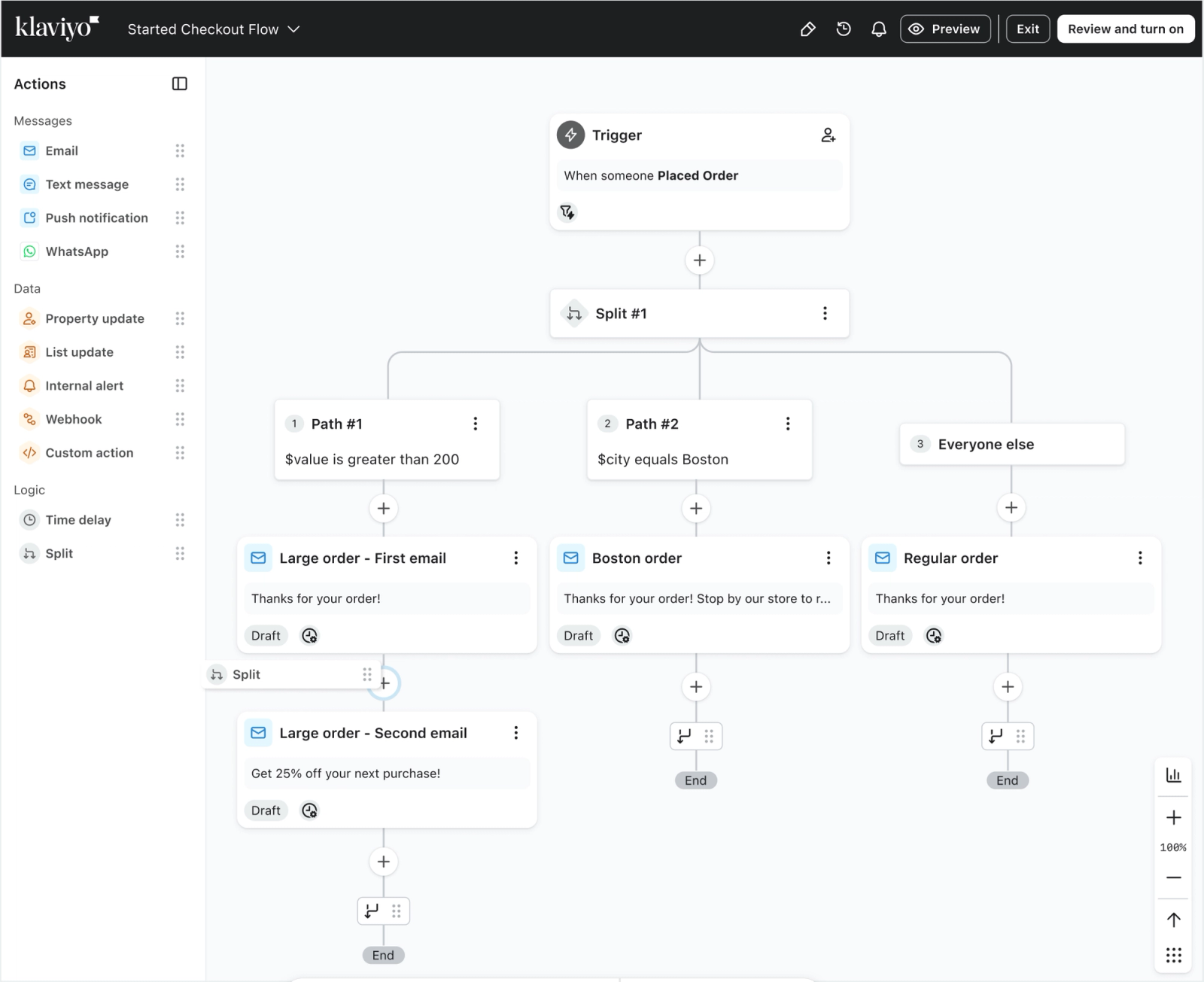
How profiles move through a split
When a profile reaches a split, Klaviyo checks the paths in sequence: "Check first," "Check second," and so on. The profile goes down the first path whose conditions it meets. A profile will never qualify for more than one path within the same split.
The "Everyone else" path is always last. It catches any profile that didn't qualify for the paths above it. This path cannot be removed.
If you have paths with no conditions configured, those paths are skipped. Klaviyo treats an unconfigured path as false and moves to the next one. The "Everyone else" path still evaluates regardless of how many paths above it are left unconfigured. If none of your paths have conditions set, every profile will go through "Everyone else."
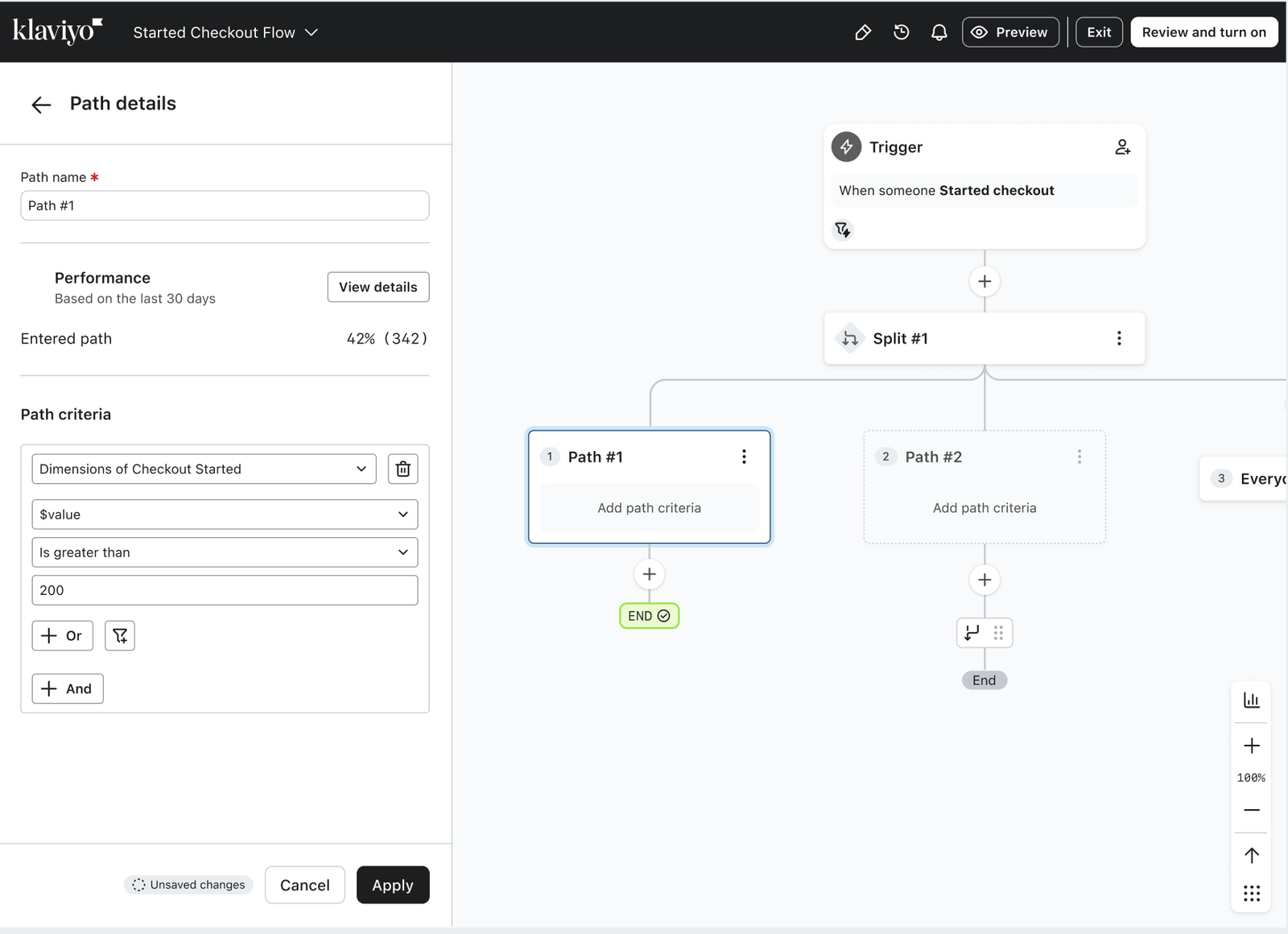
What you can do with multi-branch splits
Each split supports up to 20 paths: 19 you configure and one "Everyone else" path. Within each path, you can use any combination of profile properties and event-based conditions; the same conditions available in the filter builder when setting up segments.
Adding and organizing paths
In the flow builder, drag Split from the Logic section of the sidebar onto the flow. Select the split to open its configuration panel. Select Add path criteria on a path, set its conditions, and save your changes. To create another path, select Add path, then set that path’s criteria. Configure each path you want profiles to take before setting the flow live; an unconfigured path is skipped.
In the split configuration panel, select Add path above the path where you want the new one to appear. Use Move up or Move down on a path to change the order in which paths are evaluated. The Everyone else path stays last.
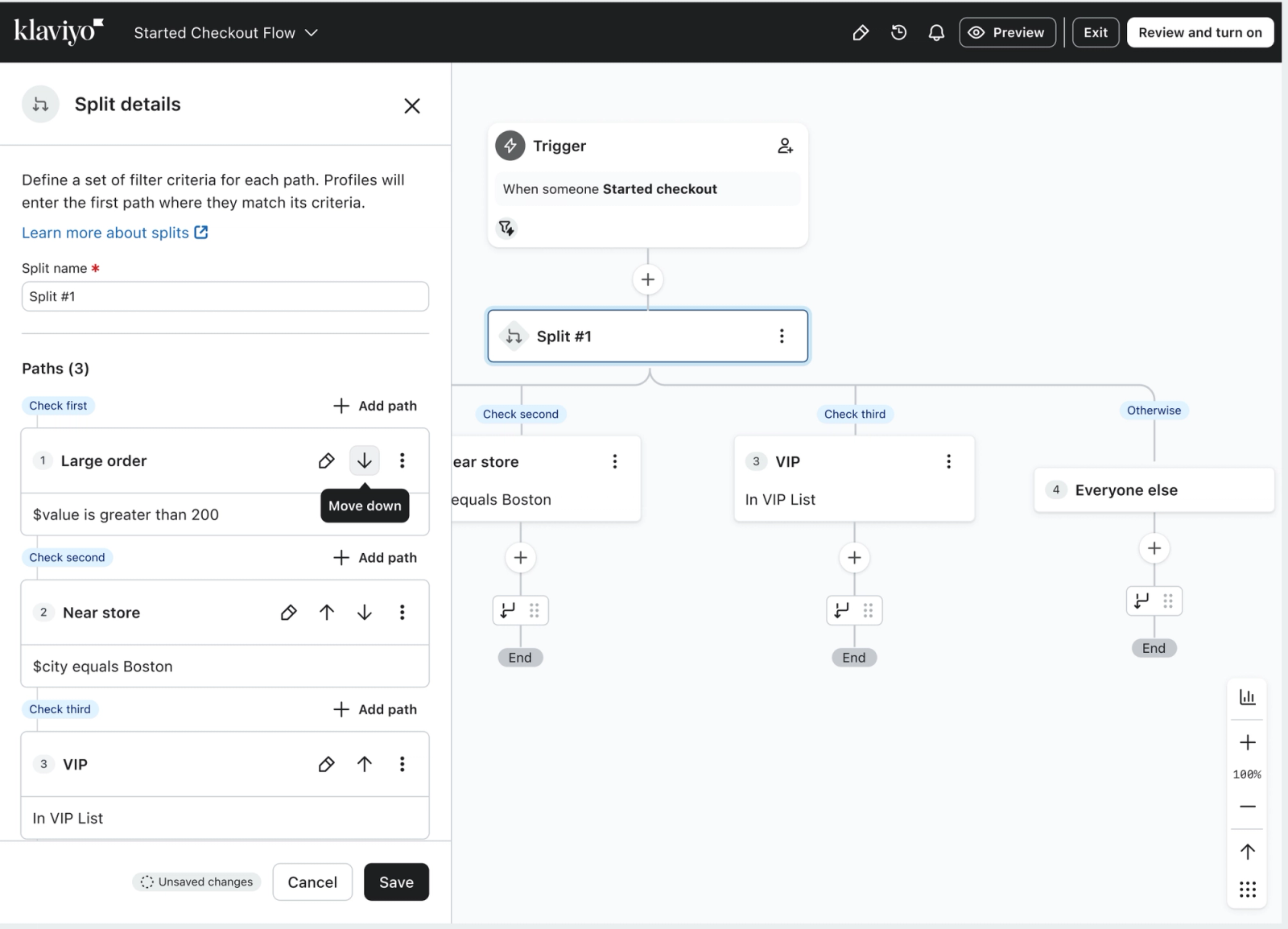
You can also clone a path to copy its conditions into a new path. This is useful when two paths have similar logic that you want to adjust, rather than rebuild. Cloning copies the conditions only. Any messages or actions you've placed under the original path are not duplicated.
Tip: add paths to one split — don't stack splits. To route your audience into more than two groups, add more paths to the same split rather than placing another split under the "Everyone else" path. A single split can hold up to 20 paths, evaluated in order, which does the same job as chained splits with far less to manage. Nesting a new split under "Everyone else" recreates the old workaround that multi-branch splits are designed to replace.
Naming
Both splits and paths can be renamed. By default, splits are labeled "Split #1," "Split #2," and so on. Paths default to "Path #1," "Path #2," and so on within the split. If you're building a flow with multiple splits or several paths per split, renaming helps your team understand the logic at a glance without having to open each card.
Analytics
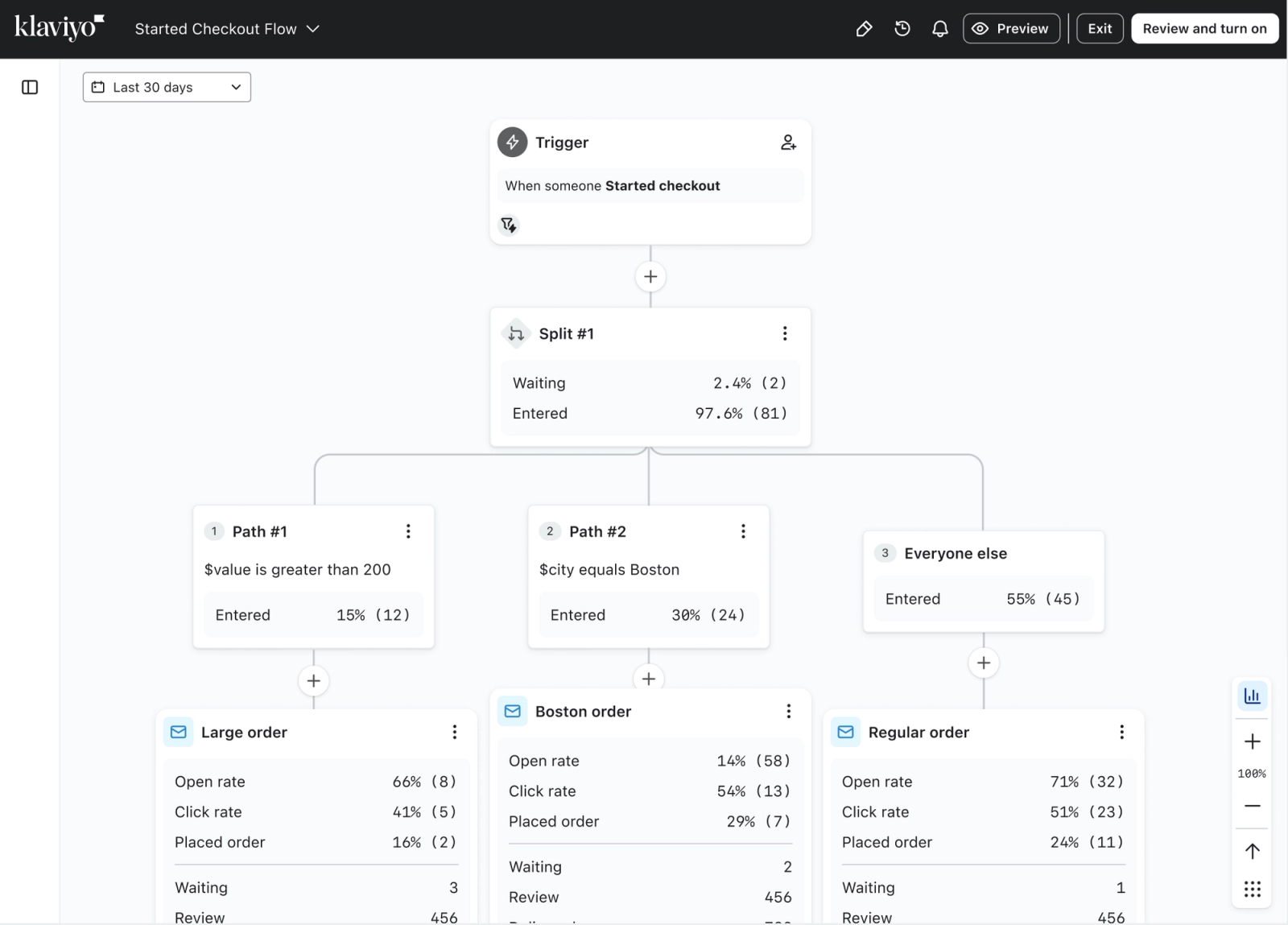
Once a split is live, the configuration panel shows how many profiles went through each path over the last 30 days (both as a number and as a percentage of total profiles that entered the split). Clicking "View details" opens the split activity page, where you can see individual profiles that went through a specific path.
Flow preview
To test the logic before going live, use flow preview. Enter any profile in your account and Klaviyo will show which path that profile would take and why, based on how their conditions match the path criteria.
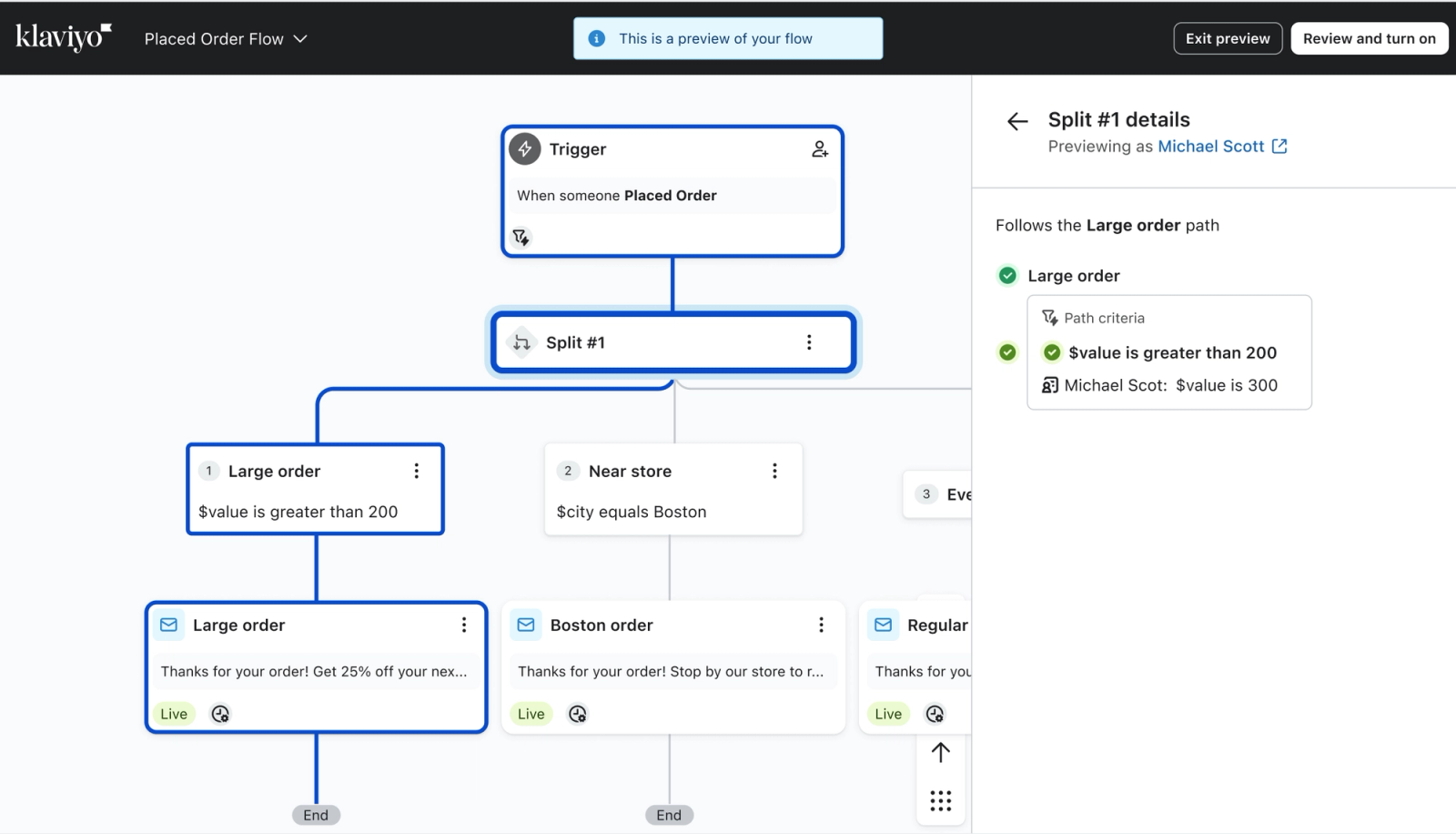
Conditions you can use on a path
Each path is defined by one or more conditions, built with the same filter builder you use elsewhere in Klaviyo. You can branch on:
- What someone has or hasn't done (a metric or event)
- Properties about someone
- Someone's location
- List or segment membership
- Whether someone can or can't receive email or SMS marketing
- Predictive analytics, such as predicted customer lifetime value or churn risk
- A random sample — a percentage of the profiles evaluated for that path
- Conditions based on the flow's trigger event, such as the value of the order that started the flow (available in metric-triggered flows only)
You can combine conditions on a single path with AND and OR logic.
Things to know
Path deletion limits. You can't delete a path when only two remain in a split. Once you're down to one conditional path and the "Everyone else" path, the only option is to delete the split itself. You can choose which path's actions to keep when you do.
Waiting contacts. If a contact is waiting inside a split or path when you delete it, that contact exits the flow. Contacts who have already moved past the split are not affected. To avoid dropping waiting contacts, hold off on deleting a split until no one is waiting inside it.
Joins. If any paths in your split are joined, you can't delete or reorder those paths until the join is disconnected first. Paths can only be disconnected one at a time.
Reordering changes evaluation. Moving a path up means Klaviyo will check it earlier. Profiles that previously went down a lower path may now qualify for the higher one instead. Review the full path order carefully after making changes.
- When you add a split in the middle of an existing flow, the actions that were below that point move onto the split's first path (Path #1).
- Flip split is available only when a split has exactly two paths (one condition path and "Everyone else"). It swaps the actions between the two paths.
Random sample conditions. If you use a random sample condition on a path, the percentage applies to the profiles evaluated for that specific path; not to all profiles entering the split. For example: 100 profiles enter a split. The first path uses a 50% random sample, so 50 profiles go down that path. The remaining 50 are evaluated for the next path, and a percentage condition there would apply to those 50.
How to use multi-branch splits
Language and locale
Brands that market to customers in multiple countries often need to send translated content or region-specific offers. With multi-branch splits, a welcome series that previously required four chained splits to reach four languages can handle all of them in one step. Each path checks for a language or country property, and the "Everyone else" path covers any profile that doesn't match.
Product line or category
Post-purchase flows for brands with multiple product categories can route customers based on what they just bought. A customer who purchased skincare goes down one path and receives category-specific follow-up. An apparel buyer goes down a different one. Anyone who doesn't match a configured path goes through "Everyone else" and receives general post-purchase messaging. No nested splits required.
Tip: add paths to one split, rather than stacking splits. To route your audience into more groups, add more paths to the same split instead of placing another split under the "Everyone else" path. A single split holds up to 20 paths, evaluated in order, which does the same job as chained splits with far less to manage.
Customer tier or loyalty segment
If you have VIP customers, loyalty tier members, or high-spend segments that need different messaging, a single split handles all of them. Each tier gets its own path with its own content, and the flow stays readable without having to trace through a chain of yes/no decisions.
What happens to your existing splits
No action is required.
Your existing conditional splits and trigger splits keep working exactly as they are. They are not automatically converted, and you do not need to change anything for them to keep running. Multi-branch splits apply to new splits you create going forward. In flows you already have, your current splits stay as-is. We will migrate existing splits to the multi-branch format in a future update, and we will share details and timing before that happens. Until then, you may see both your existing splits and the new multi-branch split format across your flows.
Availability
Multi-branch splits are being released in phases, and the feature might not be visible in your account immediately. You will receive an in-app notification within the flow builder once this functionality is enabled for you. In the meantime, your current splits will continue to operate without interruption, and there is no need for any manual updates.
What's next
Multi-branch splits are the first customer-facing feature built on Flows 2.0, Klaviyo's updated evaluation engine. The same infrastructure is the foundation for additional improvements to how flows work, including updates to how filters and conditions are managed within the flow builder. We'll have more detail on those as they're ready.