Understanding how UK GDPR and PECR affect SMS
Learn how local compliance laws including GDPR and PECR affect SMS marketing in the UK. SMS in the EU is regulated by the General Data Protection Regulation (GDPR), and SMS in the UK is regulated by the UK General Data Protection Regulation (UK GDPR). Additionally, in the UK, the Privacy and Electronic Communications (EC Directive) Regulations 2003 (PECR) apply to the sending of marketing texts to individuals. While these laws are most commonly associated with data protection, they also dictate how to gather proper consent and what to include in your SMS messages.
This information is not legal advice. Klaviyo recommends that you consult with your legal counsel to make sure that you comply with the GDPR, UK GDPR, PECR, and all other applicable laws in connection with your text message marketing.
Consent
When collecting consent in the EU and UK, you must provide a clear and detailed explanation of how you plan to use the subscriber’s information. Under GDPR and UK GDPR, consent needs to be “freely given, specific, informed, and unambiguous.” PECR has the same consent requirements under UK GDPR for obtaining valid consent.
When asking for consent:
- Make it easy to opt out (e.g., via an unsubscribe link)
- Provide links to your privacy policy and terms of service
- Be clear about what information you are collecting and how you are going to use it
- Be clear about what subscribers are subscribing to
- Ask for consent for each specific purpose (e.g., if you collect consent for both SMS and email, use separate fields for these channels so that someone has the option to subscribe to one and not the other)
- Make sure the subscriber has to take an active step (e.g., checking an unchecked box)
- Do not make receiving a good or service conditional on consent to SMS marketing
- Check the rules for marketing to children with your legal counsel. For online services offered directly to children that rely on consent to process personal data, parental authorization is required below age 13 in the UK. In the EU, the threshold for these services varies by country from 13 to 16.
- Keep records of when, where, how, and for what someone gave you their consent
Under GDPR and UK GDPR, there are other bases (like “legitimate interest”) that may be relied on instead of consent, but when using Klaviyo SMS to send text messages to subscribers, you need to ensure that you have obtained proper consent from recipients using the guidelines mentioned above.
To learn more, read this article on collecting GDPR-compliant consent.
Transparency
Each marketing text message you send to recipients in the EU and UK should identify you as the sender of the message. Many companies do this by either customizing their sender ID or including their organization name at the start of each message. When using Klaviyo SMS, you can customize your branded sender ID under Settings > Text message > Sender information.
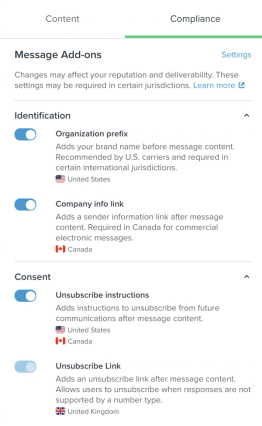
To add your organization’s name to the start of a message, open the SMS message editor, select Compliance, and turn on Organization prefix. For UK numeric sending numbers, Klaviyo includes the prefix even if this option is turned off.
Opt-out
Each marketing text message you send to recipients in the EU and UK must also include an opt-out mechanism. Many companies do this by including an unsubscribe link in their messages. In the SMS message editor, select Compliance to review the options for your sending number:
- For a branded sender ID, Klaviyo automatically adds an unsubscribe link. Branded sender IDs cannot receive replies, so recipients cannot opt out by replying STOP.
- For a number that can receive replies, such as a UK long code or short code, turn on Unsubscribe instructions to tell recipients how to opt out (e.g., by replying STOP). Klaviyo does not automatically add an unsubscribe link for these numbers.
Review the message preview to check your sender identification and opt-out text, then click Next to save and continue.
Additional Resources
- Understanding explicit vs. implicit consent
Learn more about the different types of consent (explicit vs. implicit) in Klaviyo and who you can or cannot email. Being able to email a subscriber basically boils down to having the proper consent.
- How to collect GDPR-compliant consent
Learn how consent is stored in Klaviyo to help you be GDPR compliant, and how to collect GDPR to compliant consent.
- Frequently asked questions about GDPR
Learn about frequently asked questions regarding GDPR to help you be compliant.
- How to handle GDPR and CCPA requests
Learn how to export a profile’s complete data or a record of deletion to share with customers when they contact you with a GDPR or CCPA request.