Understanding branching best practices for flows
You will learn
Learn about targeting different groups based on what they've done in order to provide a more relevant experience for each recipient. This can be especially valuable for flows, as your communications will feel more personalized to each person. In this article, we run through various ways you can branch flows in order to create a more personalized experience for your recipients.
Branching by purchasers vs. non-purchasers
Messaging existing customers and non-customers differently is a good practice, especially if you plan on offering an incentive in your welcome or abandoned cart flow. You don't want to over-discount, so you may want to only offer a coupon code to shoppers who have never purchased from you before to encourage them to buy for the first time.
If you take this approach, be sure to include language like, "Take 10% off your first purchase" so that recipients don't grow to expect a discount every time they abandon a cart. Additionally, use dynamic coupon codes to prevent sharing on sites like RetailMeNot, etc.
Learn more about how to use coupon codes in Klaviyo.
To split your flow by purchasers versus non-purchasers:
- Add a split at the top of your flow.
- Set this split to be based on What someone has done or not done > Has Placed Order at least once over all time. Existing customers match this path; people who have never placed an order go down the Everyone else path.
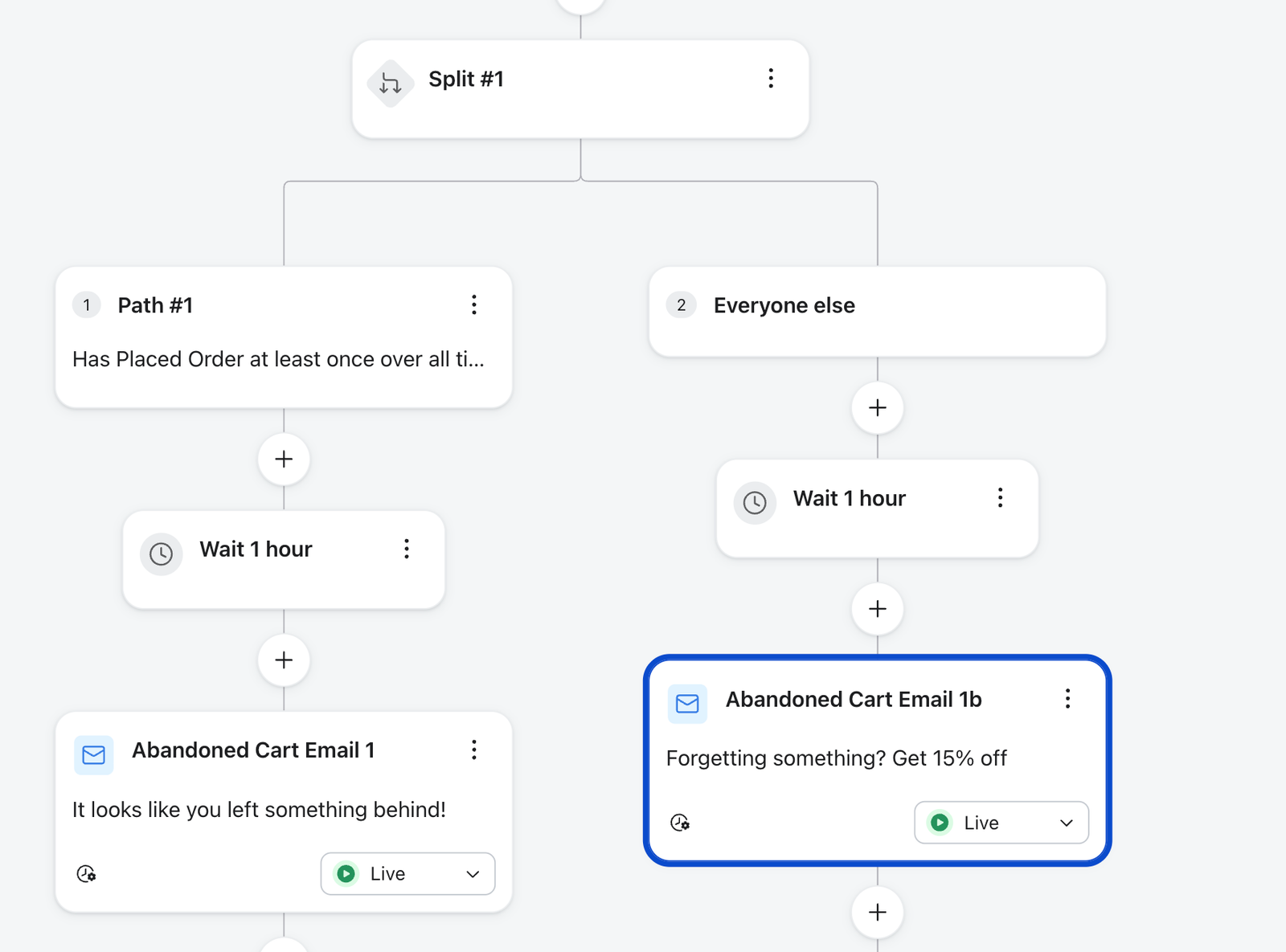
- You can include a coupon in the final message of the Everyone else path.
Branching by domestic vs. international shoppers
You may be able to offer special perks to domestic customers that you don't offer to international customers, like free shipping. Branching your flow by domestic versus international customers allows you to highlight these perks to domestic customers to persuade them to purchase.
- Add a split at the top of the flow.
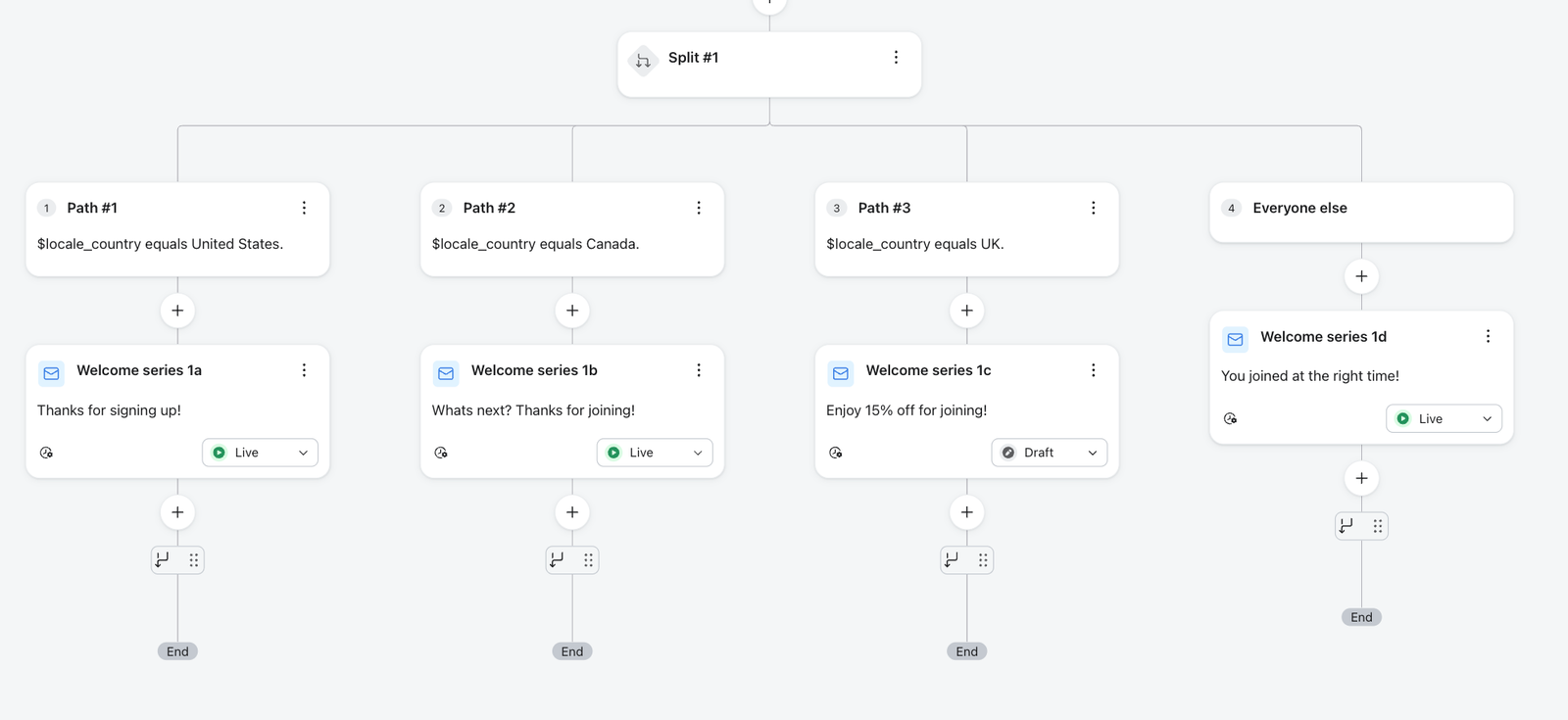
- Set this split to be based on Properties about someone > Country equals US. US customers go down this path; everyone else goes down the Everyone else path.
To tailor more than two regions, add a path per region — Check first: US; Check second: Canada; Check third: UK; Otherwise: Everyone else — instead of a single US/non-US split.
Branching by product category or collection (metric-triggered only)
If you have a large product offering, you may want to branch a metric-triggered flow (e.g., an abandoned cart or browse abandonment) by category or collection to include more relevant copy in your emails. One key example is if you sell men's and women's products. In this case, it's also important to include a default path in case the product in someone's cart is not in either the men's or women's collection.
- Add one split at the top of the flow and give it a path per category — Check first: Men’s category; Check second: Women’s category; and so on. Profiles are evaluated in order and take the first category path they match. You no longer stack a separate split for each category.
- Put a more generic message on the Everyone else path for anyone who doesn't match a category.
Tip: Order matters — profiles take the first path they match, so list your most specific categories first. To add more groups, add more paths to the same split (up to 20 paths total, including Everyone else); don't nest another split under Everyone else.
Additional resources
- Understanding flow branching
Learn how flow branching helps you personalize flows so that you can send individuals down different paths depending on what you already know about them.
- Multi-Branch Splits Send profiles down up to 20 paths in a single split, each matched by its own conditions. Learn how multi-branch splits work and how to build one in a flow.
Send profiles down up to 20 paths in a single split, each matched by its own conditions. Learn how multi-branch splits work and how to build one in a flow.
Read about flows where you can use these branching ideas:
- How to create a browse abandonment flow
Learn how to create a browse abandonment flow to show shoppers products they viewed but didn’t purchase.
- How to create an abandoned cart flow
Learn how to set up an abandoned cart flow in Klaviyo in order to increase your ecommerce revenue and personalize communication to your customers.
- How to create an email welcome series
Learn how to create a sequence of emails sent directly after someone subscribes to hear from your brand. This is a critical moment in the customer lifecycle because it's your opportunity to introduce new, interested prospects to your business and product offering. With a welcome series, you should capitalize on this display of interest.