Percentiles in Klaviyo reference
You will learn
Learn more about what Klaviyo percentiles are to better comprehend your benchmarking data. By using Klaviyo’s benchmarking tool, you can compare your business and marketing performance to other companies similar to your own. These comparisons are shown via percentiles.
What is a percentile?
A percentile is a measurement of rank in relation to the whole group. In this instance, it’s your brand’s ranking in relation to others in your peer group. You should always strive to have a high percentile, but if you find yourself ranking lower than desired, it may be time to think about how to improve. For example, if you are in the 75th percentile, this means that your company ranked higher than 75% of companies that are most like your own. If you are in the 25th percentile you are ranked higher than 25% of those companies.
You will see percentile data listed throughout all the pages of Benchmarks.
Standard table view
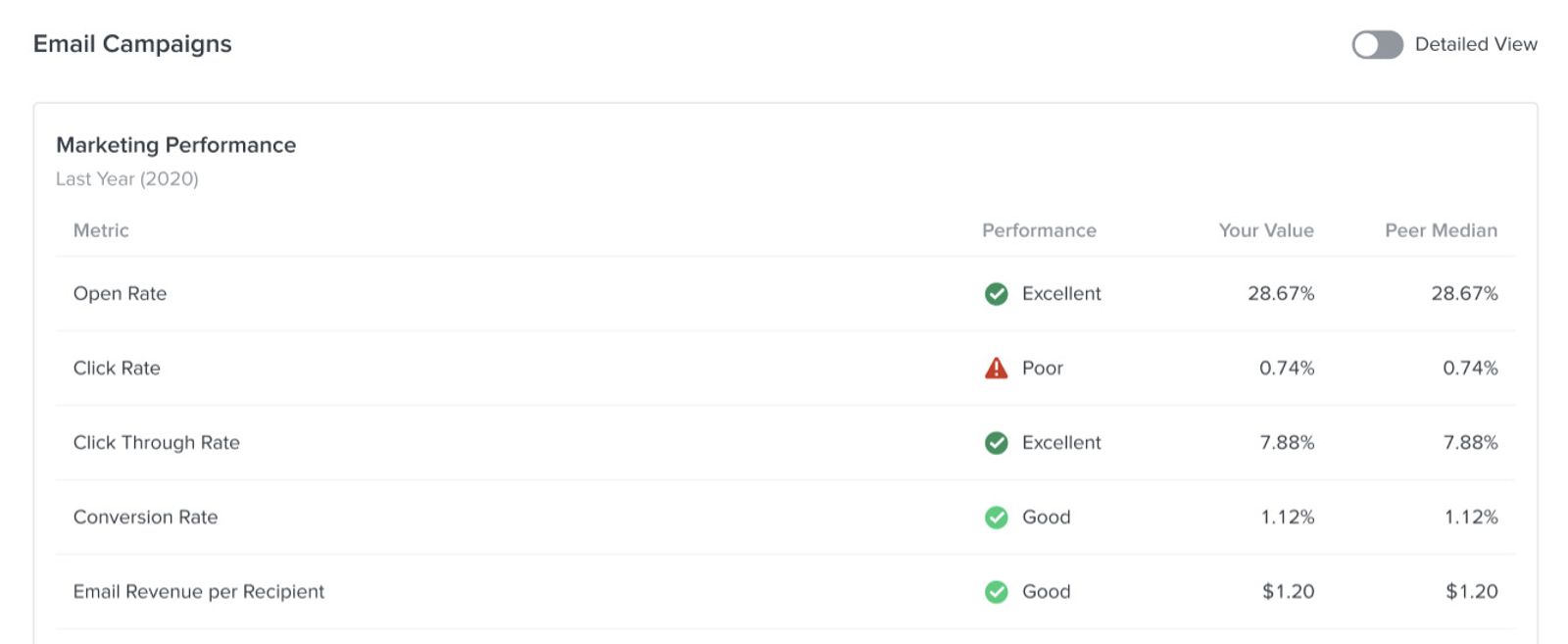
Upon landing on any table view, you will automatically see the following columns and values:
- Metric
The metrics we've chosen that represent the performance of your account. Examples include open rate, click rate, and repeat customer rate. - Performance
Connotes how well each performance indicator has functioned in relation to your peer group. These statuses are poor, fair, good, and excellent. For more information on what statuses entail and how to level up, head to How to Improve Your Benchmark Results. - Your Value
The raw amount equated to the given performance indicator; e.g., for average order value, you will see that exact monetary value for your business. - Peer Median
The value attributed to companies in the middle tier of performance. Half of the companies perform better than the median, and half perform worse.
Detailed percentile table view
To view more values and performance indicators associated with your metric, toggle on the option for Detailed View on the upper right side above the table.

Once this has been toggled on, you will see additional performance indicators populate in the table including:
- Your Percentile
Where you rank in relation to your peers within your designated peer group. For example, if you are in the 75th percentile, your company ranked higher than 75% of other similar companies. We report the 25th, 50th (median), and 75th percentiles. - 25th Percentile
The value attributed to companies in the lowest tier of performance. - 75th Percentile
The value attributed to companies in the highest tier of performance.
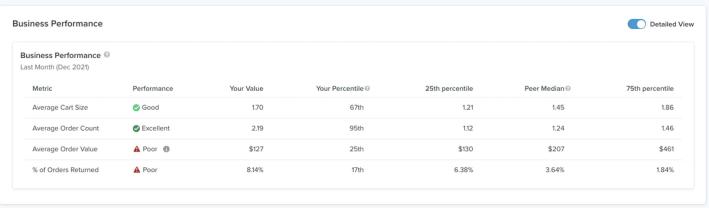
In this example, the average cart size is listed as 1.11; thus, this company falls at the 4th percentile of their peer group. The average cart size of companies within the 25th percentile equals 1.29; whereas those in the 75th percentile have an average cart size of 1.81. You can use the median (50th percentile) and 75th percentiles of your peer group to set goals for improving your account performance.
Ultimately, percentile data gives you a better idea of where you rank across different areas of your business; thus, insight into where you can improve. Head to our documentation on KPI decrease troubleshooting or improving benchmark performance for inspiration on how to get into those higher percentile ranks and grow your business.
Additional resources
- Getting started with benchmarks reports
Learn how benchmarks allow you to analyze your account data in relation to Klaviyo best practices, industry trends, and companies similar to your own. By seeing how different aspects of your account perform, you can prioritize efforts in areas that need improvement in order to use Klaviyo to its maximum potential.
- Getting started with reporting
Learn about the different robust Klaviyo reporting tools available in your account. Klaviyo is built to help your business grow and strengthen your relationships with your audience by putting data to work. Segmentation and automation tools allow you to personalize and target your communication efforts across channels to boost engagement and drive business growth. However, in order to understand how well your business strategies and marketing efforts are working, you need proper reporting to measure and analyze performance trends over time.
- Understanding peer groups, benchmarks, and how Klaviyo uses your data
Learn about peer groups and industry benchmarks in Klaviyo, including what they are and how to understand the information they provide.Klaviyo benchmarks are formulated using peer groups and industry benchmarks. In this guide, you will learn what both of these entail and how to understand the information they provide so that you can learn from benchmarking results and expand your business.
- How to update your industry and vertical in Klaviyo
Learn how to view and edit your business' industry and vertical in Klaviyo. Your Klaviyo account should always accurately reflect your business’ industry and vertical.