Understanding cookies in Klaviyo
You will learn
Learn more about how you can use Klaviyo cookies as a part of the Klaviyo web tracking services to gather information and help improve conversion rates and email performance. This article explains the Klaviyo cookies and their purposes so that you understand how customers are tracked. This information helps you understand how Klaviyo gathers data, and how this may impact customer privacy and compliance laws.
This article is for general informational purposes only and is not legal advice. Cookie, tracking, and data privacy laws (including GDPR, the ePrivacy Directive/PECR, CCPA/CPRA, and other applicable state and international privacy laws) vary by jurisdiction and change over time. Please consult your own legal counsel to determine the specific disclosures, consents, or other compliance steps your business needs to take.
Applicable privacy laws (such as GDPR, the ePrivacy Directive/PECR, CCPA/CPRA, and other data protection laws) may require you to display links to your privacy notice, Terms of Service, and cookie policy in your emails. We recommend confirming which disclosures apply to your business with your own legal counsel.
Why use Klaviyo cookies
The Klaviyo cookie allows you to build more robust profiles by gathering tracking events such as when a user is on your site or views a product. When anonymous visitor tracking is enabled, Klaviyo can store activity in the visitor’s browser before they are identified, then add that earlier activity to their profile after identification. With more complete profiles, you have more data for segmentation and can use browsing events and revisits to target campaigns and trigger automated flows.
Klaviyo’s tracking cookies collect behavioral data that is not required for your site to function. Merchants typically categorize them as analytics or marketing cookies in their consent management platform rather than as strictly necessary. Confirm the right categorization for your setup with your advisors.
Klaviyo tracking cookies
When Klaviyo's JavaScript is enabled, the Klaviyo cookie (__kla_id cookie) can track and identify site visitors through an auto-generated ID. Once a visitor is identified, the cookie can pass their data into Klaviyo. A visitor can be identified when they:
- Fill out a Klaviyo sign-up form.
- Click a link from a Klaviyo email or SMS message.
- Go through checkout on your website. Klaviyo can identify visitors and collect checkout events through supported ecommerce integrations. See the Shopify requirements below.
For a first-time profile, the Klaviyo cookie is placed client-side by Klaviyo’s JavaScript, where onsite tracking is enabled and the script has not been blocked by a consent management tool or suppressed by platform-level privacy settings. Because the script executes under your domain, the resulting cookie is a first-party cookie. Cookie categorization for consent purposes typically depends on what the cookie does rather than which domain sets it, so review the behavior described in this article when deciding how to categorize it.
SMS click tracking and click-based conversion tracking depend on having a link, and this link must use the Klaviyo link shortener. When setting up your SMS messages, it’s important to have the option checked for Automatically shorten links to ensure you are using the default tracking.
Klaviyo has 2 features that help re-identify returning visitors after the Klaviyo cookie expires, so event data can continue to be tied to their profiles.
- Extended ID: Uses an identity graph to cross-reference a selection of existing identifiers set by other platforms already present in a visitor's browser (ad and social-platform cookies) to re-identify a user and place a Klaviyo cookie.
- First-party ID: Uses a separate server-set cookie, __kle_id, on your domain to restore the JavaScript-set __kla_id cookie when it expires.
Klaviyo cookie: data collected
The Klaviyo cookie can temporarily hold data points including: external id, email, phone number, and anonymous id. For more information on what external id and anonymous id are, please see this article.
- The __kla_id cookie contains base64-encoded JSON. After identification, it includes an encrypted token named $exchange_id, which can contain identifiers such as email, phone number, external ID, and anonymous ID. Only Klaviyo can decrypt this token server-side; base64 encoding does not encrypt the rest of the cookie.
Technical note: Before a visitor is identified, __kla_id includes cid, an anonymous browser identifier. Once the visitor is identified, the cookie is updated with $exchange_id so activity can be associated with their profile.
These values are stored in a browser cookie on your domain and are accessible to scripts running on your pages. Review the third-party scripts on your site accordingly.
Consider these characteristics when categorizing the cookie and preparing your notices.
- As __kla_id expires from the user’s browser or if the user clears their cookies, so too will the data held in __kla_id expire and they will be anonymous until re-identified.
- If a user returns to the website and has __kla_id refreshed (through an identification event, Extended ID, First-party ID, or other means), the values will also be refreshed and held in the cookie until it expires or cookies are cleared again.
Cookie lifetime
Klaviyo sets the __kla_id cookie to expire after 2 years, but browsers can shorten its lifetime. Klaviyo’s JavaScript sets this cookie, including when Extended ID or First-party ID re-identifies a visitor. First-party ID also uses the separate server-set __kle_id cookie. Learn how to set up Extended ID and First-party ID.
The standard __kla_id cookie lifespan varies by browser. More detailed information about browser restrictions is available on CookieStatus.
The table compares browser restrictions on JavaScript-set and server-set cookies. These are browser limits, not guaranteed lifetimes: a cookie can expire sooner based on its configured expiry, browser settings, or deletion by the visitor.
Browser | Standard __kla_id cookie (JavaScript-set) | First-party ID’s __kle_id cookie (server-set) |
|---|---|---|
Safari | Deleted after 7 days of browser use without interaction with the site. A 24-hour expiry applies after navigation from a known tracker to a URL containing query parameters or fragments. | A 7-day cap applies when a subdomain points to a cross-site host or uses an IP address that meets Safari’s third-party hosting criteria. |
Brave | JavaScript-set cookies have a 7-day expiry cap. Shields can block requests to known tracking domains. | Server-set cookies have a maximum expiry of 6 months. Shields can block known tracking requests, including requests whose CNAME target is blocked. |
Firefox | Storage for known trackers is purged daily unless the visitor has interacted with the site in the last 45 days. | Storage for known trackers is purged daily unless the visitor has interacted with the site in the last 45 days. |
Chrome | 400 days | Up to 400 days |
Edge | Up to 2 years (Klaviyo's own setting — not an Edge restriction) | No additional browser lifetime restriction; the cookie’s configured expiry still applies. |
Safari’s 24-hour restriction applies to JavaScript-set cookies after navigation from a site classified as a tracker to a URL containing query parameters or fragments. Safari also deletes script-writable storage after 7 days of browser use without interaction with the site.
Privacy notice, cookie notice, and consent
If you choose to turn on Extended ID or First-party ID, it is strongly suggested that you re-issue your cookie notices to your customers, and that you review your Terms of Service and/or privacy notice to ensure that your customers are notified of re-identification processes. In both scenarios the Klaviyo cookie will expire, but there are 2 approaches to re-identification:
- Extended ID is a first-party identity graph feature that allows you to replace the Klaviyo cookie by cross-referencing a selection of existing identifiers set by other platforms already present in a visitor's browser.
- First-party ID uses a separate server-set cookie on your domain to restore the Klaviyo cookie after it expires.
Extended ID and First-party ID behave differently from a standard tracking cookie. Before enabling either, review the following against your notices, your consent configuration, and your own privacy obligations:
- Collection timing. Where anonymous visitor tracking is enabled and tracking is permitted by your consent configuration, Klaviyo can store activity in the visitor’s browser before identification.
- Reading as well as writing. These features read identifiers already present in the visitor’s browser, in addition to writing the Klaviyo cookie. Extended ID reads identifiers set by other platforms; First-party ID reads a cookie set on your own subdomain.
- Behavior after cookie deletion. Both features can restore a Klaviyo identity after __kla_id expires, provided the identifiers they rely on remain available. If those identifiers have also been deleted, the visitor must be identified again before new identifiers can be linked to their profile.
- Extended ID needs an available identifier already linked to the visitor’s Klaviyo identity. A newly placed identifier needs to be linked during identification before it can be used on a later visit.
- After its server cookie is deleted, First-party ID must save the visitor’s identity again following an identification event.
- Consent tooling. If your consent configuration should prevent these features from running, confirm your consent management platform blocks them, and that visitors can withdraw consent as easily as they gave it.
- Existing notices. If you have any Klaviyo Onsite Identification features enabled and you did not update your cookie notice, visitors who accepted your prior cookie notice may not have seen a description of these features. Consider re-issuing your cookie notice and reviewing your privacy notice when you enable either one.
First-party ID vs Extended ID
Klaviyo also offers Extended ID, which re-identifies visitors using existing identifiers set by other platforms like Shopify, TikTok, and Reddit. Here's how the two compare:
Extended ID | First-party ID | |
|---|---|---|
How it re-identifies | Reads existing identifiers set by other platforms (Shopify, TikTok, Reddit, etc.) to match a returning visitor to a known profile | Uses a long-lived server-set cookie on your own subdomain to rehydrate __kla_id directly |
Relies on existing identifiers set by other platforms | Yes | No |
DNS setup required | No | Yes for the Klaviyo-managed setup: a subdomain CNAME pointing to Klaviyo’s Cloudflare account. |
If both First-party ID and Extended ID are enabled, First-party ID takes priority in refreshing __kla_id:
- First-party ID attempts to rehydrate __kla_id from __kle_id first.
- If First-party ID successfully rehydrates, the event is attributed to First-party ID, and Extended ID runs only to update the stored values in the identity graph.
- If First-party ID is unavailable or cannot be rehydrated (e.g., the worker subdomain is unreachable), Extended ID can still re-identify the visitor using existing identifiers set by other platforms as a fallback.
Both features continue to operate independently — enabling First-party ID does not disable Extended ID.
How does Extended ID work?
Extended ID is a first-party identity graph feature that allows you to refresh the Klaviyo cookie. It uses an identity graph to cross-reference a selection of existing identifiers set by other platforms already present in a visitor's browser (ad and social-platform cookies) to re-identify a user and replace a Klaviyo cookie. Learn how to set up Extended ID. Extended ID is available on all Klaviyo plans - free and paid.
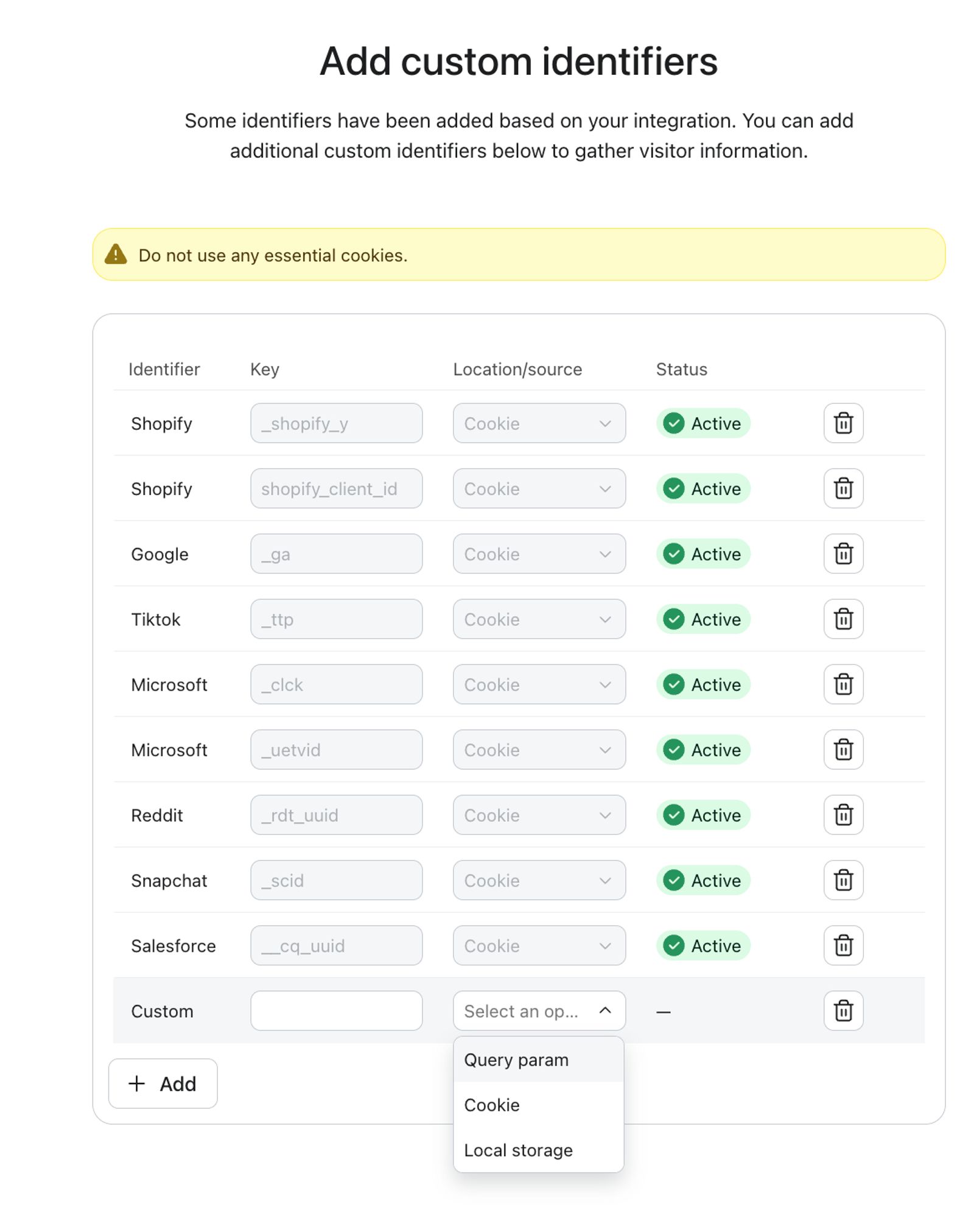
- The identity graph is populated by identifying and storing the identifier values of the existing identifiers set by other platforms - such as the Shopify, TikTok, or Reddit cookie - and using them to re-identify the visitor on future visits. Extended ID does not collect any other information from those cookies.
- For other platforms or solutions, you will need to set up custom identifiers.
- If a user returns after their Klaviyo cookie has expired, and Extended ID is enabled, Extended ID attempts to check the existing identifiers set by other platforms in the user’s browser to re-identify them and refresh the Klaviyo cookie.
It's important to note that while Extended ID can help identify shoppers longer, it doesn't automatically create new profiles based on shopper info from other sites. A shopper needs to already have a Klaviyo profile for Extended ID to re-identify them and update their Klaviyo identity cookie.
Klaviyo builds these associations whenever a shopper is successfully identified; for example, by clicking an identifying link in a campaign email or SMS. At that moment, it links the identifiers set by other platforms present in their browser to their Klaviyo identity, so a later visit can use those cookies alone to re-identify them and refresh their Klaviyo cookie, even without a fresh link click. No match, no new association; the shopper is treated as anonymous until identified again.
This screenshot shows the identifiers set by other platforms that make up the identity graph.
Learn how to turn on and set up Extended ID.
How does First-party ID work?
First-party ID uses a server-set cookie called __kle_id to restore the JavaScript-set __kla_id cookie after it expires. In the Klaviyo-managed setup, a Cloudflare worker runs on a dedicated subdomain of your brand, and traffic to that subdomain is handled by Klaviyo’s infrastructure. Server-set cookies are subject to different browser lifetime rules than JavaScript-set cookies. Factor this into your privacy notice and any data processing documentation you maintain. Learn how to set up First-party ID.
- The server-set __kle_id cookie is created or updated after identification so it is available when __kla_id expires.
- If __kla_id has expired when a visitor returns, First-party ID retrieves the stored identity from __kle_id and Klaviyo’s JavaScript uses it to restore __kla_id.
It's important to note that while First-party ID can help identify shoppers longer, it doesn't automatically create new profiles from anonymous traffic. A shopper needs to already have a Klaviyo profile for First-party ID to be able to re-identify them and refresh their Klaviyo identity cookie.
If First-party ID is unavailable, standard Klaviyo tracking can still identify visitors through an existing __kla_id cookie or a new identification event. Extended ID can also re-identify them when enabled and a matching identifier is available. Visitors who cannot be identified will not immediately have their activity attributed to a profile.
Shopify-branded onsite tracking
In addition to Klaviyo’s identification methods as part of standard web tracking, Shopify’s onsite tracking pixel enables identification during checkout if customers submit their information.
For a visitor’s identity to be captured during checkout, they must complete one of the following Shopify events:
- checkout_completed
- payment_info_submitted
- checkout_contact_info_submitted
- checkout_shipping_info_submitted
This will cause anonymous activity to sync over to the associated profile, even if they never submitted a Klaviyo form or clicked a link in a Klaviyo email or SMS.
In order for visitors’ identities to be captured during checkout, the following requirements must be met:
- Anonymous activity tracking must be enabled.
- Shopify behavioral events must be enabled.
- Site visitors must accept marketing and analytics cookies.
These requirements apply to Shopify. Other integrations may not enforce a consent condition automatically. If you use a different platform, confirm how your consent management tool controls Klaviyo’s tracking.
Disabling cookies
There may be instances where you choose to disable Klaviyo cookies from tracking. These reasons may include:
- You don't want to track users because of privacy, GDPR, or other security concerns.
- Customers have asked not to be tracked.
- You have a lean marketing program or want all customers to receive the same marketing, regardless of whether they have interacted with your brand before, bought, etc.
Klaviyo forms, including pop-ups, can continue to appear if you block tracking but allow the forms scripts to load. Blocking Klaviyo.js or the forms scripts can prevent forms from appearing. Without visitor identification, targeting forms by profile information, such as subscription status, is limited, and you cannot associate later browsing activity with the profile.
To prevent Klaviyo’s browser tracking from loading before consent, configure your consent management tool to block the tracking scripts. Klaviyo serves tracking modules from static-tracking.klaviyo.com, which can be blocked separately from the forms scripts. Review your setup for other event sources, such as ecommerce integrations and custom API calls; blocking a browser script does not stop those sources. See how to configure OneTrust with Klaviyo’s cookies.
For a developer-controlled tracking opt-out, set __kla_off to true before Klaviyo’s tracking script loads, for example: document.cookie = "__kla_off=true; path=/". If tracking has already loaded, reload the page after setting the cookie. To allow tracking again, set the same cookie to false or remove it, then reload. This setting disables the standard tracker for that browser session; it does not delete __kla_id or replace your consent management configuration.
Preference pages
Klaviyo allows you to create custom Preference pages that allow users to manage their marketing consent. Preference pages control whether a subscriber receives messages from you. They do not control whether tracking cookies are set or read. Cookie consent and withdrawal are handled through your consent management platform, separately from preference pages. Please see this article for more information.
Check whether a visitor is identified
On a page where Klaviyo.js is loaded, run klaviyo.isIdentified().then((identified) => console.log(identified)); in the browser’s JavaScript console. The method returns a Promise that resolves to true if Klaviyo has a usable identifier for the visitor, or false if it does not.
Email to website tracking
When email to website tracking is enabled, Klaviyo identifies individuals that click through a Klaviyo email and browse your website, provided Klaviyo.js is installed and allowed to run on the site. You can toggle on and off Klaviyo's ability to track email to website activity in your account's email settings.
With the release of iOS15, macOS Monterey, iPadOS 15, and WatchOS 8, Apple Mail Privacy Protection (MPP) changed the way that we receive open rate data on your emails by prefetching our tracking pixel. With this change, it's important to understand that open rates will be inflated.
To see if your opens are affected, we suggest creating a custom report that includes an MPP property. You can also identify these opens in your individual subscriber segments.
For complete information on MPP opens, visit our iOS 15: How to Prepare for Apple’s Changes guide.
- Click your account name in the lower left, then select Settings > Email > Tracking.
- Under Email to website tracking, select or clear Turn on email-to-website activity tracking.
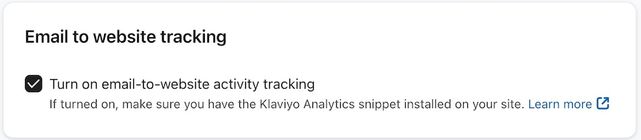
- Click Save.
When this is on, Klaviyo adds an identifying parameter called _kx to website links in your emails. The parameter contains an encrypted value. When the visitor reaches a site with Klaviyo tracking, the script sends that value to Klaviyo to identify the visitor server-side.
For Shopify stores, onsite tracking depends on your Shopify Customer Privacy settings and the visitor’s consent. When Shopify’s consent service reports that the visitor cannot be tracked, Klaviyo waits for tracking consent before loading its analytics. Review your Shopify Customer Privacy settings and consent configuration for every region you serve.
To learn more, check out our article on Klaviyo onsite tracking.
Additional resources
- Understanding message conversion tracking
Learn how conversion tracking works for email, SMS, and mobile push messaging and how to edit these settings. For each campaign and flow sent, Klaviyo automatically tracks conversions. This allows you to analyze the performance of your marketing channels and their individual success.
- Getting started with Klaviyo onsite tracking
Learn about the different ways that Klaviyo can support onsite tracking on your ecommerce site. There are 2 key types of onsite tracking:
- Understanding UTM tracking in Klaviyo
Learn what UTM tracking is, how it works, and how you can use it in your Klaviyo messages to gain a deeper understanding of your marketing performance.