Klaviyo's default lists and segments reference
You will learn
Learn about the default lists and segments provided for all new Klaviyo accounts. Once you complete the Klaviyo setup wizard, you will have several default lists and segments populated in your account. These lists and segments identify key groups of people within your account and are designed to help you get off on the right foot with your sending strategy. The pre-populated lists and segments are as follows:
- Preview List
- New Subscribers
- Engaged (30, 60, and 90 days)
- Email List
- Text Messaging List
When you add a supported ecommerce or hospitality integration to your Klaviyo account, additional default segments are also created.
New to Klaviyo and need inspiration for segmentation? Check out our Guide to creating segments.
Preview list
Your preview list is a static list of people that receive your test campaigns. This list should include yourself, as well as any other members of your organization who wish to receive previews of campaigns. Sending to this list will allow you to test the layout of your content in the inbox in a live send rather than a preview email sent from within the email editor. This can be particularly helpful if you want to check whether your email is mobile-optimized or clips in Gmail.
New subscribers
New subscribers are contacts added to your Email List in the last 2 weeks who can receive email marketing. Contacts synced from an ecommerce integration or uploaded from a CSV file qualify if they were added to this list during that period. Once someone has been on your Email List for longer than 2 weeks, they leave this segment. The email marketing condition excludes globally suppressed contacts, giving you a more accurate calculation of how many people within the segment can receive email marketing.
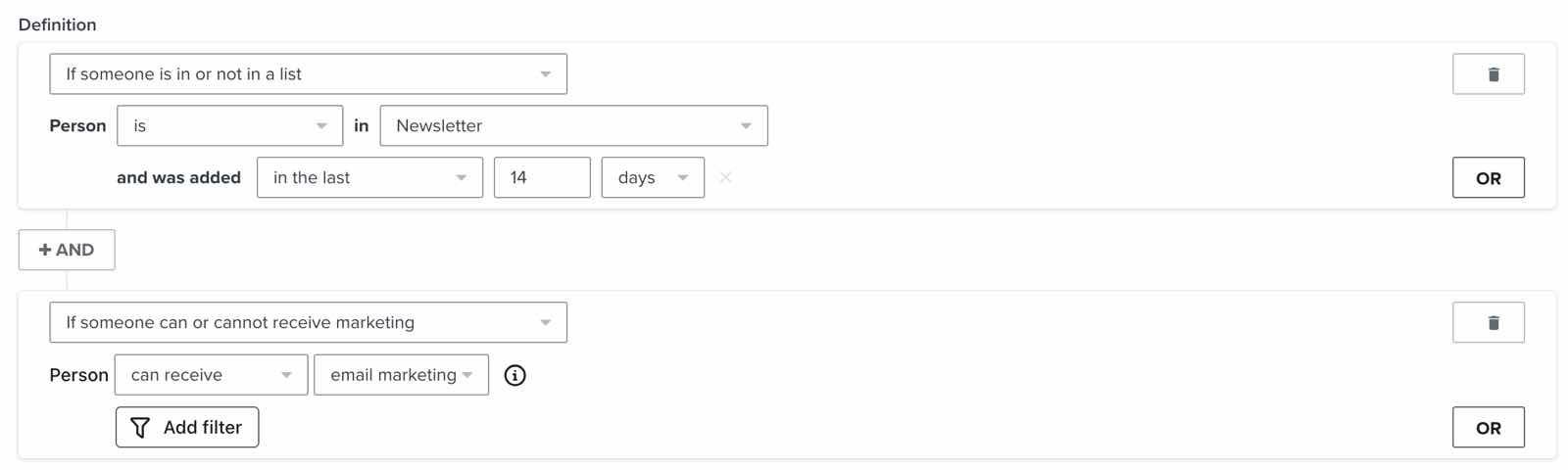
There are several reasons you may want to use this segment. First, if you integrate your Klaviyo account with Meta Ads, you can sync this segment to Custom Audiences to target new subscribers.
Second, if you have a welcome series flow, you may want to exclude new subscribers from your campaign sends while you introduce them to your brand. This segment uses a 2-week window, so check that it matches the length of your welcome series.
Last, this is a good group to keep an eye on from a business intelligence standpoint. You may want to monitor how this number of people changes over time to ensure that your number of recent signups is growing.
Engaged
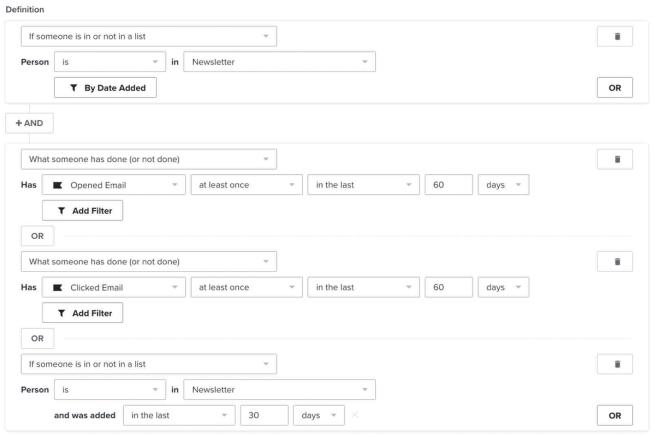
Your engaged segments are the primary groups of people that you should send to. Each segment includes people on your Email List who meet either its email engagement condition or its recent signup condition. Recent subscribers can qualify before you send your first email with Klaviyo.
- Engaged (30 Days): opened or clicked an email in the last 30 days, or joined your Email List in the last 15 days.
- Engaged (60 Days): opened or clicked an email in the last 60 days, or joined your Email List in the last 30 days.
- Engaged (90 Days): opened or clicked an email in the last 90 days, or joined your Email List in the last 45 days.
With the release of iOS15, macOS Monterey, iPadOS15, and WatchOS 8, Apple Mail Privacy Protection (MPP) changed the way that we receive open rate data on your emails by prefetching our tracking pixel. With this change, it’s important to understand that open rates will be inflated.
If your campaign analytics show a large number of iOS openers, we suggest identifying these affected opens in your individual subscriber segments.
For complete information on MPP opens, visit our iOS 15: How to Prepare for Apple’s Changes guide.
Email list
This is the default "main email list" that Klaviyo creates in your account. This should be the list that all new email subscribers are added to, whether they sign up via a sign-up form, by opting in at checkout, or subscribe via any other acquisition method that you use. When emailing this list to reach a broad audience, create and exclude unengaged segments to help protect your deliverability.
Text Messaging List
Use your Text Messaging List for all your SMS subscribers. Message this list when you want to reach all SMS contacts, or segment it to send targeted messages.
Integration segments
Supported ecommerce and hospitality integrations create separate sets of default segments. Each segment name includes its integration, so if you have both Zenoti and Magento, you get a separate set for each.
Segment names | Example integrations |
Churn Risks Potential Purchasers VIP Customers Win-Back Opportunities Repeat Buyers | Ecommerce: Shopify, BigCommerce, Square, WooCommerce, Magento 1, Magento 2 |
First Time Guests, VIP Guests, Churn Risks, Win-Back Opportunities, Repeat Guests | Restaurants: ChowNow, Toast Hotels and travel: Guesty, Mews, Cloudbeds |
First Time Clients, VIP Clients, Churn Risks, Win-Back Opportunities, Repeat Clients | Health and wellness: Zenoti, Boulevard |
These integration segments include only profiles who can receive email marketing. The definitions below describe ecommerce purchases. For the corresponding hospitality segments, the same counts and time frames apply to the following activity:
- Zenoti: Completed Appointment.
- Boulevard, ChowNow, and Toast: Placed Order.
- Guesty, Mews, and Cloudbeds: Confirmed Reservation.
Churn risks
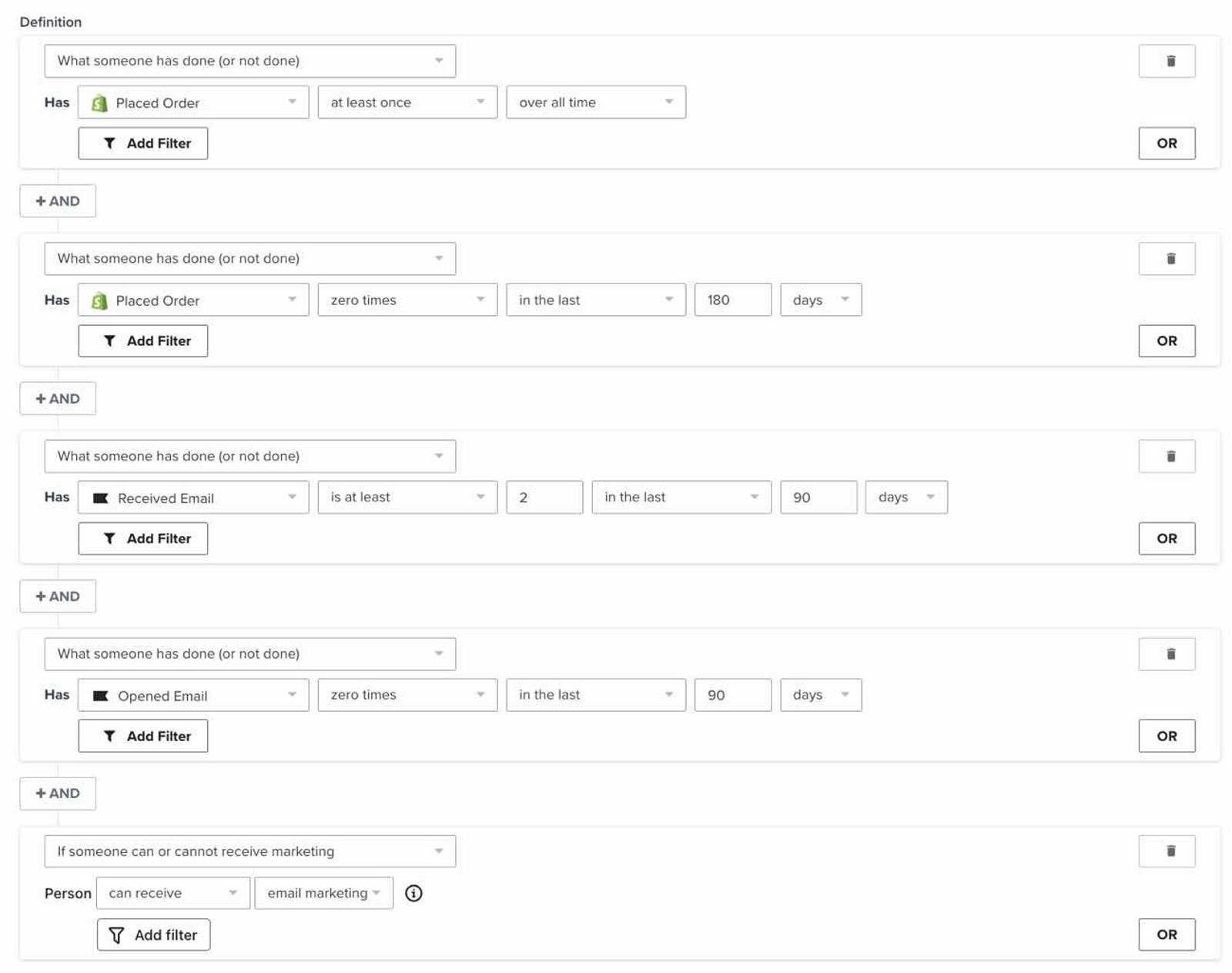
The default Churn Risks segment includes profiles who can receive email marketing and have placed at least 1 order over all time, but none in the last 180 days. They must also have received at least 2 emails in the last 90 days and opened none during that period. This gives you insight into who may soon turn toward another brand completely. You will want to re-engage these profiles with campaigns that include targeted content and a discount or other incentive.
You may have a high churn risk if you have a large number of one-time purchasers, in which case you will want to focus your marketing efforts on retaining customers after their first purchase. Consider creating upsell and cross-sell flows to send after someone makes a purchase, guiding them in the direction of other products they may be interested in.
Potential purchasers
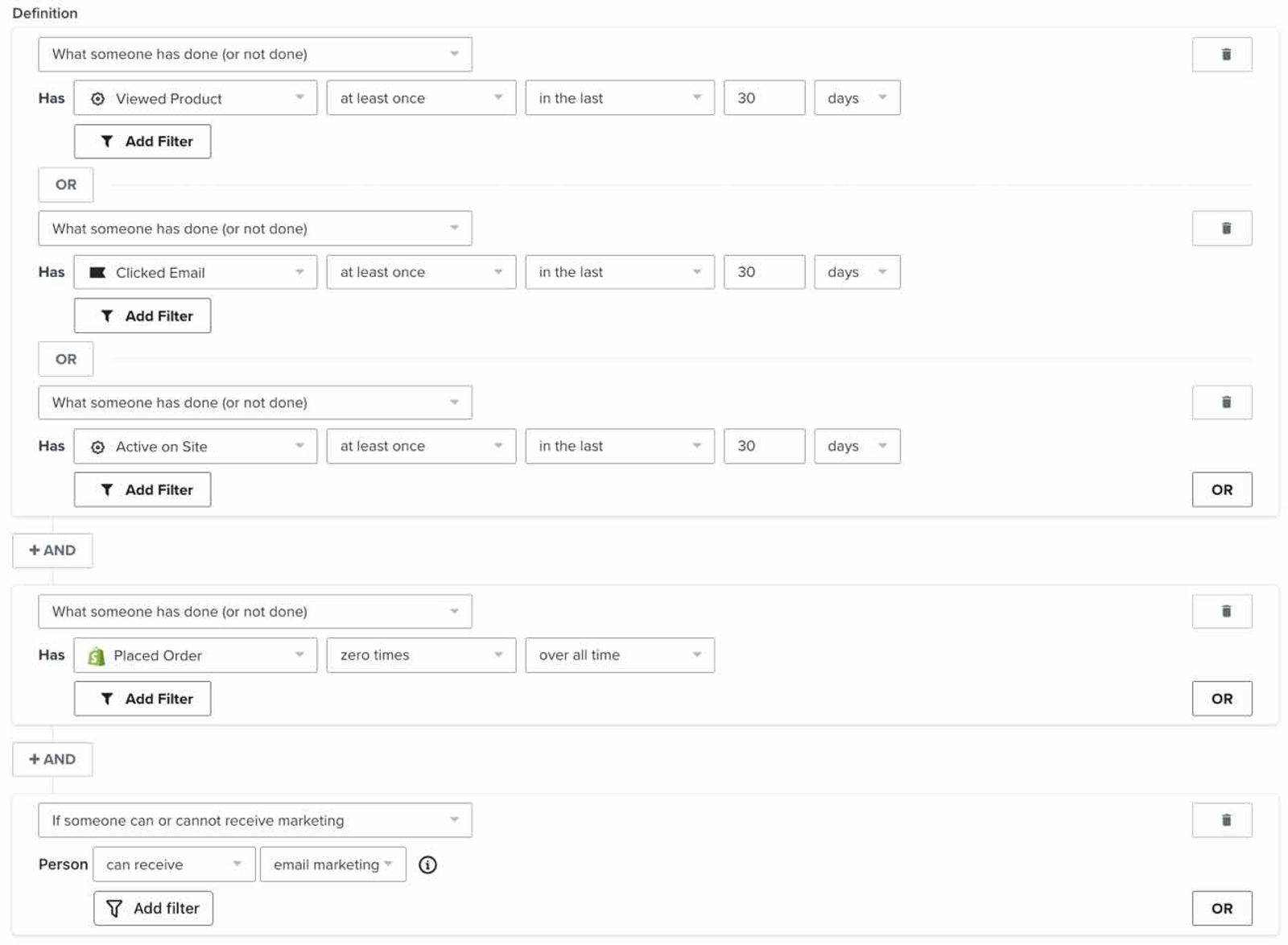
The default Potential Purchasers segment includes profiles who can receive email marketing and have viewed a product, clicked an email, or been active on your site in the last 30 days, but have never placed an order through that integration. This is a good segment to target with campaigns, ads, and forms as they are interested in your brand and may benefit from a gentle reminder to purchase.
VIP customers
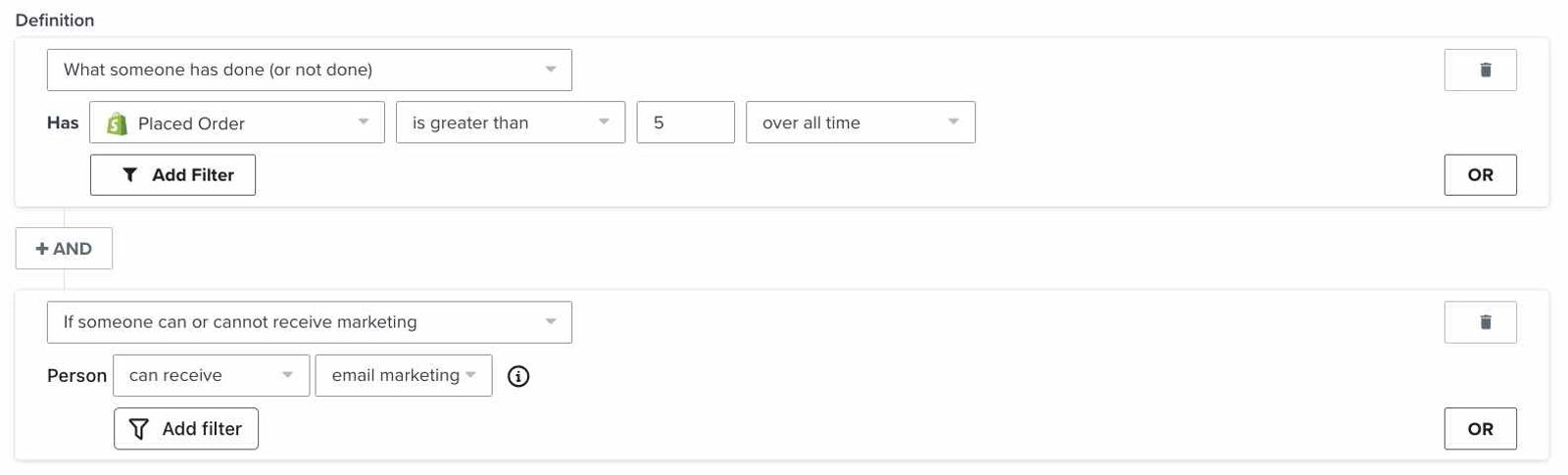
The default VIP Customers segment includes profiles who can receive email marketing and have placed more than 5 orders over all time. It does not require a recent purchase or a minimum amount spent. You can redefine this segment to match your business preferences and customers’ buying cycles.
Win-back opportunities
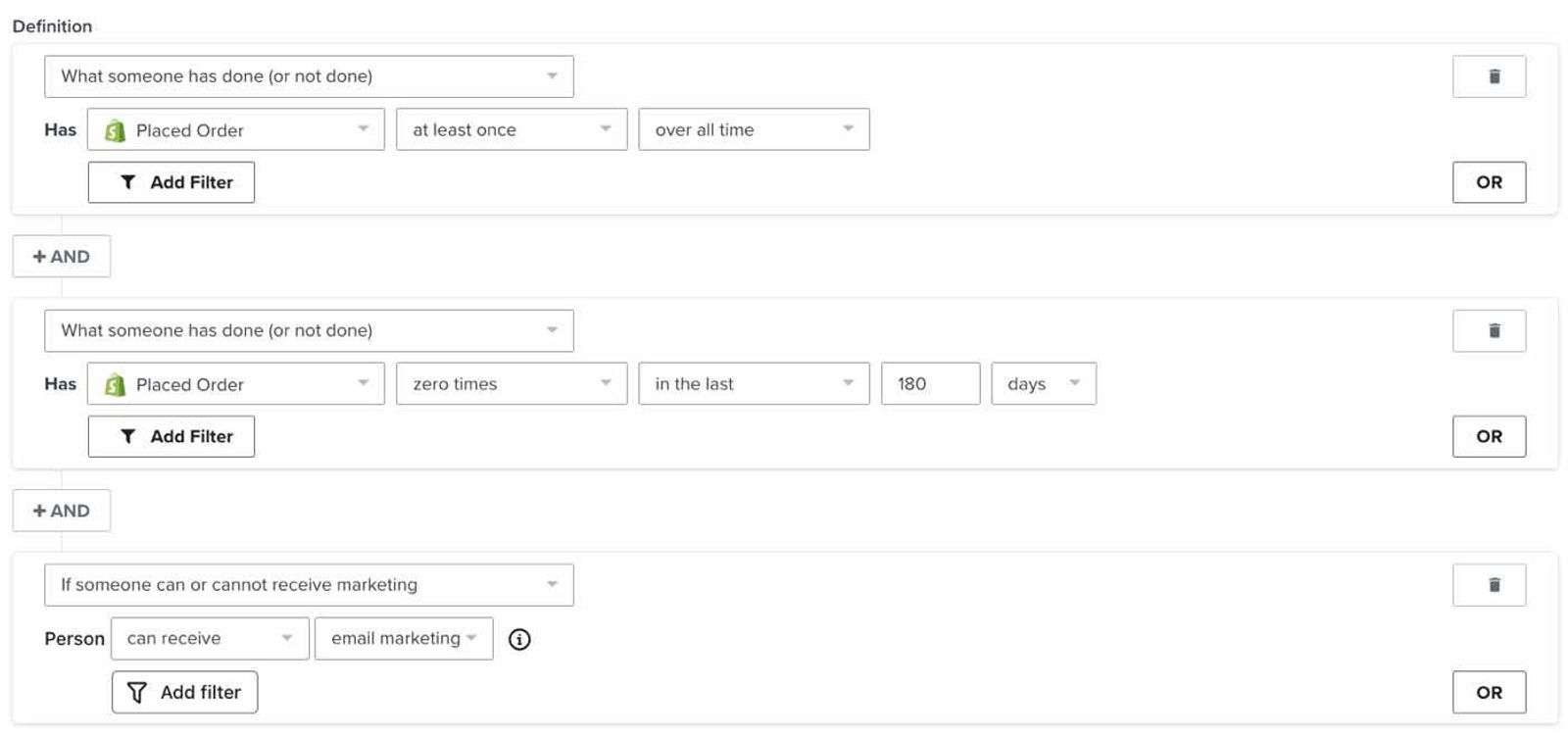
Your default Win-Back Opportunities segment includes profiles who can receive email marketing and have placed at least 1 order over all time, but none in the last 180 days. A best practice is to generate a winback flow to re-engage these individuals and remind them of the value of your brand.
Repeat buyers
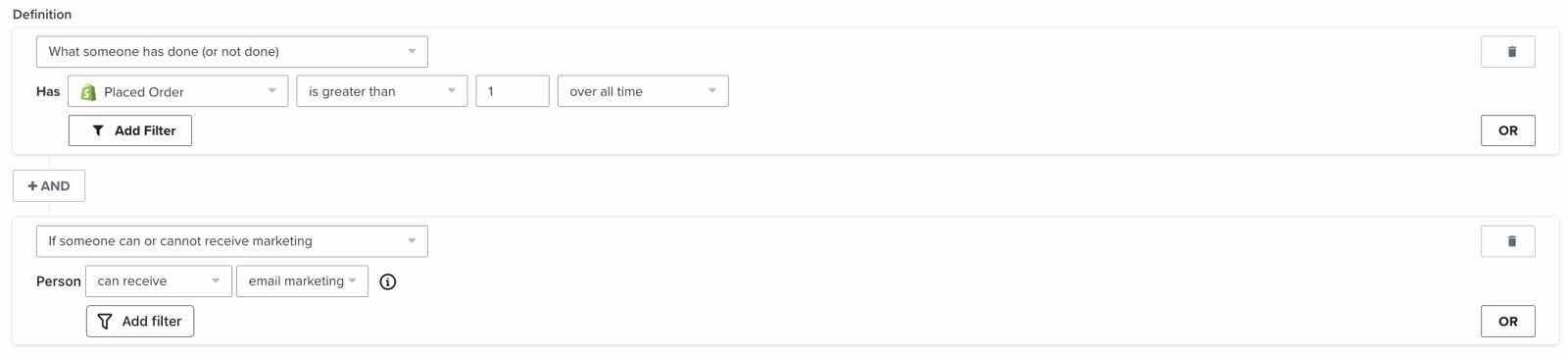
The default Repeat Buyers segment includes profiles who can receive email marketing and have placed more than 1 order over all time. They are a good audience to target with branded content as they are already interested and may need a nudge in the direction of another purchase.
First-time clients and guests
First Time Clients and First Time Guests include profiles who can receive email marketing and have completed the relevant activity exactly once over all time. For example, First Time Clients for Zenoti uses 1 Completed Appointment, while First Time Guests for Guesty uses 1 Confirmed Reservation.
Additional resources
- Getting started with segments
Learn how to create and use segments in Klaviyo, which are a powerful tool for understanding your audience and sending targeted messages.
- How to segment by customer lifetime value (CLV)
Learn how to create a customer lifetime value (CLV) segment and export any key CLV information. CLV is part of Klaviyo's predictive analytics and can be a powerful tool to use in segmentation. It is the total amount, both past and predicted, that a customer will purchase from your brand over time. CLV segments allow you to group customers based on this amount so that you can send them relevant content and trigger segment-based flows. For example, you can use historic CLV to build a VIP welcome flow or use predicted CLV to send targeted campaigns to customers who will likely spend a certain amount over the course of a year.
- AND vs. OR reference
Learn more about AND and OR connectors and how they are critical to setting up segments and flows in Klaviyo. These connectors define who will be grouped within your segments as well as when someone will receive flow messages. In this guide, we will go over what differentiates the 2 conditions and when to use each to target the right audience.