Brand design reference
You will learn
Learn how to make your business look professional and reputable through your colors, designs, fonts, and brand concepts. This guide will walk you through:
Creating a design concept
To start, you should have at least a rough idea of your business plan and audience. Before you dive into creating a logo or choosing your fonts, you need to map out an idea of your design concept that will give credibility to your brand and attract clients. First, make sure that you have a good understanding of your audience. It's crucial to know the kinds of media that your audience consumes and where they spend their time both on and off of the internet. Using that information, head to competitors’ sites and observe their colors, fonts, logos, photography, and other design work. What colors do they use? Do they have script, serif, or sans serif fonts? What is the basic imagery they use to develop their brand? Make notes of what you like and what works well.
Choosing brand colors
Deciding which colors to use can be daunting. Color can influence how people respond to your brand, but its meaning depends on the context. Use the associations below as starting points when choosing colors for your audience.
- Blue
Connotes trust, intelligence, confidence, reliability, tranquility.
Blue can suggest trustworthiness and reliability. You’ll see it in branding for hospitals, pharmaceutical companies, governments, and technology companies. Look at the apps on your phone that carry sensitive information and consider how their colors influence your impression of them.
- Red
Connotes excitement, attention, stimulation, strength.
Red can attract attention, making it an option for logos and calls to action. Consider how it works with the rest of your design and the message you want to convey.
- Green
Connotes sustainability, durability, health, freshness, friendliness.
Green gives a friendly and sustainable energy. You’ll see it in healthy food options and outdoor brands.
Other colors like yellow (cheerful, positive), purple (glamour, mystery), and black (VIP, high end, exclusive) are used in logo design also but aren’t as common as the colors above.
Start by picking 1 neutral color, 2 bold colors, and 1 call-to-action color. Choose a color you like that fits the message you want to convey, then build the rest of your palette around it. Make sure the colors work well together and that text is easy to read against its background.
For color scheme inspiration, use the Adobe Express color palette generator to explore palettes and create color combinations for your brand.
When you’re picking your brand’s colors, the most important thing is to reflect on the message you want to portray to your customers. Think about how your colors will translate to logo design, websites, and even to merchandise you might sell. Once you have an idea of your color scheme, you’re ready to move on to fonts.
Choosing brand fonts
Finding and choosing brand fonts can seem like a daunting task. After all, there are thousands of fonts out there. But what’s most important to realize is that fonts ultimately fall into a few categories — serif, sans serif, script, and display.
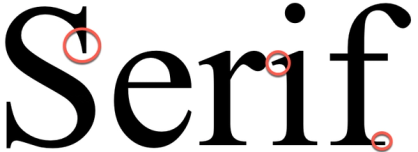
- Serif
Serif fonts have lines attached to the end of each letter. They are classic, traditional, and serious.
- Sans Serif
Sans Serif literally means “without serif.” These fonts do not have lines at the end of their letters, thus giving them a more modern feel. Both serif and sans serif fonts are usually easy to read, with the slight advantage given to sans serif fonts.

- Script
Script fonts look the most like handwriting and have letters that are connected in one way or another. They have come into a lot of popularity over the last few years and give off an air of fun and DIY. They are used in logos and headers but are rarely used in body text.

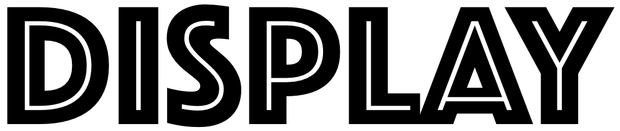
- Display
Display fonts attract attention. They are the hardest to read and should be used intentionally and rarely.
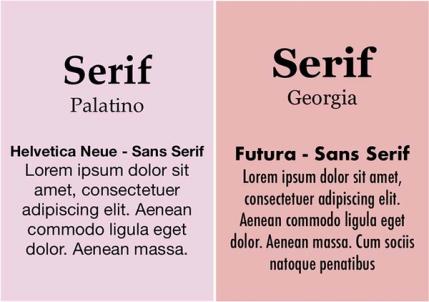
You can add depth and character to your brand and website by pairing different weights of the same font or different types of fonts. For example, use a bold serif or sans serif font for headers and a lighter weight of the same font for body text.
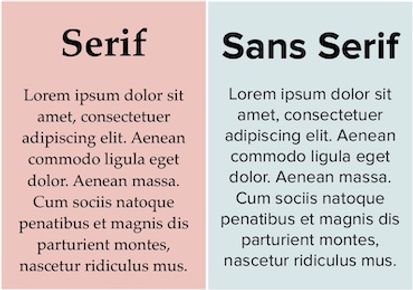
Using different font types, on the other hand, could look like pairing a serif and sans serif font. Usually, the serif font is used as the header and the sans serif font is used for body text. You can also use script and display fonts as your header with a serif or sans serif font, but use caution. At the end of the day, you want to make sure that your content is easy to read. Lastly, don’t pick fonts that are closely tied to another brand (e.g., Coca-Cola, Sopranos, Harry Potter, etc.). A great resource for downloading free fonts is Google Fonts.
If you plan to use a custom brand font in Klaviyo emails, choose a web-safe fallback font in a similar style. Some inboxes do not support custom fonts and use a fallback instead. Learn how to add custom fonts in email templates.
Logo design
Now that you have done the hard work of researching the design of competitors, creating a color scheme, and choosing fonts that you think would work well for your brand, it’s time to build out your logo. But before we get started, let’s walk through some concepts to keep in mind as you build out your logo.
Your logo should be:
- Simple
- Scalable (i.e., as easy to read on a mobile device as it is on a billboard)
- Primarily horizontal
You have 2 options when it comes to creating a logo. You can design a logo yourself or have someone else design it for you. If you choose to design something yourself or want to toss around some options but don’t want to invest in expensive new software, GIMP, Inkscape, Pixlr, and Canva offer free image editing or design options that you can use to build your logo. Some features or assets may require payment.
When designing, keep in mind that you’ll need the following logo variations for the best scalability of your brand:
- Versions with transparent and white backgrounds.
- Versions with dark and light-colored text.
- Square and horizontal versions, plus a version for a favicon.
If you prefer to start from a logo template, Shopify Logo Maker can help you design a logo for free. Just make sure that your logo matches both your brand and industry.
After you have your site up and running, you may need a handful of stock photos and videos to give life to your emails, website, and other communications. Unsplash, Gratisography, and Pexels are sources for stock imagery to use in your brand’s communications.
Outcome
So you have brand colors, styling, and a logo, now what? Next, figure out where you’re planning on hosting your website. Are you selling something? Set up an ecommerce store, keeping in mind the branding choices for your website. Check out our article on integrations for ecommerce businesses. Once you’ve zeroed in on your branding and design, coming up with branded content becomes much easier.
Additional resources
- About email images best practices
Learn about best practices when using images in Klaviyo emails, including size recommendations and how to add images.
- Building a brand community
- Getting started with Klaviyo