Understanding the difference in SMS and Whatsapp shortened links
You will learn
Learn about the differences between the various types of shortened links for SMS and WhatsApp: the default Klaviyo link, branded Klaviyo link, and branded custom link.
Before you begin
There are 3 available types of shortened links in Klaviyo:
- A Klaviyo link
- A branded Klaviyo link
- A branded custom link
You need a paid text message plan to create a branded Klaviyo link or branded custom link.
Note that all shortened links, for both SMS and WhatsApp, stop redirecting 90 days after a message is sent. Links required for compliance, such as unsubscribe, are not affected.
The table below shows an example of what these links might look like for a company called “James Black.”
Link type | Example |
Klaviyo link | klv3.io/382aNpW5 |
Branded Klaviyo link | jblck.klv3.io/382aNpW5 |
Branded custom link | sms.jamesblack.com/382aNpW5 |
Klaviyo cannot track clicks on links shortened only by third-party services. For SMS, keep Automatically shorten links selected to track clicks and attribute conversions and revenue to those clicks. If SMS delivery attribution is enabled in your account, conversions and revenue can still be attributed without a click.
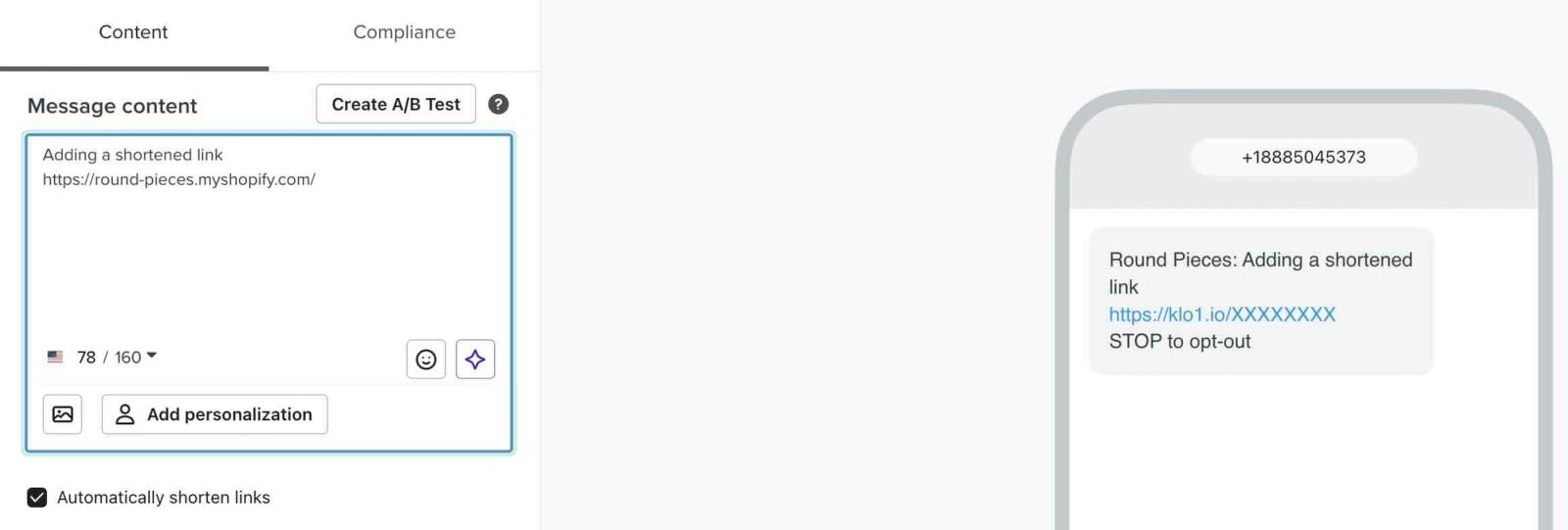
To add a shortened link to an SMS message, paste the link you want into the Message content box and keep Automatically shorten links selected.
Branded Klaviyo link vs. branded custom link
The main advantage of using a branded subdomain or domain is that the link shows that it's coming from your business.
Branding
A subdomain is like a branded prefix. It shows your brand name at the beginning, followed by what looks like a normal shortened link in Klaviyo. For example:
- Klaviyo link: klv3.io/382aNpW5
- Branded Klaviyo link: jblck.klv3.io/382aNpW5
Branded custom links mean links in your SMS and WhatsApp messages look like any other link to your website. The only difference is that they are shorter than normal, not showing the specific page they are linking to.
- Normal website link: JamesBlack.com/catalog/signed-jerseys
- Branded domain: sms.jamesblack.com/xxxx
Sender reputation
With branded custom links, you have more control over your specific deliverability and sender reputation. These URLs have their own domain, and thus individual sender reputations.
Both regular and branded Klaviyo links use a shared domain. In general, this doesn’t have a large impact on deliverability; however, if you have concerns over your deliverability or sender reputation, it is recommended to set up a branded custom link.
Universal links and App Links
Universal links and App Links are only available for text messages if you have a branded custom link.
These links direct your customers to content within your mobile app or, if the app isn't installed, to the same content on your website. Using these links in email and text messages allows you to use consistent URLs across all your marketing channels while creating a seamless experience for your customer, no matter their device.
Character count
Branded Klaviyo links are always longer than the default Klaviyo URL, since branded links include extra characters as well as the full Klaviyo URL.
When it comes to branded custom versus branded Klaviyo links, it depends on what you use.
The following James Black examples count only the domain, excluding the URL scheme (such as https://), slash, and shortened code.
- Example where the branded custom link is more characters
- Custom: sms.jamesblack.com (18 characters)
- Klaviyo: jblk.klv3.io (12 characters)
- Example where the branded Klaviyo and custom links are equal
- Custom: sms.jamesblack.com (18 characters)
- Klaviyo: jamesblack.klv3.io (18 characters)
- Example where the branded Klaviyo link is more characters
- Custom: sms.jamesblack.com (18 characters)
- Klaviyo: jamesblackSMS.klv3.io (21 characters)
The branded prefix in a branded Klaviyo link can be up to 20 characters long.
Time to set up or edit
The process of creating a branded Klaviyo link is simple and fast. They are also available as soon as you create them.
Branded custom links require you to connect a domain and configure its DNS records. Most DNS records update within a few minutes, but can take up to 48 hours. It is recommended that you are familiar with the technical details of how your website is hosted (e.g., your DNS provider). For setup instructions, see how to create a branded shortened link.
Additional resources
- How to create a branded shortened link for SMS
Learn how to add your brand name to shortened links in your Klaviyo SMS messages. Branding your shortened links makes them more personalized to your brand and credible, indicating to recipients that this link will take them to your website or page.
- Understanding and reviewing your SMS deliverability
Learn the important aspects of SMS deliverability, including how to evaluate it and best practices.