Paying for Klaviyo in Local Currency
Currencies available in Klaviyo
Klaviyo currently supports billing in:
- US dollars (USD)
- Canadian dollars (CAD)
Additional currencies may become available in the future.
When viewing Klaviyo pricing on the Pricing page, you can use the currency selector to view available plans in USD or CAD.
How is my currency selected?
When you create a new Klaviyo account, the country associated with the address you provide during sign-up helps set your default currency. For self-serve accounts, a Canadian address sets the default to CAD if CAD billing is available; otherwise, the default is USD.
Before purchasing your first paid Klaviyo product, you can review or change this selection.
You need permission to edit billing settings to change your currency preference. The currency selector appears only if CAD billing is available for your account. If you use shared billing, select the currency in the parent account. If you are on a contract, you can't change your currency in billing preferences.
To select your preferred currency:
- Go to Settings.
- Select Billing.
- Select Preferences.
- Find the Billing currency section.
- Select your preferred available currency from the Preferred currency dropdown.
- Click Save currency preference.
- Review the selected currency, then click Confirm.
Your selected currency will be used to display eligible Klaviyo pricing and will be used when you purchase your paid plan.
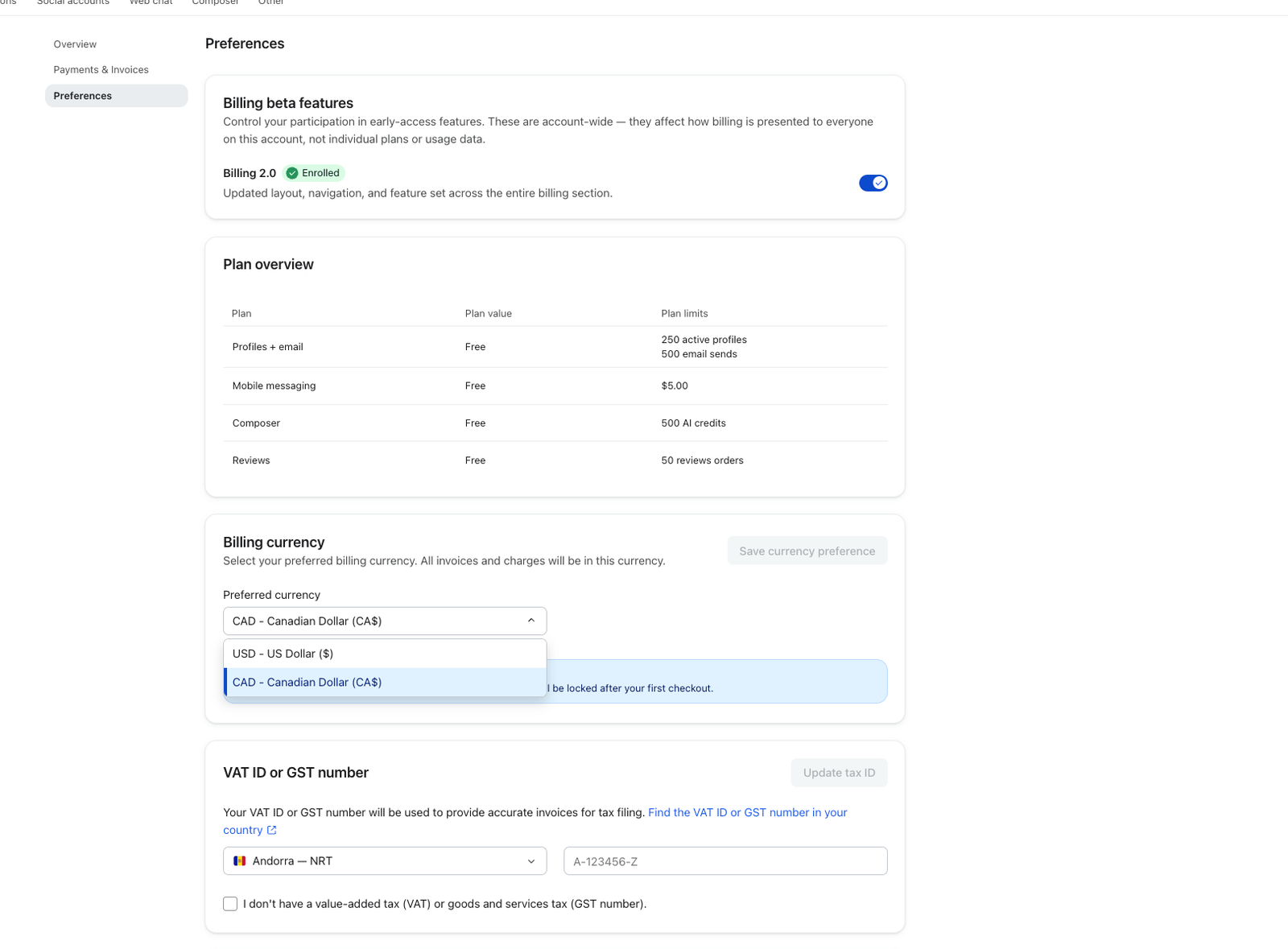
Can I change my currency?
You can change your currency preference before you make your first payment to Klaviyo.
Once you purchase your first paid product, your billing currency is locked and can't be changed while you remain on your paid plan.
For example, if you select CAD and purchase a paid Klaviyo plan in CAD, your plan, invoices, and applicable charges will be shown and billed in CAD.
Existing customers who are already billed in USD can't currently change their billing currency to CAD.
Who is eligible to pay in CAD?
CAD billing is available to eligible new customers or first-time subscribers. If CAD is available for your account, it appears as an option in your billing preferences.
If you’re eligible for CAD billing, you can choose either CAD or USD before making your first payment.
If you’re an existing Klaviyo customer already paying in USD, you can’t currently switch your account to CAD. This includes existing customers who are changing or amending their current plan or contract.
If your Klaviyo account has multiple companies or accounts billed together, they must all use the same billing currency. For example, if the parent account is billed in USD, its associated child accounts must also be billed in USD.
Can I see the exchange rate between USD and CAD?
Klaviyo does not use a live USD-to-CAD exchange rate to convert your price at checkout. Instead, Klaviyo maintains pricing specifically in CAD.
Because CAD pricing isn't calculated using a live currency conversion at checkout, an exchange rate isn't displayed in Klaviyo.
From time to time, Klaviyo may update CAD pricing. If you're affected by a pricing change, we'll communicate the change according to the terms of your plan or contract.
What happens if I cancel my plan?
Canceling a single plan while keeping other plans active moves the canceled product to its applicable free plan. If you cancel your account, you must reactivate it as free to use Klaviyo again. Learn how to cancel a plan or reactivate your account.
Frequently asked questions
Can I choose USD even if I'm eligible for CAD?
Yes. Eligible new customers can choose to be billed in either USD or CAD before making their first payment.
I'm already a Klaviyo customer in Canada. Can I switch from USD to CAD?
Not currently. CAD billing is initially available to new customers. Existing customers already billed in USD will continue to be billed in USD.
Can I switch between USD and CAD depending on the exchange rate?
No. You can choose your preferred available currency before your first payment. Once you've purchased a paid product, your billing currency is locked.
Will my CAD price change if the USD/CAD exchange rate changes?
Not automatically. CAD pricing is maintained separately from USD pricing and isn't recalculated using a live exchange rate each time you're billed.
Klaviyo may update CAD pricing over time. If a change affects your plan, we'll provide notice as applicable.
What currency will I receive a refund or credit in?
Refunds and credits are issued in the same currency you're billed in. For example, if you're billed in CAD, an eligible refund or credit will also be issued in CAD.
Can accounts under the same parent account use different currencies?
No. A parent account and its associated child accounts must use the same billing currency.