How to create a non-opener segment
You will learn
When sending an important email campaign, it is useful to know who in your audience does not open your message. With this knowledge, you can retarget non-openers on other channels (e.g., social media) or resend key content that they won’t want to miss out on. This article will walk you through how to build a non-opener segment and best practices for retargeting these subscribers.
Creating a non-opener segment
When building a non-opener email segment, consider who you want to include. Do you want to target subscribers who received but did not open a specific campaign? Do you want to target those who received emails this month but have not opened any? Build the definition of your segment accordingly.
The key conditions of a non-opener segment include:
- What someone has done (or not done) > Received Email > at least once, AND
- What someone has done (or not done) > Opened Email > zero times, AND
- What someone has done (or not done) > Clicked Email > zero times
You must have the condition that someone has received your email. If you do not, your segment will include everyone in your account who didn’t open your email, even those who were not recipients.
Refine your segment definition with filters, timeframes, or other conditions to make it specific to your business needs. For example, if you send a campaign for a new product launch, you will want to ensure that all of your subscribers see this information. Therefore, to resend the message, your segment will include those who received but did not open this particular campaign.
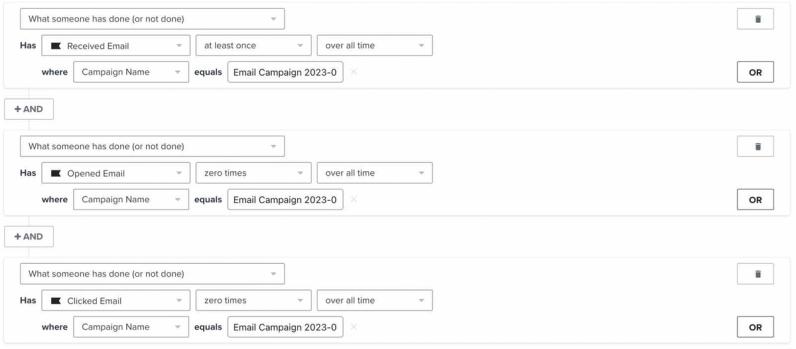
Curious why the AND connector is used in this segment? Head or our AND vs. OR guide to learn more.
Once you have created your non-opener segment, you are ready to retarget this audience with content pertaining to what they may have missed out on in the unopened email. Avoid resending your campaign unless absolutely necessary; instead, retarget on a different channel (e.g., signup forms or social media).
With the release of iOS15, macOS Monterey, iPadOS 15, and WatchOS 8, Apple Mail Privacy Protection (MPP) changed the way that we receive open rate data on your emails by prefetching our tracking pixel. With this change, it’s important to understand that open rates will be inflated.
If your campaign analytics show a large number of iOS openers, we suggest identifying these affected opens in your individual subscriber segments.
For complete information on MPP opens, visit our iOS 15: How to Prepare for Apple’s Changes guide.
If you want to target subscribers who received multiple emails over an extended period of time (e.g., in the last 60 days) but have not opened any, head to our documentation on creating an unengaged segment.
Additional resources
- How to include a follow-up email to resend a campaign to "non-openers"
Learn how to use the include a follow-up email setting to resend a campaign to recipients that didn't open the original email. This option is available in the campaign wizard when setting up a new campaign.
- Advanced segmentation reference
Learn effective advanced segmentation strategies that provide insights into your customer base and create highly personalized experiences for your subscribers.
- How to create and target a segment of recent cart abandoners
Learn how to identify site visitors who have recently abandoned a cart in order to target them across marketing channels. For example, you can create a recent cart abandoners segment and sync it to Facebook Custom Audiences to drive them back to your site, or you can create an exit-intent popup targeting shoppers as they're about to leave your website. While it's not possible to dynamically display the specific items left in someone's cart as you would in an abandoned cart email, you can still remind them of items left behind with the language and CTA you use.
- How to clean your email list to maintain good deliverability
You will learnLearn how to clean your email lists to avoid sending to contacts who aren’t interested in your content. This process allows you to keep in touch with the subscribers who are most engaged with your messages, so you are seen as a trusted sender with a good reputation.