Understanding when SMS profiles merge
You will learn
Learn how SMS affects profiles in Klaviyo, including how email and phone number contacts merge into one cohesive profile and which scenarios are exceptions.
How SMS profiles merge
In general, each customer will have one, unique profile in Klaviyo. Both email and SMS information will be found here so you can effectively streamline communication and store all data in one place.
How profiles merge
If you use Klaviyo to send emails, then you likely already have a number of profiles in your account. When a subscriber opts in to receive SMS and the signup identifies their existing email profile, that profile updates and their SMS consent status appears there.
A single profile can store both email and SMS contact information, along with the consent status for each channel. Having someone's email address and phone number does not itself mean they have consented to both channels. If Klaviyo cannot connect the signup to their existing profile, separate profiles can remain, as explained below.
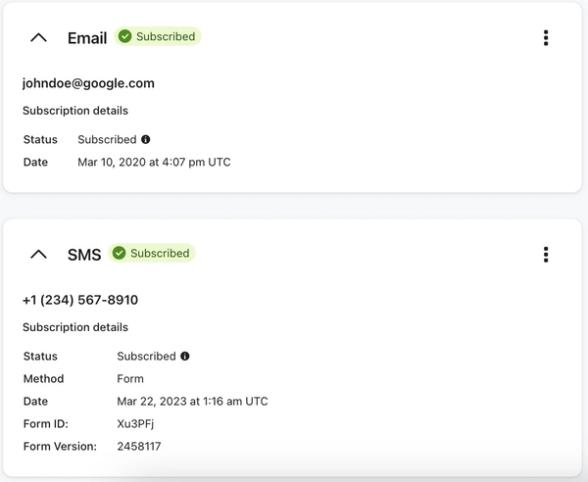
Profiles will also merge when Klaviyo learns that an email address and phone number are connected to the same profile. For instance, if a phone-only profile adds an email that matches an existing email-only profile, the two will merge.
If you use Klaviyo solely for SMS, your customer profiles will be uniquely identified by their phone numbers until you start collecting email addresses.
When profiles stay separate or contact information changes
Some scenarios in which a customer's contact information will not merge into one profile, or will merge in a way you may not expect, are listed below:
- If an email subscriber opts in to SMS with a phone number that does not already exist in Klaviyo in an accepted format, but no email or other information identifying their existing profile is attached to that action, a new profile is created.
- If a later checkout sends their existing email address and that same phone number together to Klaviyo, the phone-only profile can merge with the email profile. A checkout that sends only one of these does not establish that connection.
- If a purchase updates a customer's profile with a different phone number, the new number replaces the previous number on the profile.
- SMS consent is tied to the phone number. Consent for the previous number does not transfer to the new number. If you don’t already have SMS consent for the new number, you need to collect it before sending SMS to that number.
- If someone subscribes by keyword or a click-to-text banner that sends only a phone number, Klaviyo uses that number to find or create a profile. The phone number alone cannot connect the signup to a separate email-only profile.
- For example, the mobile tap-to-text experience of an SMS subscribe link does not identify the email recipient, even when the link is sent in an email campaign. It will not automatically merge a separate email-only profile with the SMS profile.
A Klaviyo tap-to-text form can connect the SMS signup to an existing email profile when Klaviyo recognizes the visitor, such as after they enter their email in an earlier form step. Learn how to create an SMS form that targets email subscribers.
Keep these one-off situations in mind as you collect SMS information that will merge with email in a profile.
If separate profiles belong to the same person, you can merge the profiles manually. Review which profile you want to keep before merging. Merging cannot be reversed.
Additional resources
- Understanding profiles in Klaviyo
Learn about profiles, including how to find them and the data available on the profile page. Profiles are used to keep track of all the information you have about your customers and prospects.
- How Klaviyo billing works
Learn how Klaviyo bills customers for Profiles and Emails, Mobile Messaging, Reviews, Advanced Klaviyo Data Platform (formerly “CDP”), Marketing Analytics, Customer Hub, Helpdesk, and Customer Agent.
- How to clean SMS lists
Learn about list cleaning for SMS, including why list cleaning is important, how to list clean, and when to clean your lists.