Understanding suppressed email profiles
You will learn
Learn about suppressed email profiles, including how they differ from active profiles and how you can use these profiles to better understand your audience.
What is a suppressed profile?
When a profile is suppressed for email, they cannot receive email marketing messages. A suppressed profile cannot receive email marketing messages, even if they have provided consent and indicated they want to receive emails.
A person can become suppressed for the following reasons:
- An email hard bounced
A hard bounce occurs when an email cannot be delivered due to a permanent reason. This can be caused by a variety of reasons, including a misspelled email address or a deliberate block by the email server. A hard bounce signals a permanent email delivery issue, so Klaviyo will automatically suppress these profiles to help ensure your lists stay clean. - An email soft bounced 7 consecutive times
A soft bounce occurs when an email cannot be delivered due to a temporary reason. For example, a recipient's inbox may be full or the server may be down. If an email soft bounces 7 times in a row, it indicates that this is a consistent issue. To prevent continual soft bounces, Klaviyo will suppress email addresses that soft bounce 7 times consecutively. Only soft bounces within the past 2 years are considered for this count. - Spam complaint
The recipient previously marked an email message from this account as spam. - Manually suppressed
If you have uploaded a file of people to manually suppress them for email, they will appear on your suppression list with the reason User suppressed. - The person was suppressed in a previous email service provider
This type of suppression occurred prior to your use of Klaviyo and was synced from a third-party service provider, such as Mailchimp. The suppression reason depends on the original suppression and how it is synced. For example, bounced email addresses synced from Mailchimp are suppressed for bounces.
When someone unsubscribes globally or marks an email as spam, they cannot receive email marketing. These are not displayed as suppression reasons; instead, the profile has an Unsubscribed consent status. These profiles do not count toward your email plan’s active profile limit.
Global vs. list suppressions
Based on your settings in Klaviyo, a profile can be globally suppressed from all lists in your account, or just be suppressed for specific lists.
Global suppressions
If you have Klaviyo's global unsubscribe feature enabled, which is highly recommended, profiles will become globally suppressed for email in your account after unsubscribing from any email. This means that when someone unsubscribes from email, they will be suppressed from any further email marketing sends.
You can access a global unsubscribe link by navigating to Settings > Other > Consent pages and finding Global unsubscribe page.
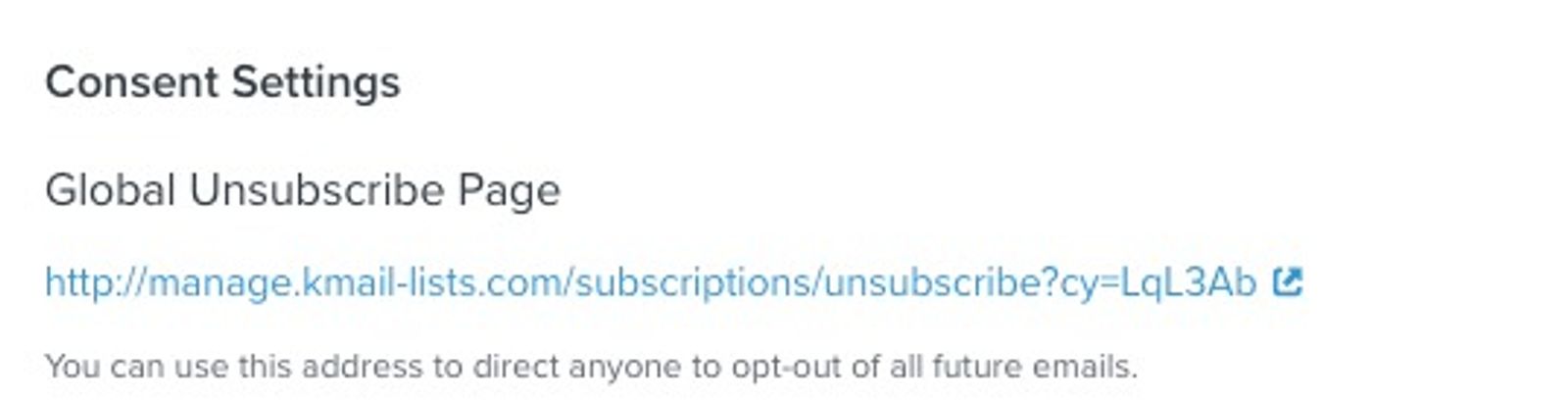
This is a recommended feature that is enabled on accounts by default, because when a customer unsubscribes from one of your emails, they expect to unsubscribe from all of your emails. If a customer continues to receive emails from you after unsubscribing, they will either ignore them, mark them as spam, or take more aggressive action. As a sender, all of these consequences can significantly harm your email deliverability.
Note that the total number of suppressed profiles on your Profiles tab represents all profiles that have been globally suppressed in your account. If global unsubscribes are off for both your account and the relevant list, a customer who unsubscribes only from that list will not count as a suppressed profile on the Profiles tab. If someone unsubscribes from a non-list-based send, such as a segment-based send, they will be suppressed from all future email marketing.
List-specific suppressions
By default when a recipient unsubscribes from an email you send, they will be suppressed for all future email marketing.
A paid email plan is required to change the account-wide global unsubscribe setting. To allow list-specific unsubscribes, turn this setting off for your account and for every list used in the send. Recipients who unsubscribe from a list-based email will then be suppressed only for the relevant lists they belong to, and may still receive emails sent to other lists they have subscribed to. If any included list has global unsubscribes enabled, the unsubscribe is global. These settings do not impact SMS or push consent.
List-suppressed profiles will not be included in the suppression condition in segmentation (i.e., If someone can or cannot receive marketing > cannot receive > email marketing > because person is suppressed) as profiles can still receive some emails.
To maintain strong deliverability and avoid recipients marking your emails as spam, Klaviyo highly recommends that you leave global unsubscribes enabled.
First, turn off global unsubscribes for each list you want to use with list-specific unsubscribes:
- Navigate to Audience > Lists & segments and select your list.
- Open Settings > Consent.
- Under Opt-out process, uncheck Unsubscribe from all email marketing.
- Click Save.
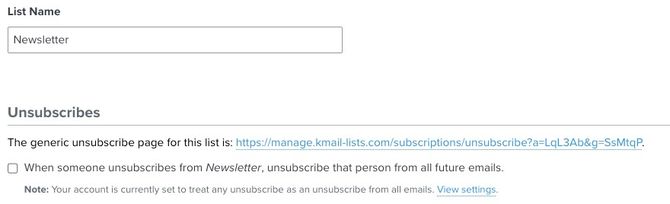
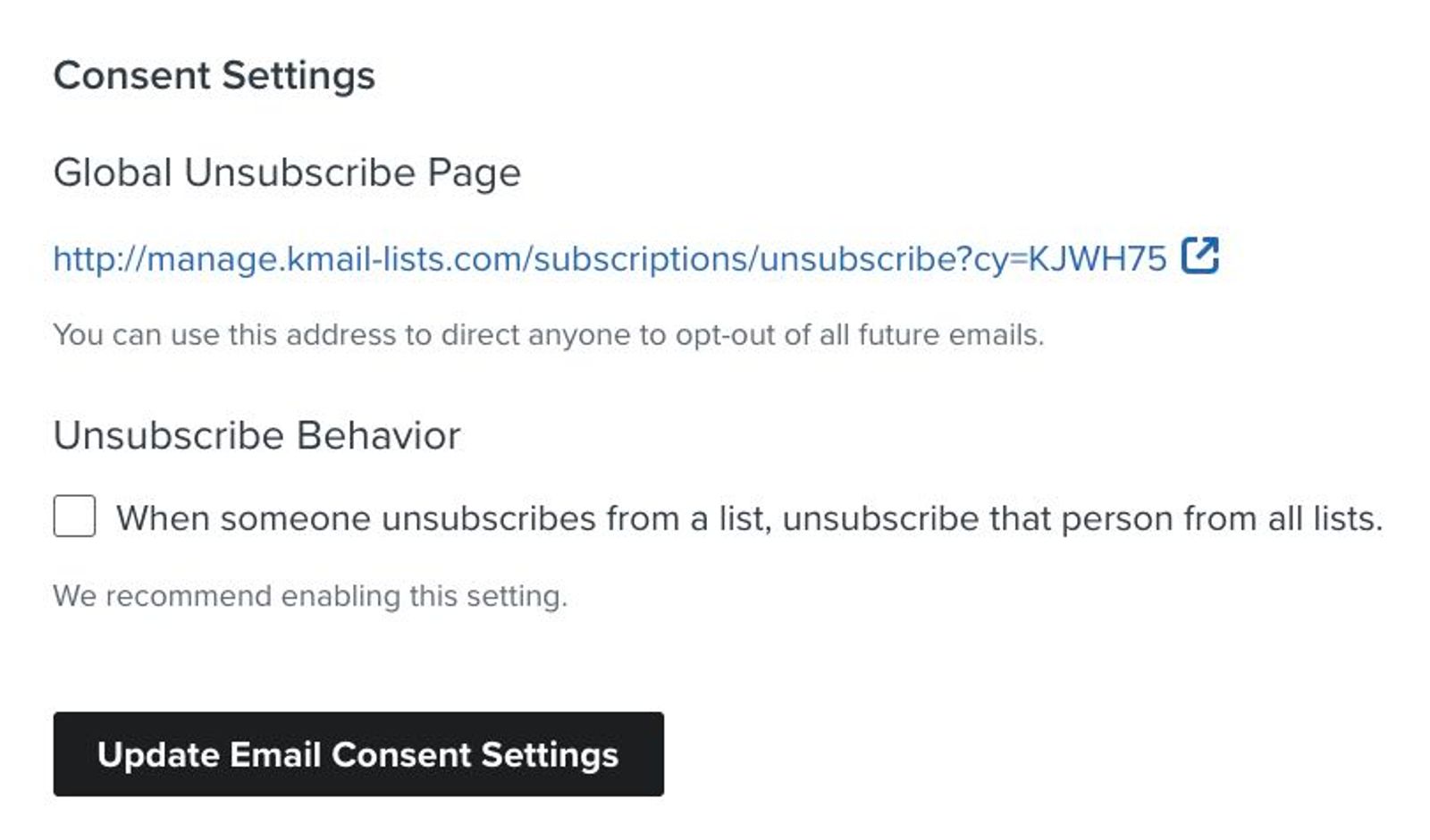
Then, turn off the account-wide setting. Lists that still have their own global unsubscribe setting enabled will continue to unsubscribe recipients globally:
- Navigate to Settings > Other > Consent pages.
- Under Global unsubscribe page, find Unsubscribe Behavior.
- Uncheck When a profile unsubscribes from a list, unsubscribe them from all future email marketing for your account.
- Click Update Email Consent Settings.
Viewing a profile’s suppression status
To see if a profile is suppressed for email, navigate to their profile.
On the Details tab, you'll see the different channels a profile can be reached through along with their suppression and consent status. You'll see the following statuses here:
- A green checkmark
This symbol indicates that the profile is able to receive marketing because they have subscribed for the corresponding channel and are not suppressed.



- A red indicator
This symbol indicates that the profile is unable to receive marketing through the channel because they are unsubscribed or suppressed. This may be because they unsubscribed, were manually suppressed, or had an email hard bounce.

- A yellow exclamation mark
A yellow exclamation mark indicates that the profile is able to receive email marketing, but has neither subscribed nor opted out. While they are able to receive emails (e.g., an abandoned cart flow email) because they are not suppressed, you should exercise caution when contacting them.


For SMS and push notifications, profiles need to provide express consent in order to receive messages. Profiles with a status of Never subscribed for SMS and push notifications are not able to receive messages through the channel until they opt-in.
By expanding a channel, you can see information about when and how someone became subscribed and the reason the profile is suppressed. If the profile is suppressed for more than one reason (e.g., manually suppressed and also suppressed after a hard bounce), only the highest-priority suppression reason will appear. Suppressions are prioritized as follows:
- Deliverability (i.e., hard bounce or invalid email)
- Manual (i.e., the profile was manually suppressed)
Navigating to your email suppression list
Global suppressions
To see the total number of profiles that are active versus suppressed for email, navigate to Audience > Profiles and review the Active and Suppressed counts.
Click View suppressed profiles to view a list of all global email suppressions.
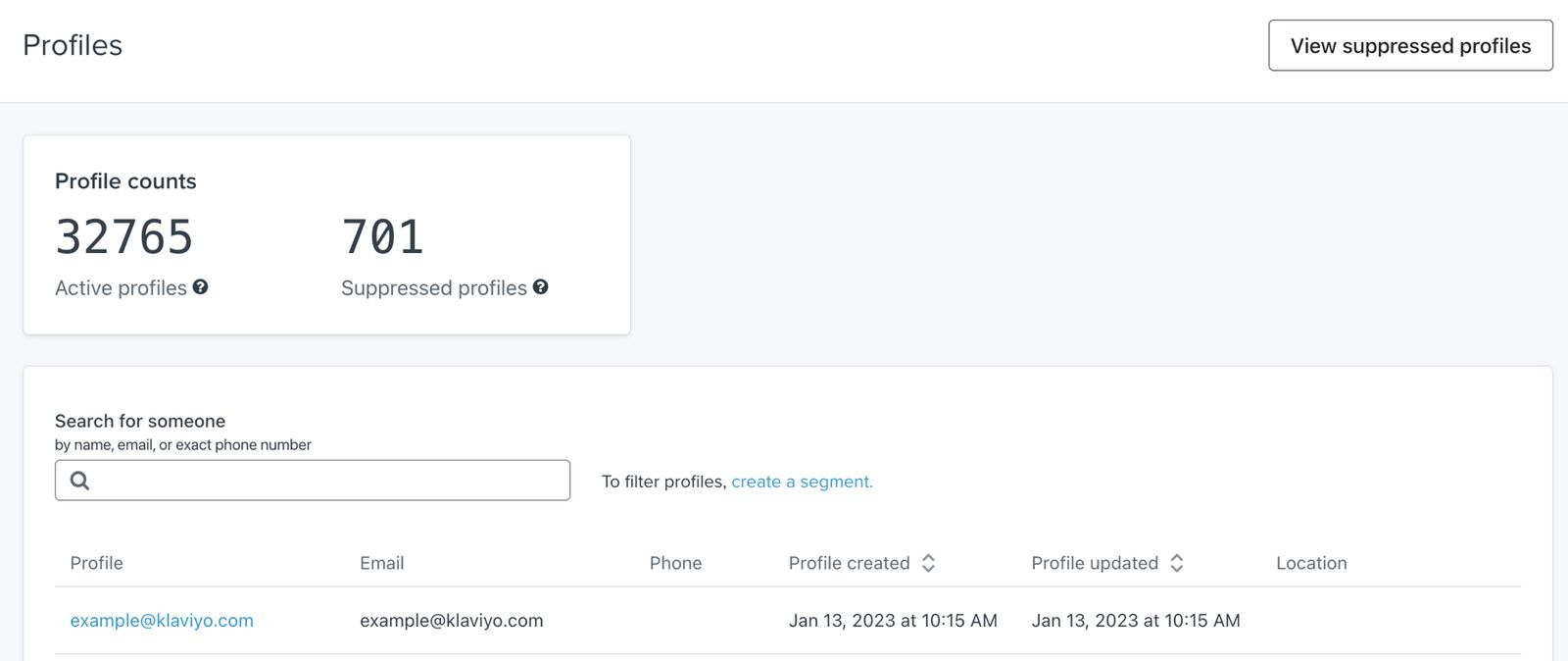
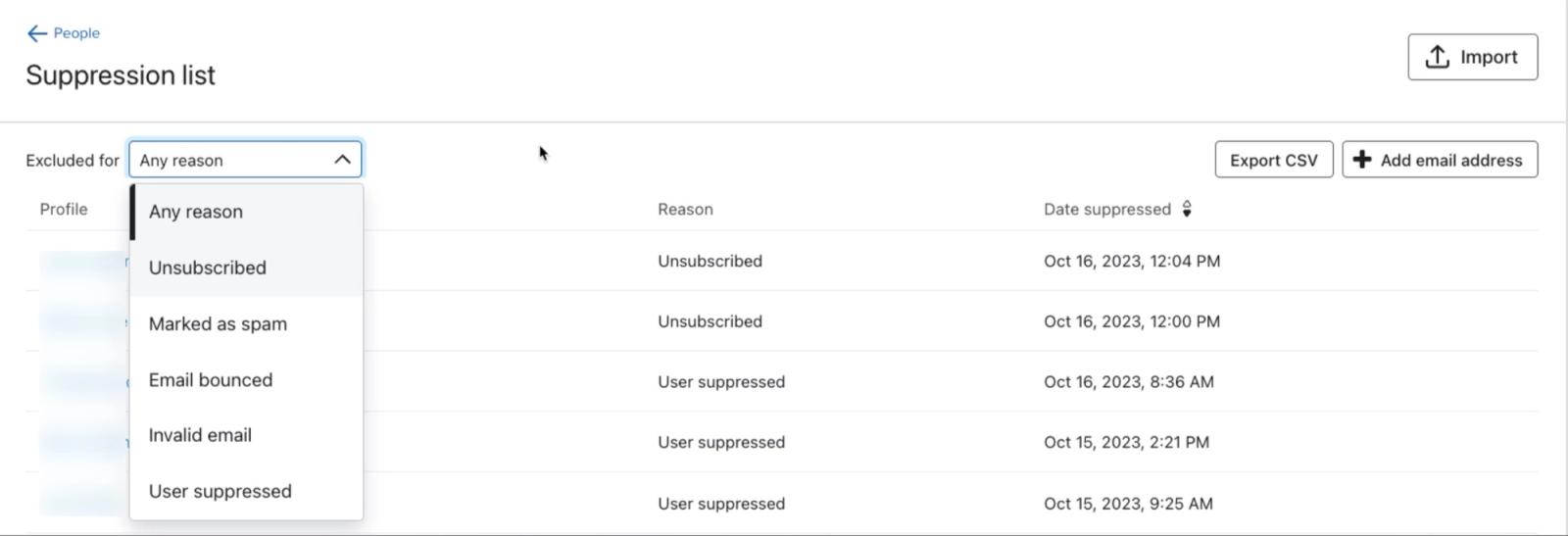
Once you navigate to your email suppression list, you can:
- Filter by reason
- Export this list to a CSV
- Add an email address manually
- Upload a file of people you'd like to suppress
List suppressions
To see the profiles that are suppressed for a specific list, navigate to Audience > Lists & segments and select your list. Open Manage list > View list suppressions.
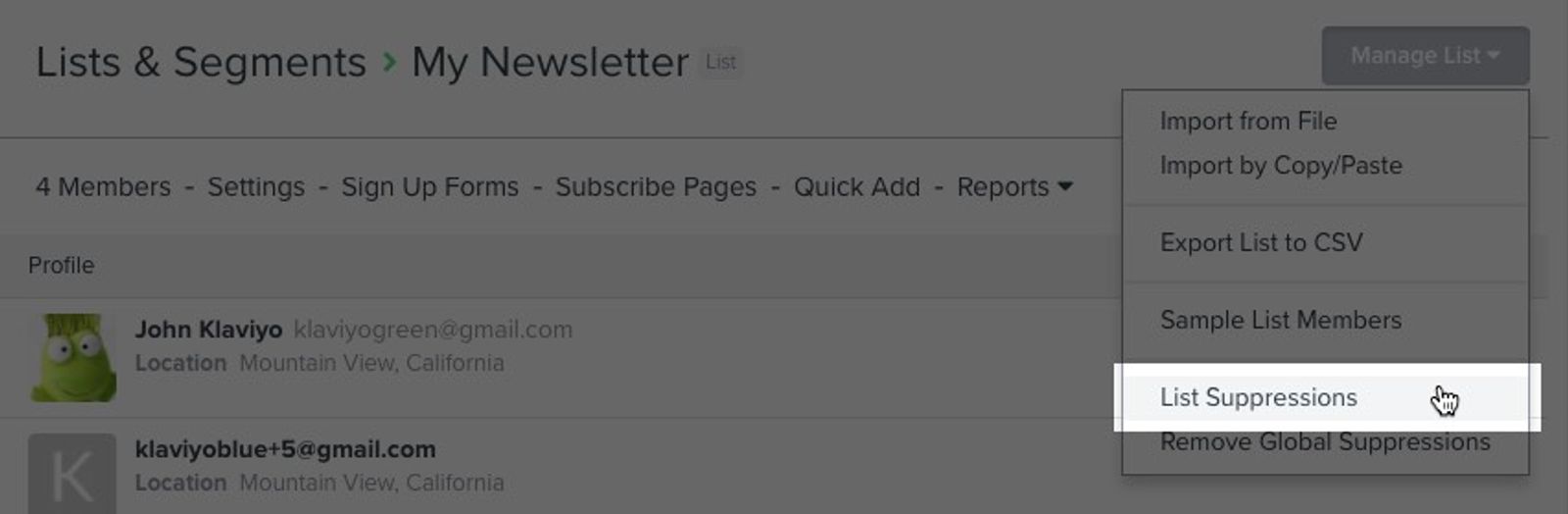
When a profile is manually suppressed for a list, the Manually Suppressed from "List name" Email Marketing event appears on the profile's activity log.
Note that with global suppressions enabled, profiles that become suppressed will not appear here.
How to suppress profiles
The Owner, Admin, and Manager user roles can suppress profiles.
To suppress a single profile for email:
- Navigate to Audience > Profiles and click View suppressed profiles.
- Click Add email (or Add email address).
- Enter the email address and click Add.
Additionally, you can suppress a profile directly from the Details tab on a profile. Open the menu next to the email consent indicator, select Suppress, and click Suppress to confirm. Choose Unsubscribe instead if you need to record that the person has revoked email marketing consent.
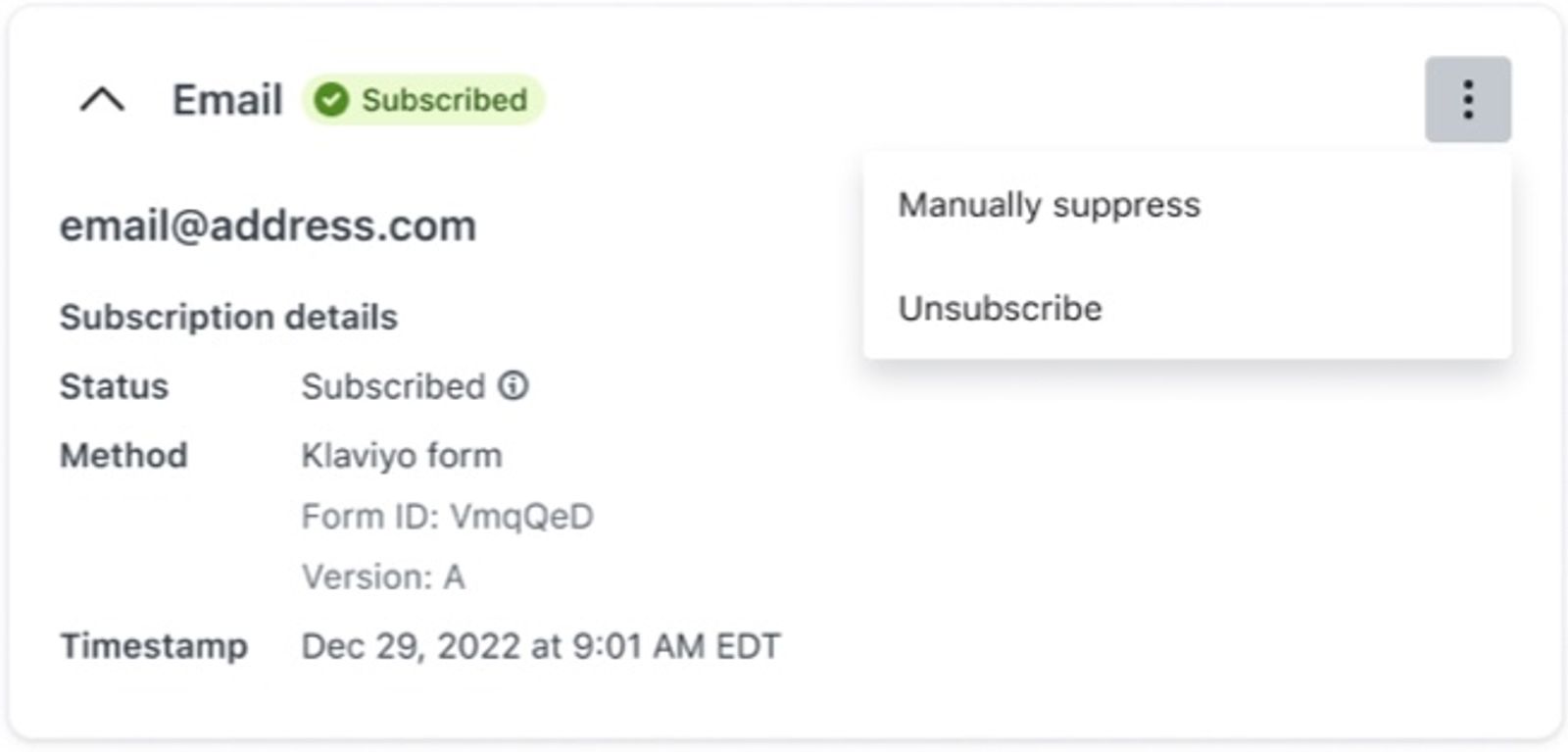
Manually suppressing a profile applies a User suppressed suppression reason and leaves their existing consent status unchanged. For example, a subscribed profile remains subscribed but is unable to receive email marketing. Choosing Unsubscribe changes the consent status instead.
When a profile is manually suppressed, the Manually Suppressed from Email Marketing event appears on the profile's activity log.
To learn how to suppress multiple profiles at once, head to our article on how to bulk delete or suppress contacts in Klaviyo.
Updating subscriptions and suppressions
Before unsuppressing a profile, note that after a profile is manually suppressed and then unsuppressed, you must wait until 90 days after the original suppression to manually suppress them again. This restriction does not apply during the first 30 days after a new account is created.
To manually unsuppress a profile:
- Navigate to the profile’s Details tab and expand the email channel.
- Click Remove global suppression. For a manually suppressed profile, you can also select Unsuppress from the menu next to the email consent indicator.
- Click Remove Suppression to confirm.
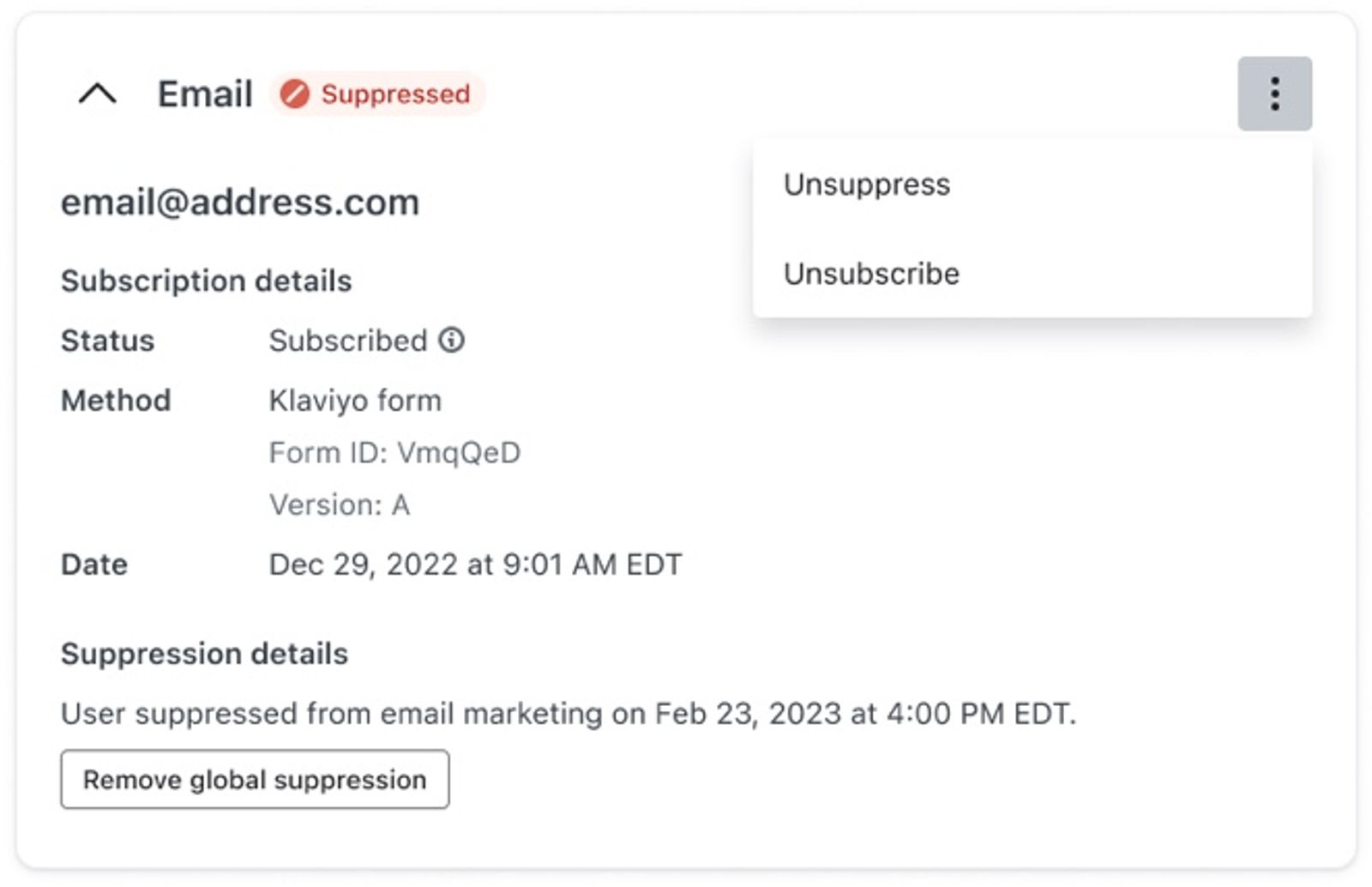
When a profile is manually unsuppressed, the Manually Unsuppressed from Email Marketing event appears on the profile's activity log.
Profiles that unsubscribed or marked an email as spam will not display an Unsubscribe option. If you have received explicit consent from the recipient, you can resubscribe them:
- Open the menu next to the profile’s email consent indicator and select Resubscribe.
- Select a list under Subscribe list.
- Click Resubscribe Profile. This action does not send a confirmation email.
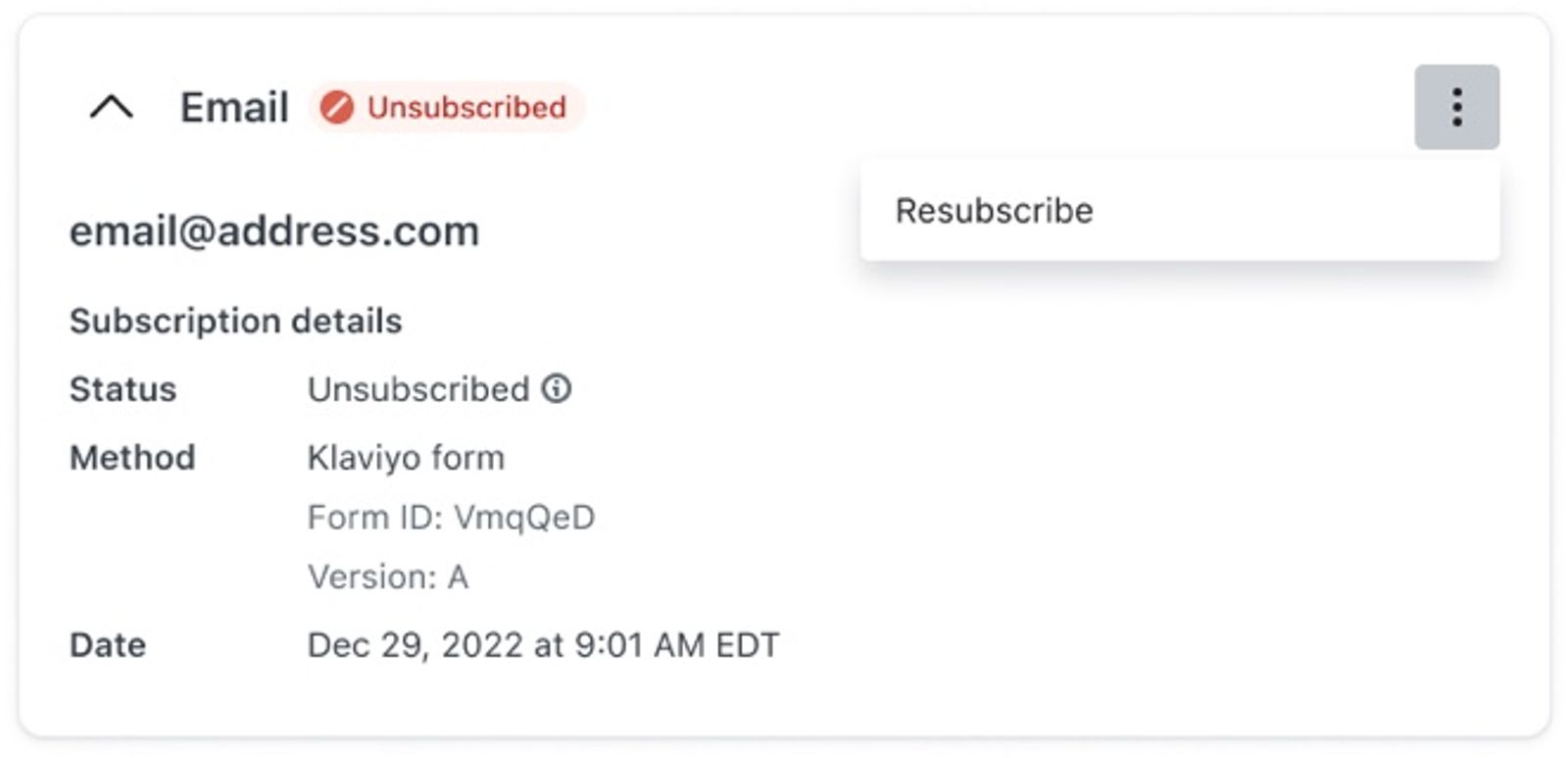
When a profile resubscribes (e.g., via a list uploaded with consent or by filling out a signup form), their global manual suppression and suppressions for the list they subscribe to are lifted. Suppressions for other lists remain in place. Deliverability suppressions (e.g., those due to hard bounces) are not removed by subscribe actions in order to protect your sender reputation.
How Klaviyo treats suppressed email profiles
Suppressed profiles and pricing
Klaviyo’s email plan pricing tiers are based on the number of active email profiles in your account. An active email profile has an email address and can receive email marketing.
Suppressed email profiles do not count toward your email plan’s active profile limit. To review your plan, navigate to Settings > Billing > Overview.
Meanwhile, under Audience > Profiles, you can see the Active and Suppressed counts separately, as shown above.
Exclusion from email sends
Klaviyo will automatically exclude suppressed profiles from email marketing sends. This means that, even if you try to send a marketing email to suppressed profiles, Klaviyo will ensure that these intended recipients are skipped. Approved transactional flow emails can still be sent to manually suppressed or unsubscribed profiles, but not to profiles suppressed for bounces or invalid email addresses.
For flow emails, open Recipient activity > Skipped and select Skipped: Person Suppressed to see how many people did not receive the email because they are suppressed in your account.
Suspicious emails
Suspicious emails are email addresses that Klaviyo has flagged based on hard-bounce history across Klaviyo accounts. This means that an address can be flagged even if it has never hard bounced in your account.
Suspicious emails will automatically be skipped from receiving emails. This is in an effort to preserve your sending reputation, as well as the sending reputation of other Klaviyo customers. A campaign’s Overview shows the total number of skipped emails. To see how many were skipped as suspicious, open Recipient activity > Skipped and select Skipped: Suspicious Email.
Consent vs. suppression status
In Klaviyo, there are 2 key concepts to understand which contacts are reachable and which have provided consent to receive marketing. These are consent status and suppression status.
Suppression and consent statuses are separate from each other. For example, a profile that has provided consent and is subscribed can be suppressed and retain its consent status.
Consent status
Consent status refers to whether a profile has opted-in to receive email marketing. At the top of the Details tab of a profile page, you'll see a profile’s consent status and ability to receive messages by channel. The different statuses you may see for consent are:
- Subscribed
Subscribed means that a profile has explicitly provided consent to receive marketing, but can receive marketing through the corresponding channel only if they are not suppressed. - Never subscribed
Never subscribed means the profile has neither subscribed, nor opted out of email marketing. For example, someone who placed an order or abandoned a checkout on your site may have added their email address during the checkout process, but never explicitly opted in. If they are not suppressed, they are able to receive email marketing (e.g., an abandoned cart flow email), but you should exercise caution when contacting them. - Unsubscribed
Unsubscribed means that a profile is no longer interested in receiving your email marketing and has explicitly revoked consent for receiving it. Once unsubscribed, the profile will no longer be able to receive email marketing.
Suppression status
Suppression status refers to whether a profile is reachable through a channel. When a profile is suppressed for email, they cannot receive email marketing, even if they have provided consent and indicated they want to receive emails. These profiles do not count toward your email plan’s active profile limit.
Profiles can either be in a suppressed state, or an unsuppressed state.
Keeping vs. deleting suppressed profiles
There are several reasons why Klaviyo recommends keeping suppressed profiles in your account instead of deleting them:
- Suppressed profiles do not count toward your email plan’s active profile limit
Klaviyo’s email plan pricing tiers are based on active profiles, so keeping suppressed profiles does not increase this count. If you clean your list and qualify for a lower pricing tier, review your plan under Settings > Billing > Overview and select a lower plan if needed.
Advanced KDP billing is separate from Email and SMS plans on Klaviyo. Advanced KDP billing is based on total profiles, including suppressed profiles.
- Suppressed users still matter for business insights
Klaviyo's segmentation tools can help you gain important business insights. If you plan on creating segments to analyze customer behavior, website activity, etc., deleting profiles (even those you can't ultimately email) will skew these segments and make it impossible to get accurate insights.
Additional resources
- Understanding active email profiles in Klaviyo
Learn about active email profiles, including how they differ from suppressed email profiles, and how you can contact the people represented by these profiles.
- Understanding unsubscribes and resubscribes
Learn about unsubscribes in Klaviyo, and how to manually unsubscribe contacts yourself.
- How to manage email suppressions and delete profiles in bulk
Learn how to suppress a group of profiles in Klaviyo in bulk, remove suppressions in bulk, or delete profiles in bulk, and how the suppression modal helps you avoid suppressing recently active, high‐intent profiles.You will also learn how suppression recommendations on the Suppressed profiles page help you safely suppress low‐value, long‐term inactive profiles based on standard sunset flow criteria.