Use your social content in campaigns, flows, and sign-up forms
Premium feature. Browsing and inserting social content require a paid Klaviyo Social Marketing plan or an active free 14-day trial, plus an Instagram connection through Facebook Login.
With Klaviyo Social Marketing, your brand's own Instagram content is available directly inside the media picker, so you can reuse your best-performing social content in emails, flows, and sign-up forms without downloading and re-uploading anything. Inserted content can include a social context overlay with a profile picture, username, and caption preview to identify the creator and provide context.
This article covers where social content appears, how to insert it, how the overlay works, and how access differs by plan.
Where social content appears
A Social tab appears in the media picker in the campaign and flow email editors and the sign-up form builder.
The Social tab shows your brand's own published Instagram content (including feed posts and carousels) and user-generated content (UGC) for which you've recorded the creator's permission to reuse it in Klaviyo.
Browse and select content
If the Social tab prompts you to start a trial, select Try it free to open Social content in a new tab and complete trial setup. If you already have access but need to connect Instagram through Facebook Login, select Turn on Social Content and follow the connection prompts. If the tab shows Upgrade, select it to choose a paid plan. After completing setup, return to your editor. For connection requirements, see Connect Instagram to Klaviyo.
- In the campaign or flow email editor or sign-up form builder, add or select an image block. In the image settings, click Select image, or click Replace for an existing image, to open the media picker.
- Select the Social tab.
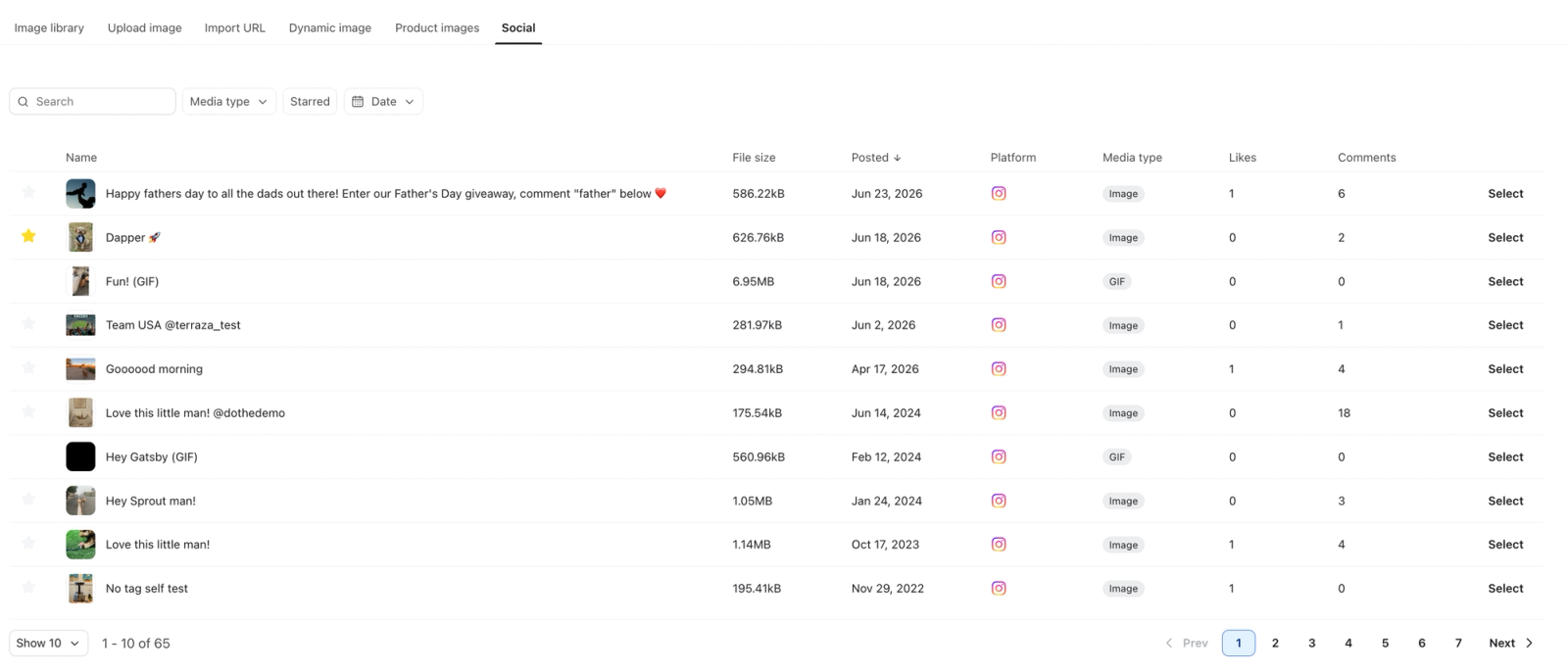
- Browse your Instagram content. Filter by Media type or Date, or sort by the Likes or Comments column. The table shows thumbnails; add the social context overlay after selecting content.
- Click Select on the image or GIF you want to insert. For a carousel, expand the post and select an individual item. The picker closes and the image appears in your editor.
The Social tab lists your Instagram content with media type, posted date, likes, and comments.
The social context overlay
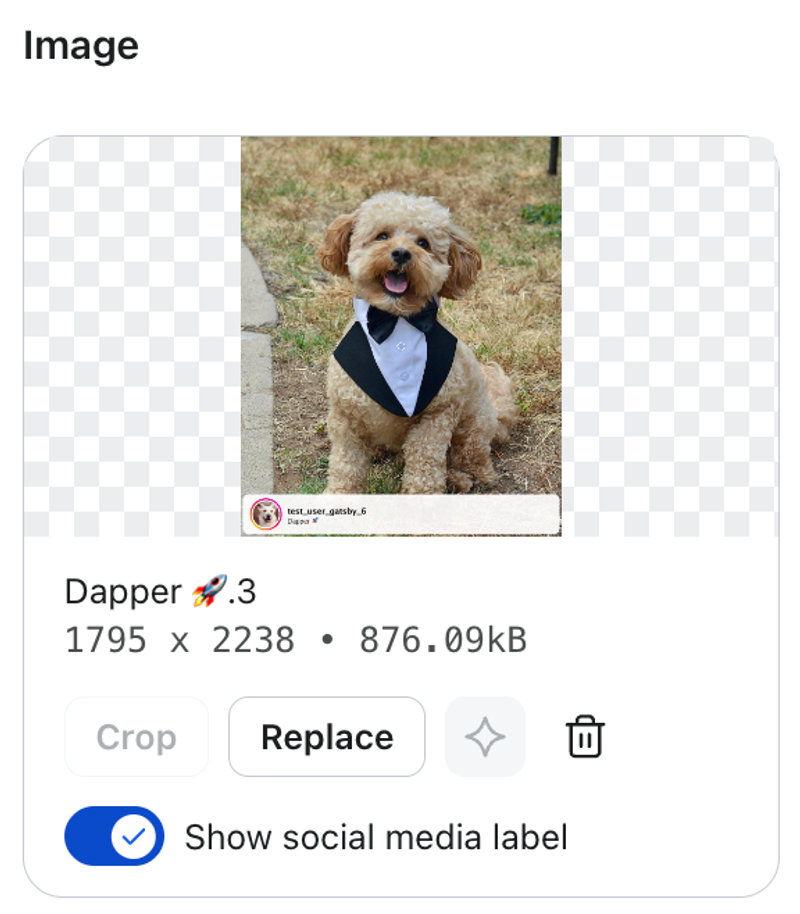
The social context overlay adds creator details directly to the selected image. It can include:
- A profile picture, or initials if a picture is unavailable
- Username
- A preview of the caption
When Show social media label appears beneath the selected image preview, turn it on to add the overlay, or off to use the clean image. This control is available for images and GIFs that have synced to Klaviyo. Choose the overlay in the same editing session in which you select the content. If you reopen the editor, select the content from the Social tab again to change the overlay.
Example Instagram post in the campaign editor with the overlay turned on:
Video content
Klaviyo creates GIF versions of Instagram videos for use in email and sign-up form image blocks. Select a GIF version once it appears in the Social tab. The GIF uses up to the first 5 seconds of the video. Conversion may shorten it further or reduce its frame rate or resolution to keep the file size within limits.
Plan behavior
- Free Auto-replies plan. You need an active trial or paid Social Marketing plan before you can browse content in the Social tab. Select Try it free if shown to start a free 14-day trial, or Upgrade to choose a paid plan. No payment details are required for the trial, and your account is not automatically charged when it ends.
- Trial and paid Social Marketing plan. Browse and insert content into campaigns, flows, and forms. Posts are shown newest first. Sort by Likes or Comments to compare engagement before choosing content.
- After a trial ends. Unless you upgrade to a paid Social Marketing plan, you can no longer browse or insert new social content from the Social tab. Content you inserted during the trial remains in your messages and forms.
Things to know
- Requires Facebook Login. Social content does not flow in on Instagram Login connections.
- Feed posts and individual carousel items are supported, along with available GIF versions of videos. Your brand's unexpired image stories can also appear. Expired stories are excluded from the media picker.
- Social content does not appear in the Asset Library today; it is available through the media picker only.
- Inserted images render across major email clients, including Gmail, Apple Mail, and Outlook. To review your content's performance before choosing what to insert, use the Social Content Library.
- UGC only appears here after you have recorded the creator's permission to reuse it. Recording permission doesn't mean Klaviyo has reviewed or verified it. You are responsible for having the rights to reuse the content and for having any marketing consent required for your use; see Record creator consent and use social UGC and How to collect consent via Instagram.