How to increase email click rates
You will learn
Learn why email click rates may decline and how to improve them. Click rates allow you to measure engagement, granting you insight into how often recipients click the links you send. There are a variety of reasons why click rate may decline over time as you send campaigns and flows.
This article specifically focuses on email click rates. If you are instead focusing on SMS click rates, head to Campaign SMS and MMS Benchmarks for guidance.
What is click rate?
Click rate is the percentage of people who clicked a link in your email out of the people who received your email. This is not to be confused with click-through rate which measures those who clicked your email divided by those who have opened that email.
- Click rate
The number of people who click your email divided by the number of people who receive your email.
Automated security checks can generate clicks without a recipient engaging with your email. If your click rate drops, check whether bot clicks have been excluded from reporting before concluding that engagement has declined. Learn more about bot clicks and their effect on reporting.
Why click rates matter
Clicks can signal to inbox providers that your content is wanted and of value to recipients, which can support better inbox placement. Click rate is also a great indicator of whether or not your content resonates with your audience. When click rates rise it’s a sign that you’re sending content that recipients want to receive; whereas, when it falls you should look for where to improve in your messaging going forward.
A click rate around 2.5% or higher is a general goal, but results vary by industry and message type. Compare campaigns and flows separately and monitor trends over time. For more information on deliverability metrics and industry benchmarks, head to Getting started with email deliverability monitoring and performance metrics.
How to increase click rates
Some key strategies to help you increase click rate include:
- Optimizing links
- Segmenting your audience
- Matching subject lines to email content
- Incentivizing customers
- Ensuring that emails render for all recipients
1. Optimize links
Links are the backbone of click rate because, without a link, there is no click. Be strategic with where and when you add links, emphasizing them so that they are easily found in your emails. You should also ensure that your emails are optimized for desktop and mobile so that links do not render poorly on either device.
When adding links to emails, have a clear call-to-action (CTA) that explains why someone should click your link and what it will lead to. For example, a flash sale CTA will direct customers to your sale (e.g., shop our sale or claim your coupon). You can likewise link out to product recommendations, new collections, or a navigation bar for your site, among other things.
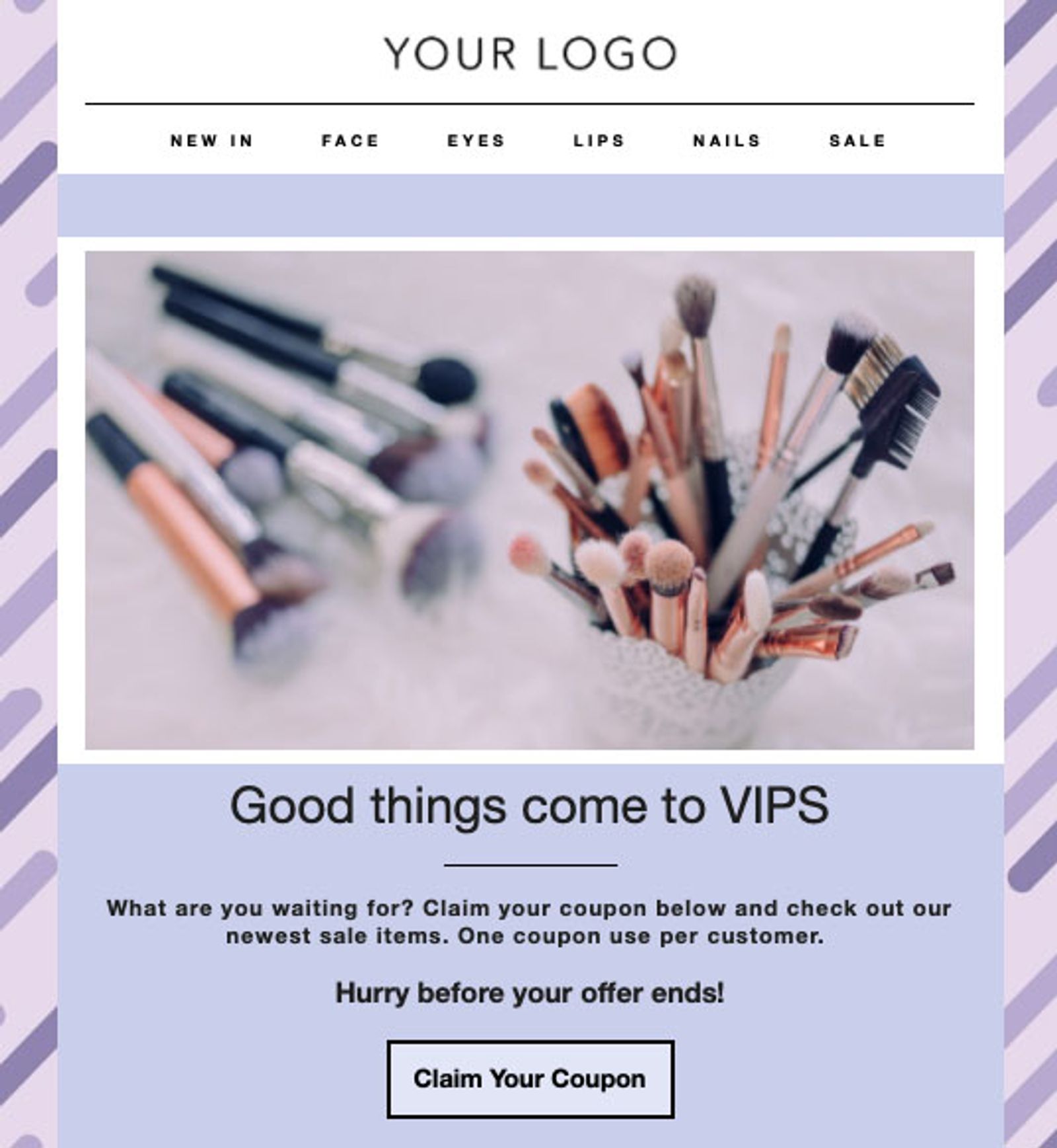
Some CTA best practices include:
- Start with an action verb
Action verbs grab a reader's attention and direct them to what action needs to be taken. When writing a CTA, start your phrase with a verb to immediately ground subscribers on a particular goal. Some examples of how your CTA may start include: get started, learn more, shop now, etc. - Ensure that no links are broken or lead to the wrong destination
Broken links can confuse and frustrate subscribers, leading them to not click your emails, or worse, to unsubscribe or mark them as spam. Always ensure that your links are valid before sending or scheduling emails to avoid this. - Design your CTA and links to stand out
It is best practice to use buttons in Klaviyo to direct customers to click a link. You can also use larger fonts or colors to guide a reader's attention. That being said, only emphasize what is most important. This ensures that you do not distract from your main CTA and clickable content.
If you recently changed your email design, preview and test your emails to check the layout, and use A/B testing to see what emails resonate with your audience.
2. Segment your audience
Sending to engaged segments is a crucial first step to improving your deliverability and open rate. That being said, if your email content does not interest those who open, then they may not take that crucial next step of clicking the link provided.
One way to improve click rate is to refine your engaged segments. Add conditions around customer interests, location, characteristics, and more to target your messaging. Connect these conditions to your existing engagement criteria with AND so recipients must meet both. You can then tailor content to each audience’s interests. For example, if you create a campaign informing customers of a new store opening, then you’ll want to specifically target a location-based segment — in this case, subscribers in and around Boston.
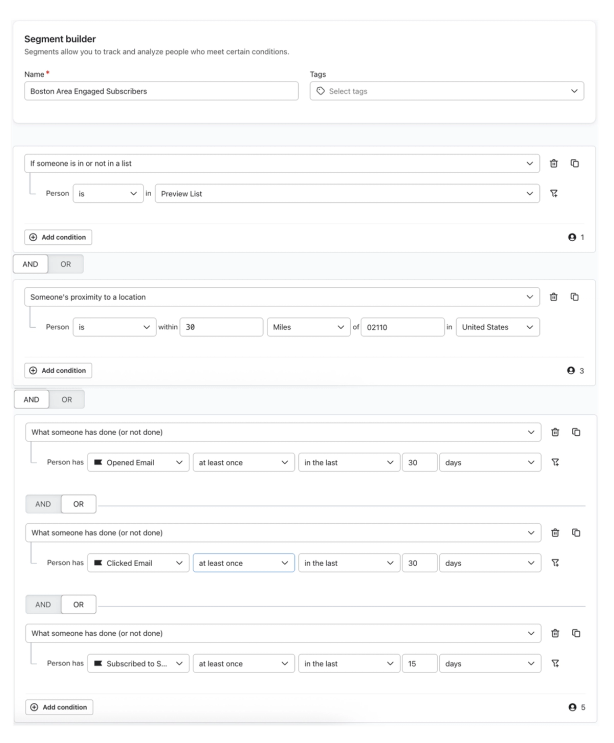
In a similar vein, you may target specific genders or age groups when sending emails about a new clothing line, or target VIP customers with exclusive deals or promotions. The possibilities for targeted marketing are endless when you employ segmentation. For more inspiration, head to our Guide to Advanced Segmentation.
With the release of iOS 15, macOS Monterey, iPadOS 15, and watchOS 8, Apple Mail Privacy Protection (MPP) changed the way that we receive open rate data on your emails by prefetching our tracking pixel. With this change, it’s important to understand that open rates will be inflated.
To see if your opens are affected, we suggest creating a custom report that includes an MPP property. You can also identify these opens in your individual subscriber segments.
3. Match subject lines to email content
Subject lines play a crucial role in getting people to open your emails. However, subject lines should not only entice recipients to open, but should also inform them of the content of your email. If your subject lines are misleading, then those who open the message may not continue to click a link. On the other hand, if your subject lines do not adequately convey an incentive or piece of information you’re offering, then recipients may not even open, and thus will not click your email.
For subject line strategies, head to our blog on subject line best practices. For help generating subject lines and email content, see Speed up content creation with Email AI.
4. Include incentives in your emails
Incentives, like flash sales, free shipping, buy 1 get 1 offers, and more, can help improve click rate. Incentives give recipients a reason to open your email, and a link to obtain the incentive can encourage clicks, conversions, and purchases.
If you recently increased the price of your products or offered fewer discounts, a drop in incentives may translate to a decrease in clicks. Alternatively, if customers find themselves receiving too much of the same incentives, they may be less likely to click into your emails. Thus, be strategic with these offers and avoid sending the same content to the same groups of people. Instead, keep them engaged with new collections and creative content, and use segmentation wisely.
5. Ensure that your emails render for all users
Always account for mobile versus desktop layouts for your emails. If there are rendering issues on either layout, then customers using one device-type are less likely to click in your emails. A dip in click rates may also signal that your recipients are experiencing slow email load times or clipping. For example, Gmail generally clips emails above about 102 KB on desktop, and mobile limits can differ. This size refers to the email’s HTML, including text, styling, and links, rather than the size of externally hosted image files. Adjust your email design accordingly.
Likewise, some recipients may use dark mode on their devices. Dark mode inverts or darkens the colors that a viewer sees to reduce eye strain from screen use. That said, it can impact how your email appears. As such, make links noticeable and optimized for dark mode.
- Open your email in the drag-and-drop editor and click Preview. Switch between Desktop and Mobile to check both layouts before sending. If the toggle is disabled because mobile optimization is off, check mobile rendering with the test email in the next step.
- In the preview sidebar, enter your email address and click Send test. Open the test email on desktop and mobile, including in dark mode, and check that your links are visible and readable.