Understanding consent in profiles
You will learn
Learn how to understand consent in profiles and best practices for email and SMS compliance.
Rules around customer consent vary between email and SMS. It is crucial to understand these differences to comply with international laws and maintain a positive relationship with your customers.
Viewing a profile’s consent status
To see if a profile is able to receive messages and has provided consent, navigate to their profile.
At the top of the Details tab of a profile page, you'll see the profile’s consent status and ability to receive messages by channel. The different statuses you may see are:
The oldest consent record that can be set in Klaviyo is January 1, 1990. If you see this date is set as the timestamp for a consent record in Klaviyo, this is because an earlier date was set and the timestamp was updated to the minimum consent date possible in the system.
- Subscribed
The Subscribed status (represented by a green checkmark) indicates that the profile has provided explicit consent to receive messages through that channel and is reachable.




- Unsubscribed
Unsubscribed (represented by a red indicator) means that the profile is unable to receive marketing through the channel because their consent has been revoked. This can happen when they opt out or when you unsubscribe them. Note that consent status and suppression status are separate from each other. For example, a profile that is subscribed can be manually suppressed.

- Never subscribed
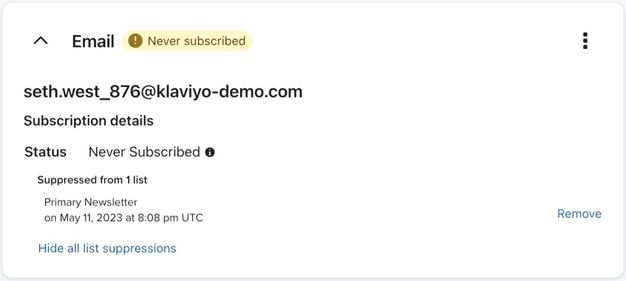
Never subscribed (represented by a yellow exclamation) means the profile has neither subscribed nor opted out of email marketing. They are able to receive emails since they are not suppressed (e.g., an abandoned cart flow email), but you should exercise caution when contacting them.

Text message consent is separated into Text messaging marketing and Text messaging transactional on a profile. Profiles need express consent to receive text messages. A status of Unsubscribed or Never subscribed has a red indicator. SMS marketing consent also permits transactional messages, as explained below. When a recipient opts out using an SMS unsubscribe keyword or unsubscribe link, they opt out of both marketing and transactional text messages.
By expanding a channel, you can see additional details around the profile’s subscription status.
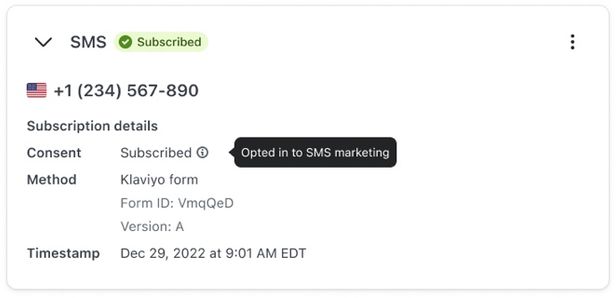
If a profile is not able to receive messages because they are suppressed, there are details around their suppression at the bottom of the channel when expanded.
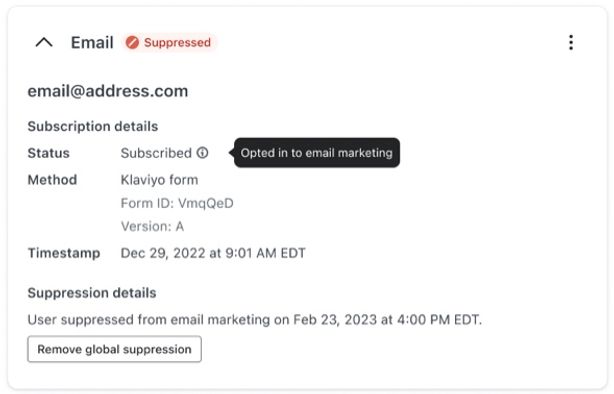
Unsubscribed and spam complaints are not displayed as a suppression reason in this section. If these suppressions exist, the profile will always have an unsubscribed consent status.
For more information on suppression and unsubscribes, see our guide on suppressed profiles in Klaviyo.
Profiles that have never subscribed
There are certain methods of adding a profile that result in a consent status of Never Subscribed. If this is the case and the person is not suppressed, the profile shows a yellow exclamation mark for that channel. For example, people who provided their information when starting a checkout without opting in to email marketing would have a consent status of Never Subscribed.
You can only send emails to these profiles; you cannot send them SMS marketing, SMS transactional, or mobile push messages. And even with email, you should exercise caution when contacting them. Depending on your local regulations you may be permitted to email these profiles if you believe they have implied consent. Make sure to use good list cleaning practices and consider each contact’s engagement when deciding whether to send to them.
Klaviyo recommends that you only email profiles with express consent to protect your deliverability and sender reputation.
Open tracking consent
Open tracking consent is separate from marketing consent. It controls whether Klaviyo records a recipient's email opens, and it does not affect whether they can receive your messages.
When a recipient has an explicit open tracking consent value, an Email open tracking row appears in the channel list on the Details tab, with a status of Subscribed or Unsubscribed. A status of Unsubscribed prevents open tracking for that recipient. Subscribed allows it when open tracking is enabled for the account. Expand the row to see the recorded subscription details. This row is read-only. You can update open tracking consent through an import or the API.
If a recipient hasn’t been set to Subscribed or Unsubscribed, no Email open tracking row appears on their profile. This means no explicit choice has been recorded. Klaviyo records their opens by default when open tracking is enabled for your account. Turning off open tracking for the account stops recording opens, including for recipients marked Subscribed.
To learn how to manage these controls, see How to manage open tracking.
Click tracking consent
Click tracking consent is separate from marketing consent. It controls whether Klaviyo records a recipient’s email clicks, and it does not affect whether they can receive your messages.
When a recipient has an explicit click tracking consent value, an Email click tracking row appears in the channel list on the Details tab, with a status of Subscribed or Unsubscribed. A status of Unsubscribed prevents click tracking for that recipient. Subscribed allows it when click tracking is enabled for the account. Expand the row to see the recorded subscription details. This row is read-only. You can update click tracking consent through an import or the API.
If a recipient hasn’t been set to Subscribed or Unsubscribed, no Email click tracking row appears on their profile. This means no explicit choice has been recorded. Klaviyo records their clicks by default when click tracking is enabled for your account. Turning off click tracking for the account stops recording clicks, including for recipients marked Subscribed.
To learn how to manage these controls, see How to manage click tracking.
When someone subscribes to one of your lists (e.g., through a sign-up form) and completes any required double opt-in confirmation, their consent status is marked as Subscribed in Klaviyo. This results in the creation of their profile in your account (if it does not already exist) and a green checkmark representing their subscription status.
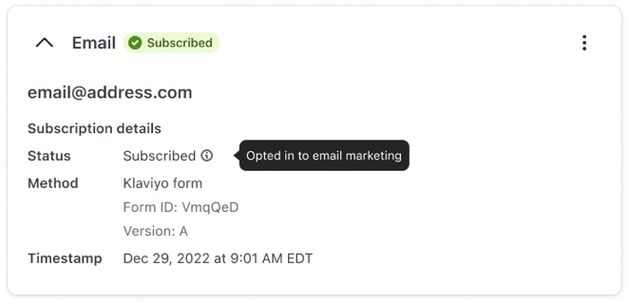
Consent vs. suppression status
In Klaviyo, there are 2 key concepts to understand which contacts are reachable (i.e., suppression status) and which contacts have provided consent to receive marketing (i.e., consent status).
Suppression and consent statuses are separate from each other. For example, an email profile that has provided consent and is subscribed can be suppressed by a user on the account, and still retain its consent status. This allows profiles to be suppressed for billing purposes, and unsuppressed at a later date without having to provide consent again.
Due to this difference between suppression and consent statuses, when you export the email marketing consent property for a list or segment, you may see Subscribed for a customer who is suppressed. To get suppression status, export the Email suppressions property as well.
GDPR
In some cases, international laws will affect email consent. A prime example of this is GDPR, which governs residents of the EU. For information on how to remain compliant and access appropriate consent for EU customers, please see our article on collecting GDPR-compliant consent.
Best practice
It is best practice to have double opt-in enabled for your lists. This means that, when a customer subscribes via a signup form or other subscription method, they will receive a confirmation email to verify that they want to subscribe. Double opt-in helps you maintain good deliverability and avoid spam traps that negatively affect your sender reputation.
Klaviyo also requires that you include an unsubscribe link in all of your emails. This is required by US law and ensures a seamless experience for your customers, improving email deliverability. It is always better that someone unsubscribes from your content rather than marks it as spam. You can customize your unsubscribe link as well to fit your business style and needs.
Text messaging marketing and transactional
SMS consent is collected separately from email consent. If you have email consent for a profile, that does not mean that you can legally send that same contact text messages and vice versa.
In order to send an SMS message to a profile, you must collect their SMS consent. You can ask for SMS consent in a landing page on your site, prompt website visitors to subscribe in a signup form, or request it from email subscribers in a campaign. To learn more about how to gain SMS consent, head to our guide on collecting SMS subscribers.
SMS marketing consent includes the ability to send a profile transactional messages, but the opposite is not true. If someone only has SMS transactional consent, they can only receive SMS transactional flow or conversational messages.
Once SMS consent is provided by a profile, you will see another green checkmark denoting their consent status in the relevant text messaging row on the Details tab of the profile page.
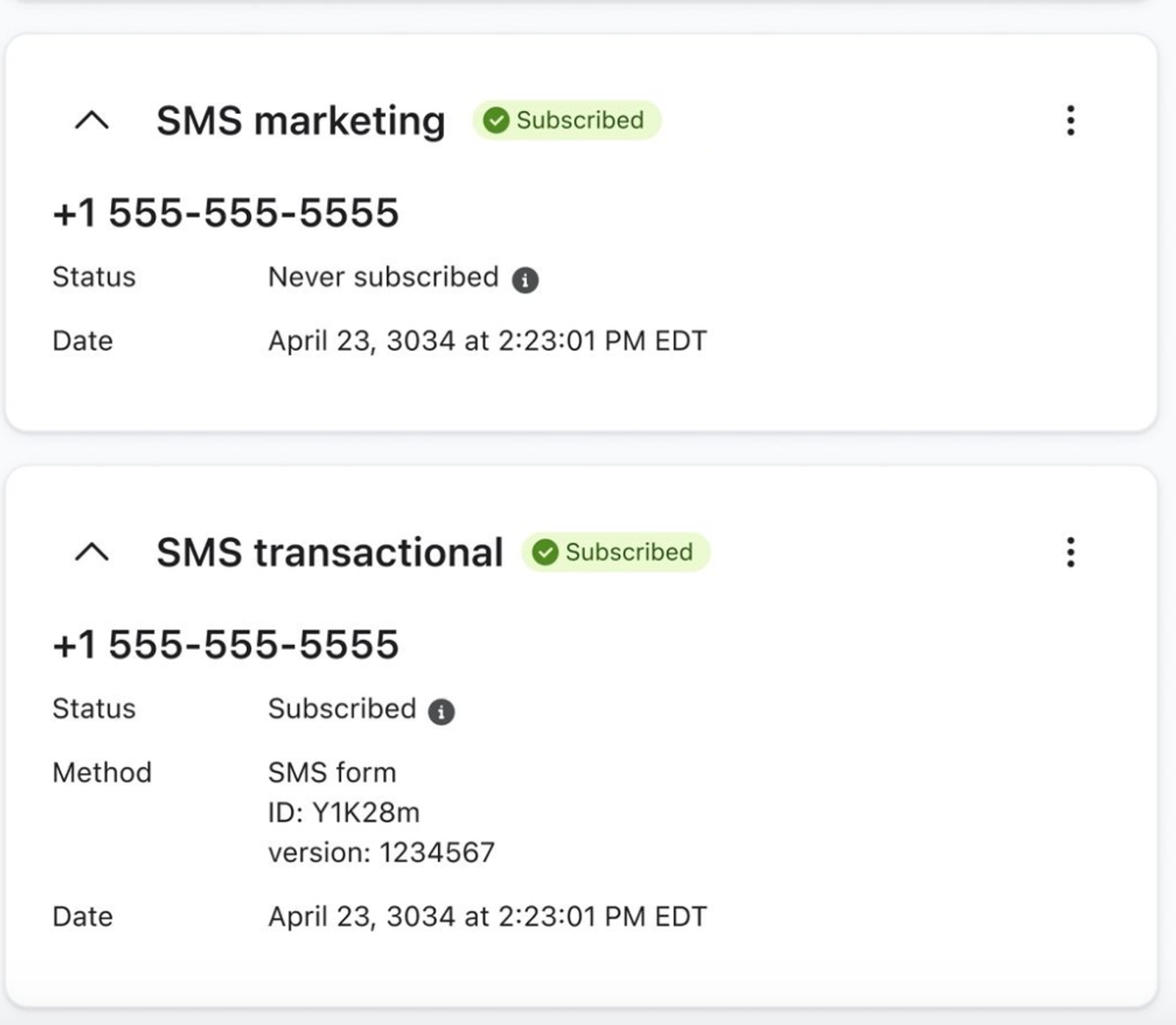
SMS consent is only associated with the specific phone number that opts in. If the phone number for a profile changes after the initial opt-in, the customer needs to subscribe again with the new number.
Best practices
Like email, double opt-in for SMS marketing is highly recommended. Double opt-in is not supported for SMS transactional consent. For SMS marketing, double opt-in will confirm that the phone number of the recipient is legitimate, provide you with a record of consent, and allow text message recipients to opt-out if they change their mind.
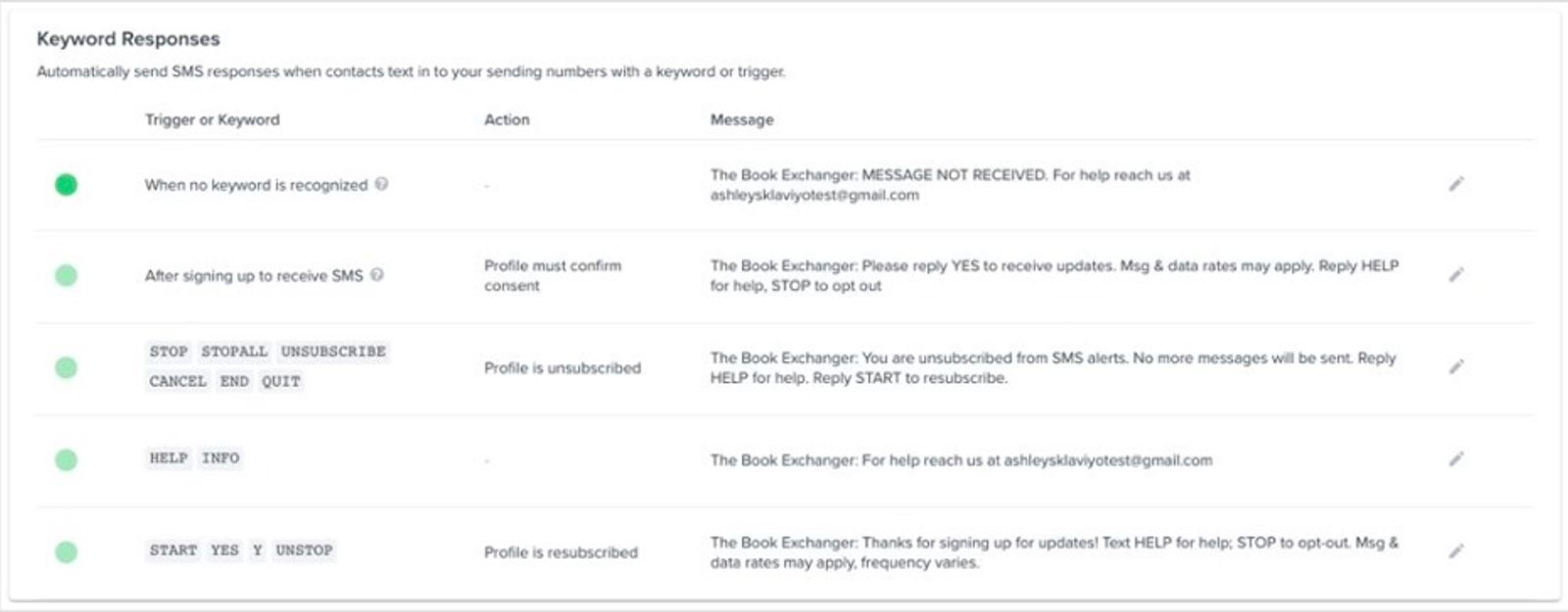
A recipient marking a text message as spam carries greater consequences than a recipient marking an email as spam. If you are reported as spam by recipients, you may be subject to hefty fines. SMS consent laws depend on the country. To comply with their laws, Klaviyo requires that you send certain keyword responses to customers. These required keyword responses are free of charge. Editing is restricted for some responses; for example, opt-out and resubscribe responses in the US and Canada cannot be edited. Responses to optional keywords, such as custom subscribe keywords, are charged.
Mobile push notifications
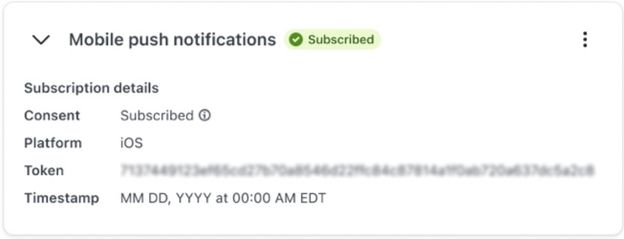
In order to send a push notification to a profile, you must collect their explicit consent first.
Push notification consent is collected separately from email and SMS consent. If you have consent for a different channel, that does not mean that you can send push notifications to that contact until they specifically opt in to receive push notifications.
Once a profile grants consent, you will see a green check mark denoting their consent status on their profile page.
Best practices
To collect push notification consent, prompt customers to enable notifications in your mobile app using the native iOS or Android permission prompt. Before that prompt, it is best practice to explain the following:
- What types of notifications your brand sends
Include details about the different push notifications your brand plans to send (for example, account changes, reminders, and special discounts). - Why users should opt in
Include information around why a customer should provide permissions (for example, to receive important updates or early access to sales).
Learn more about collecting push notification consent and best practices.
Updating subscriptions and suppressions
You can update subscriptions and suppressions for a recipient on the Details tab of the profile page. You need permission to edit profiles to use these actions.
Resubscribe or remove suppressions from a profile
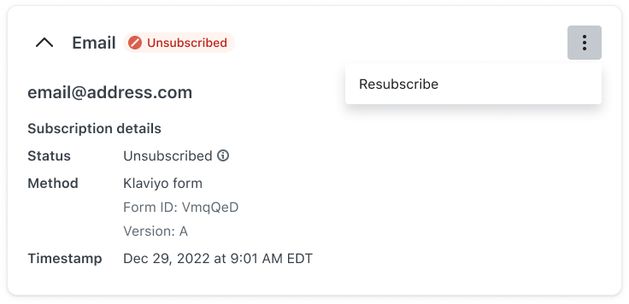
If a profile has unsubscribed from email or marked an email as spam, only resubscribe them after they have explicitly agreed to receive your email marketing again. Manual resubscription uses single opt-in and does not send a confirmation email.
- On the profile’s Details tab, open the three-dot menu next to the Email consent indicator and select Resubscribe.
- Select a list under Subscribe list.
- Click Resubscribe Profile.
To remove a manual email suppression without changing the profile’s consent status:
- Open the three-dot menu next to Email and select Unsuppress.
- Click Remove Suppression.
You can also remove any suppressions for profiles that may be suppressed from specific lists.
Expand Email, then expand the list suppressions. Click Remove next to the appropriate list, then click Remove List Suppression to confirm.
Klaviyo does not support sending SMS or mobile push marketing to profiles that have a consent status of Never Subscribed. To receive SMS messages, a profile must opt-in to the channel.
Suppress or unsubscribe a profile
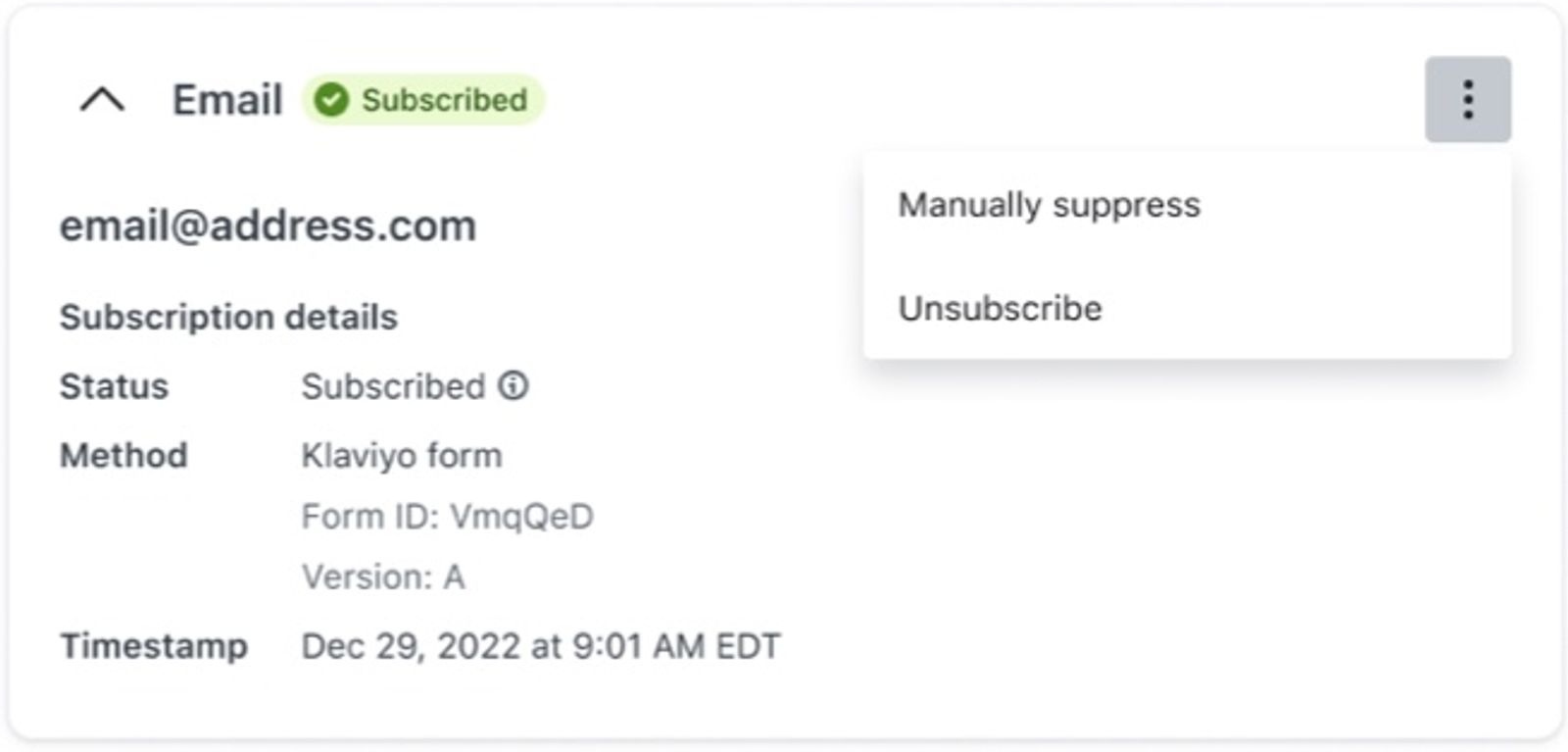
On the Details tab, open the three-dot menu next to the channel’s consent indicator. Choose the action that matches what you want to do:
- For email, select Suppress, then click Suppress to stop email marketing without changing the profile’s consent status.
- To revoke consent, select Unsubscribe for the relevant channel, then click Unsubscribe profile. For text messages, choose the Text messaging marketing or Text messaging transactional row you want to update.
Subscription events
When a profile provides consent to receive marketing, Klaviyo sets an event on the profile to capture this. This event is set when the profile successfully subscribes to a channel, and was previously never subscribed, unsubscribed, or manually suppressed.
For email and text messaging, these subscription events are:
- Subscribed to Email Marketing
- Subscribed to Text Messaging Marketing
- Subscribed to Text Messaging Transactional
If a profile is added to a list when they subscribe, the Subscribed to list event will also appear on their event timeline.
Prior to March 29, 2024 the Subscribed to email marketing event was only emitted when a profile subscribed to email marketing without being added to a list. Unsubscribed from email marketing events are only emitted beginning March 29th, 2024 as well.
When profiles unsubscribe, events are also captured on their event timeline to reflect this. The Clicked and Unsubscribed from Email event is emitted when a profile clicks the unsubscribe link in an email to unsubscribe from email marketing. This event is only set when a profile takes action to unsubscribe themselves by clicking on the link in an email.
The Unsubscribed from Email Marketing event is also set whenever a profile has email marketing consent removed, including when it's done manually for a profile by a user on your account or through Klaviyo’s APIs.
Additionally, if a profile is removed from a list when they unsubscribe, the Unsubscribed from list event will also appear on their event timeline.
For SMS marketing, Unsubscribed from Text Messaging Marketing is recorded when a profile unsubscribes. Unsubscribed from Text Messaging Transactional records transactional text message opt-outs.
You can use these subscription events to understand when profiles have opted in and out of a channel, and segment on them to create groups of profiles with similar subscribe or unsubscribe dates.
If subscription events are being sent to your account with a timestamp in the past, flows will not be triggered. In order for subscriptions to trigger flows, the historical_import flag must be set to false (i.e., the default value) when making requests through Klaviyo’s Subscribe Profiles API endpoint, and the subscription date will be set to the current date.
Onsite tracking
By enabling basic onsite tracking on your website, you can collect helpful information around browsing activity that can be leveraged to further personalize your marketing.
Basic onsite tracking associates browsing activity with known visitors who have been identified (or "cookied") before. If anonymous visitor tracking is enabled, Klaviyo can also save activity before identification and add it to the profile once the visitor is identified.
Common ways Klaviyo identifies visitors and stores a cookie for future visits include the actions below. Tracking on later visits depends on the cookie remaining available and the visitor’s privacy settings.
A visitor will be identified when they:
- Submit a Klaviyo sign-up form
- Click a link from a Klaviyo email
For Shopify users, based on your Customer Privacy settings, Klaviyo may not track onsite events for visitors to your store in the EU, EEA, UK, and Switzerland unless they have provided consent.
Additional resources
- Understanding the difference between email and SMS
Learn how email and SMS differ as as well as when to use each channel.
- Understanding SMS consent collection
Learn about SMS consent, including what counts as SMS consent, how you can collect it, and how resubscribes work. SMS consent refers to whether someone is opted in (i.e., if they have agreed to receive marketing text messages from your brand).
- Frequently asked questions about GDPR
Learn about frequently asked questions regarding GDPR to help you be compliant.