Push notification glossary
You will learn
The glossary below defines common terms and acronyms for push notification marketing.
A
Android: operating system designed by Google for use in mobile devices. Used by a variety of companies, such as Samsung, Nokia, LG, and others.
Apple Push Notification Service: abbreviated to APNs. This is the platform Apple uses to send push notifications to apps on iOS mobile devices.
C
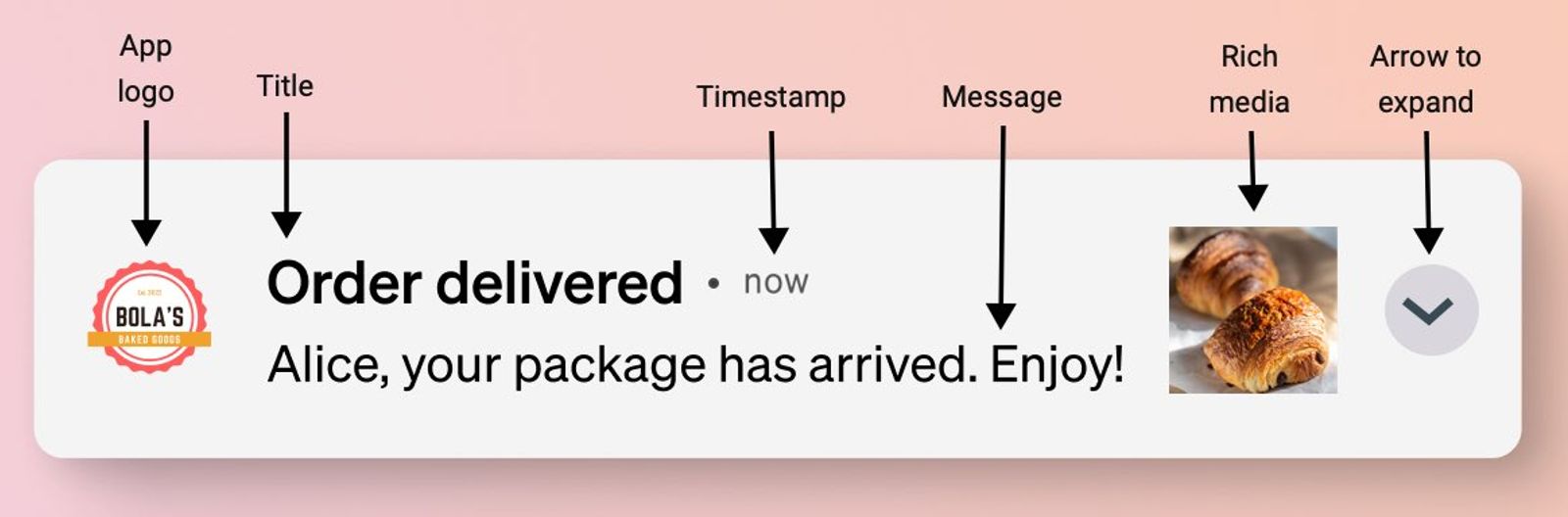
Collapsed view: how a push notification appears on a mobile device when a user hasn’t expanded it.
D
Deep linking: including a link in a push notification that takes recipients to a specific screen in your app. You can use a custom URI, an iOS universal link, or an Android App Link. Your app must be set up to handle the link. Learn how to use deep links in push notifications.
E
Expanded view: how a push notification appears on a mobile device when a user long presses on the message on iOS or taps the down arrow in the message on Android. The expanded view shows more of the message’s content, displays a larger version of the image, or plays the attached GIF (iOS only).
F
Firebase Cloud Messaging: abbreviated to FCM. This is the platform Google uses to send push notifications to apps on Android mobile devices.
I
iOS: Apple’s operating system for iPhones.
K
Key-value pair: custom data included with both standard and silent push notifications. Your app can use these keys and values to trigger app behaviors or customize notifications. Work with your app developer to configure how your app responds to them. Learn about key-value pairs.
M
Mobile device: a portable electronic gadget that connects to the internet, such as a tablet or smartphone.
Mobile push notification: a message sent by an app to a mobile app user to provide the user with reminders or other timely information. Typically, push notifications appear on the lock screen of the mobile device. Mobile push notifications are currently available with Klaviyo.
O
Open rate: the percentage of recipients who opens a push notification. It is calculated by dividing the number of unique recipients who open the notification by the number of unique recipients who received it and then multiplying by 100. An open is recorded when a recipient taps the notification. Expanding a notification does not count as an open.
P
Package manager: a tool for installing, updating, and managing software packages and their dependencies. Developers use package managers to add libraries, such as an SDK, to an app.
Push notification: can refer to either a mobile push notification or web push notification. Mobile push notifications are sent via mobile apps and appear only on mobile devices, while web push notifications are sent via web browsers and can appear on desktops, laptops, or mobile devices. Klaviyo only offers mobile push notifications.
Push token: a unique ID generated by the Apple Push Notification Service (iOS) or Firebase Cloud Messaging (Android) to identify a certain app on a certain device. Similar to email addresses and phone numbers, Klaviyo uses push tokens to know where to send push notifications for a recipient. Klaviyo uses the APNs token for iOS and the FCM token for Android. Another messaging platform may use a different token for the same app and device. Tokens can change, such as when an app is deleted and reinstalled. A push token can be associated with only 1 profile in a Klaviyo account. If multiple people use an app on the same device, Klaviyo moves the token when your app registers that token for a different profile.
R
Rich push notification: a push notification that includes a piece of multimedia, such as an image or GIF.
S
SDK: A software development kit (SDK) is a package of prebuilt code that your developer adds to your app, so it can connect to an outside service, like Klaviyo. SDKs can be installed as packages using a package manager.
Silent push notification: also called a background notification or background update. A silent push notification is sent to a device without displaying a message or playing a sound. It can carry data via key-value pairs to trigger app behaviors, such as updating content in your app.
U
Universal links / App Links: Universal links (for iOS) and App Links (for Android) direct your customers to content within your mobile app or, if the app isn't installed, to the same content on your website. Using these links in email and text messages allows you to use consistent URLs across all your marketing channels while creating a seamless experience for your customer, no matter their device.
URI: stands for uniform resource identifier (URI). Similar to a URL (which is the address for a website), a URI can be used to identify a specific screen in a mobile app. Custom URIs, such as myapp://product/123abc, are one way to deep link from a push notification to a screen in your app.
W
Web push notification: also called “browser notifications.” Web push notifications are sent by a website through a web browser and appear as notifications on a desktop or mobile device, even when the website is not open. Web push notifications are not currently offered in Klaviyo.
Additional resources
- Basics: push notification best practices
Learn 5 best practices for push notifications in order to get the most out of this marketing channel. We give tips for growing your list and crafting your push content.
- Understanding push notification consent
Learn about push notification consent and best practices for compliance. These guidelines can help you be compliant in your consent collection practices and maintain a positive relationship with your customers.
- How to use email, SMS, and push together
Learn how to use SMS, email, and push notifications together, including what makes each channel unique, what to send first, and more.
- Frequently asked questions about push profiles and tokens
Learn the answers to common questions surrounding push profiles and tokens.