Understanding special and non-special characters for SMS
You will learn
Learn which characters are considered non-special or special for SMS.
Special characters, which include emojis and certain types of text and symbols, shorten the character limit for a single SMS segment from 160 to 70. They can also be difficult to tell apart from non-special characters.
Why do special characters shorten the character limit?
This is due to how SMS messages are encoded.
Before a message is sent, it encodes each character into bits of data that can be transmitted. Each character requires a certain number of bits to be encoded, and each SMS allows for a set number of bits.
SMS uses the following encoding formats:
- GSM-7 (7-bit encoding)
Used for non-special characters. A single SMS segment holds up to 160 characters. Some symbols count as 2 characters, as noted in the tables below. - UCS-2 (16-bit encoding)
Used when the message contains special characters or emojis. A single SMS segment holds up to 70 characters.
Emojis can count as more than 1 character. For example, 😜 counts as 2 characters toward the 70-character limit.
How many more characters do I get if I go over the first 70 characters?
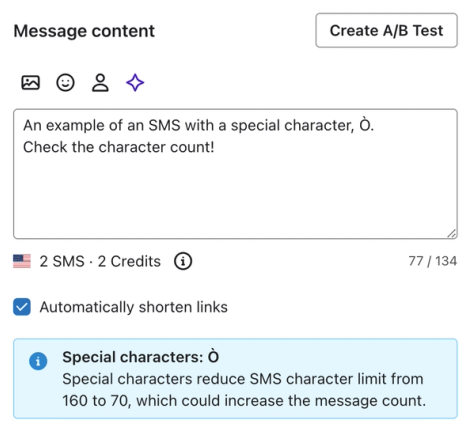
Using a special character or emoji changes the encoding for the whole SMS. A single segment holds up to 70 characters, but a message that needs multiple segments holds up to 67 characters per segment, including the first.
Part of each segment is used to link the segments together. This leaves room for up to 134 characters across 2 segments or 201 across 3 segments.
Non-special characters
Most non-special characters come from the GSM-7 character set (also called a “charset”), which includes:
- Latin letters A–Z and a–z, plus the other Latin letters listed below
- Numbers (0–9)
- Some Greek characters
- Some symbols and other characters
In some cases, capitalizing letters changes whether they are special or non-special. For example, à, è, ì, ò, and ù are GSM-7 characters, but À, È, Ì, Ò, and Ù are not. Both é and É are GSM-7 characters.
I’m using all non-special characters, why did the character limit decrease?
This is a common issue if you’re copying text and symbols from a third party. Some special characters look nearly identical to non-special characters. Accented letters can also be stored as a single character, such as é, or as a letter followed by a separate accent. These can look identical but be counted differently.
Special character | Non-special character |
а | a |
ԁ | d |
е | e |
Klaviyo automatically replaces some lookalike characters, such as curly quotation marks, with GSM-7 equivalents before sending. Other special characters remain unchanged, so check your message rather than assuming every lookalike will be replaced.
Try re-typing your message directly in Klaviyo or using a text cleaner. If that doesn’t work, check that every symbol is actually considered non-special.
Latin letters
Note that sometimes, only 1 version of a letter is accepted. If there’s no capitalized or lowercase version, the corresponding cell is blank.
Description | Capitalized | Lowercase |
Latin letter a | A | a |
Latin letter b | B | b |
Latin letter c | C | c |
Latin letter d | D | d |
Latin letter e | E | e |
Latin letter f | F | f |
Latin letter g | G | g |
Latin letter h | H | h |
Latin letter i | I | i |
Latin letter j | J | j |
Latin letter k | K | k |
Latin letter l | L | l |
Latin letter m | M | m |
Latin letter n | N | n |
Latin letter o | O | o |
Latin letter p | P | p |
Latin letter q | Q | q |
Latin letter r | R | r |
Latin letter s | S | s |
Latin letter t | T | t |
Latin letter u | U | u |
Latin letter v | V | v |
Latin letter w | W | w |
Latin letter x | X | x |
Latin letter y | Y | y |
Latin letter z | Z | z |
Latin letter æ | Æ | æ |
Latin letter sharp s (German) | ß | |
Latin a with ring above | Å | å |
Latin a with grave | à | |
Latin e with grave | è | |
Latin i with grave | ì | |
Latin o with grave | ò | |
Latin u with grave | ù | |
Latin e with acute | É | é |
Latin o with stroke | Ø | ø |
Latin a with diaeresis | Ä | ä |
Latin o with diaeresis | Ö | ö |
Latin u with diaeresis | Ü | ü |
Latin n with tilde | Ñ | ñ |
Latin c with cedilla | Ç |
Greek letters
The non-special Greek letters are listed below. Note that there is only 1 version of these characters.
Description | Character |
Greek gamma | Γ |
Greek delta | Δ |
Greek theta | Θ |
Greek lambda | Λ |
Greek xi | Ξ |
Greek pi | Π |
Greek sigma | Σ |
Greek phi | Φ |
Greek psi | Ψ |
Greek omega | Ω |
Numbers
Description | Character |
Zero | 0 |
One | 1 |
Two | 2 |
Three | 3 |
Four | 4 |
Five | 5 |
Six | 6 |
Seven | 7 |
Eight | 8 |
Nine | 9 |
Money signs
Description | Character |
Pound sign | £ |
Dollar sign | $ |
Yen sign | ¥ |
*Euro sign | € |
Currency sign | ¤ |
*Note that the Euro sign (€) counts as 2 characters.
Symbols
Description | Character |
At symbol | @ |
Low line | _ |
Ampersand | & |
Asterisk | * |
Period (full stop) | . |
Comma | , |
Exclamation mark | ! |
Inverted exclamation mark | ¡ |
Question mark | ? |
Inverted question mark | ¿ |
Colon | : |
Semi-colon | ; |
Apostrophe | ' |
Double quotation mark | " |
Left parenthesis | ( |
Right parenthesis | ) |
Less than | < |
Greater than | > |
Equal sign | = |
Plus sign | + |
Hyphen or minus | - |
Percent sign | % |
Number sign (hashtag, pound) | # |
Section sign | § |
Forward slash | / |
*Backslash | \ |
*Left square bracket | [ |
*Right square bracket | ] |
*Left curly bracket | { |
*Right curly bracket | } |
*Vertical bar | | |
*Tilde | ~ |
*Caret or circumflex | ^ |
* Any symbol marked by an asterisk counts as 2 characters in a text message.
Special characters
Special characters are characters or emojis that cannot use GSM-7 after Klaviyo’s automatic replacements. Examples include À, á, â, ç, ê, È, Ì, î, í, Ò, ô, ó, Ù, and ú.
Characters outside GSM-7 can look similar to non-special characters. Some, such as the quotation marks below, are automatically replaced with GSM-7 equivalents before sending.
- This is the non-special character: "
- Klaviyo converts these quotation marks to the straight double quotation mark before sending: «, “, ‟, ❝, 〝.
How to check if your character is special or not
If you're not sure if your character is special or not, paste your text into this message segment calculator. With Encoding set to Automatic and Smart Encoding set to No, look at Encoding in the SMS results:
- GSM-7 indicates that the pasted text contains only GSM-7 characters.
- UCS-2 indicates that the pasted text contains at least 1 character outside GSM-7.
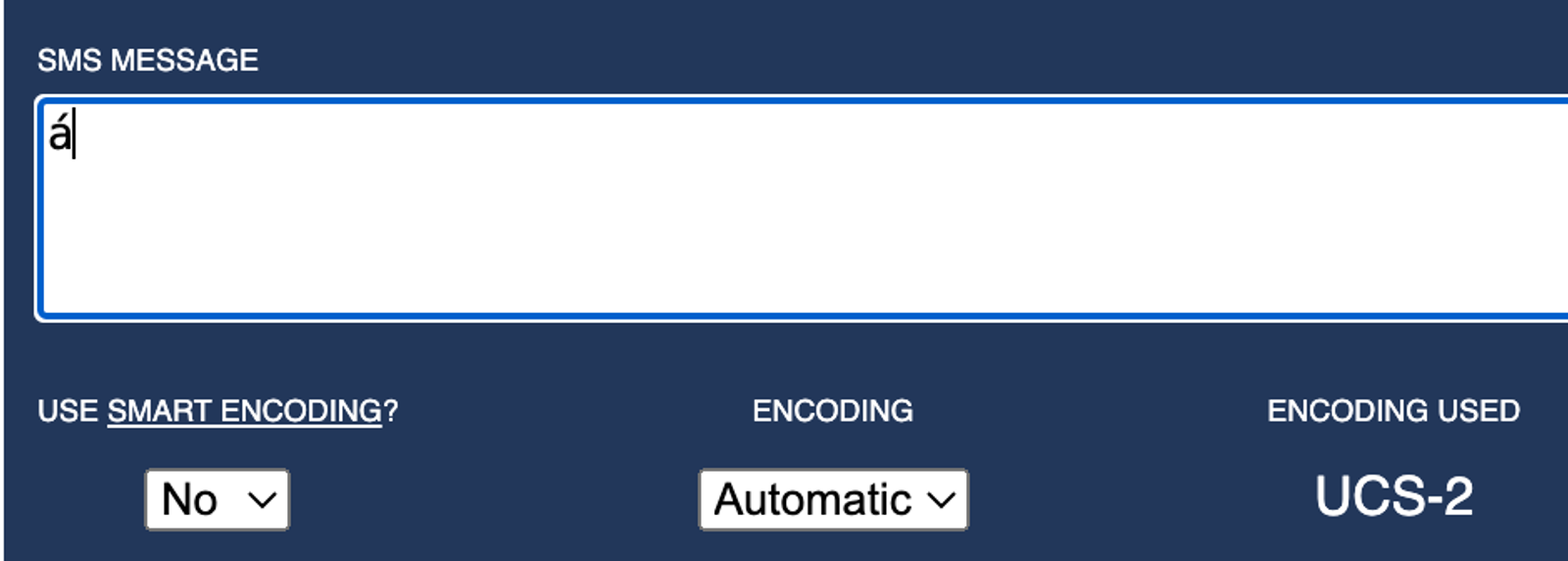
The calculator checks the text you paste. Klaviyo’s automatic character replacements can change the result, so check the estimated character and message counts in Klaviyo’s SMS editor before sending. Counts can also vary by recipient when you use personalized content.
Additional resources
- Understanding MMS image and GIF best practices
Learn best practices for sending images and GIFs in text messages so that they display nicely to recipients.
- How to create and send an SMS campaign
Learn how to create and send an SMS campaign in Klaviyo. Note that the process is almost exactly the same for MMS campaigns. The only difference is that you add an image or GIF during the content creation stage.
- How to use Klaviyo email and SMS together
Learn the pros and cons of SMS and email, strategies for using both channels in a flow or campaign, and tips for how to implement these strategies.