Understanding cookies in Klaviyo
You will learn
Learn more about how you can use Klaviyo cookies as a part of the Klaviyo web tracking services to gather information and help improve conversion rates and email performance. This article explains the Klaviyo cookies and its purposes so that you understand how customers are tracked. This information helps you understand how Klaviyo gathers data, and how this may impact customer privacy and compliance laws.
This article is for general informational purposes only and is not legal advice. Cookie, tracking, and data privacy laws (including GDPR, the ePrivacy Directive/PECR, CCPA/CPRA, and other applicable state and international privacy laws) vary by jurisdiction and change over time. Please consult your own legal counsel to determine the specific disclosures, consents, or other compliance steps your business needs to take.
Applicable privacy laws (such as GDPR, the ePrivacy Directive/PECR, CCPA/CPRA, and other data protection laws) may require you to display links to your privacy notice, Terms of Service, and cookie policy in your emails. We recommend confirming which disclosures apply to your business with your own legal counsel.
Why Use Klaviyo Cookies
The Klaviyo cookie allows you to build more robust profiles by gathering valuable tracking events such as when a user is on your site or views a product. When anonymous visitor tracking is enabled, the cookie begins collecting this activity on a visitor’s first visit, and that earlier activity is added to their profile once they are identified. By having more robust profiles, you will have more data for your segmentation, and thus ideally stronger campaign and flows performance – as shoppers will now receive automated flows or campaigns that would trigger on these browsing events and revisits.
Klaviyo’s tracking cookies collect behavioral data that is not required for your site to function. Merchants typically categorize them as analytics or marketing cookies in their consent management platform rather than as strictly necessary. Confirm the right categorization for your setup with your advisors.
Klaviyo tracking cookies
When Klaviyo's JavaScript is enabled, the Klaviyo cookie (__kla_id cookie) can track and identify site visitors through an auto-generated ID. Once a visitor is identified, the cookie can pass their data into Klaviyo. A visitor can be identified when they:
- Fill out a Klaviyo signup form
- Click a link from a Klaviyo email or SMS message.
- When visitors go through checkout on your website, Klaviyo automatically identifies them and collects checkout events.
For a first-time profile, the Klaviyo cookie is placed client-side by Klaviyo’s JavaScript, where onsite tracking is enabled and the script has not been blocked by a consent management tool or suppressed by platform-level privacy settings. Because the script executes under your domain, the resulting cookie is a first-party cookie. Cookie categorization for consent purposes typically depends on what the cookie does rather than which domain sets it, so review the behavior described in this article when deciding how to categorize it.
SMS click and conversion tracking is dependent on having a link, and this link must use the Klaviyo link shortener. When setting up your SMS messages, it’s important to have the option checked for Automatically shorten links to ensure you are using the default tracking.
To enhance the Klaviyo cookie experience, we have two features that help extend the Klaviyo cookie lifetime by re-identifying users so that event data can continue to be gathered and tied to profiles.
- Extended ID: Uses an identity graph to cross-reference a selection of existing identifiers set by other platforms already present in a visitor's browser (ad and social-platform cookies) to re-identify a user and place a Klaviyo cookie.
- First Party ID: Extends Klaviyo's cookie lifespan by serving the cookie from a subdomain of the brand via web server, and refreshing it server-side on each visit.
Klaviyo Cookie: Data Collected
The Klaviyo cookie can temporarily hold data points including: external id, email, phone number, and anonymous id. For more information on what external id and anonymous id are, please see this article.
- __kla_id is base64 JSON, so when a session is identified it will contain the profile's kx token (labelled as “exchange_id” in “__kla_id”). Exchange_id is what stores the identifying information of a user (external id, email, phone number, and anonymous id), but exchange_id is encrypted and can only be decrypted by klaviyo server-side.
Technical Note: On initial load in an anonymous session, __kla_id gets placed in a user’s browser, but it only contains cid – which is an anonymous data point that assigns the browser a value to associate the browsing data with. Once the user becomes identified, __kla_id gets updated with the actual kx/exchange_id value that contains the data points that identify the shopper, allowing that browsing data to be associated with their profile.
These values are stored in a browser cookie on your domain and are accessible to scripts running on your pages. Review the third-party scripts on your site accordingly.
Consider these characteristics when categorizing the cookie and preparing your notices.
- As __kla_id expires from the user’s browser or if the user clears their cookies, so too will the data held in kla_id expire and they will be anonymous until re-identified.
- If a user returns to the website and has __kla_id refreshed (through an identification event, Extended ID, First Party ID, or other means), the values will also be refreshed and held in the cookie until it expires or cookies are cleared again.
Cookie Lifetime Duration
When a visitor is identified, the Klaviyo cookie (__kla_id) is set to last up to 2 years, but its duration will vary depending on each browser’s cookie lifetime policies - which is informed by how the cookie is set in the browser. __kla_id is typically set using the Klaviyo Javascript, which places the cookie client side. If Extended ID or First Party ID are enabled, the Klaviyo cookie is set client side and server side respectively. Learn more about how to set up Extended ID and First Party ID.
The standard __kla_id cookie lifespan — how long it lasts before First-Party ID needs to refresh it — varies by browser. More detailed information can be found on this CookieStatus.
- Cookie lifetime varies by browser and depends on whether the cookie is set client-side by JavaScript or server-side. The table below shows both.
Browser | Standard __kla_id lifespan (placed client side – JS + Extended ID) | With First-Party ID (server-set) |
|---|---|---|
Safari | 24 hours (URL contains query parameters or fragments + if Klaviyo is a known tracker); otherwise 7 days | Up to 7 days |
Brave | If Brave's 'Shields Down' mode is enabled, 7 days; otherwise, the Klaviyo cookie is blocked by Brave | If Brave's 'Shields Down' mode is enabled, 7 days; otherwise, the Klaviyo cookie is blocked by Brave |
Firefox | 45 days lifetime limit; however, Firefox purges via daily tracker-classification checks | 45 days lifetime limit; however, Firefox purges via daily tracker-classification checks |
Chrome | 400 days | Up to 400 days |
Edge | Up to two years (Klaviyo's own setting — not an Edge restriction) | Up to two years (Klaviyo's own setting — not an Edge restriction) |
Safari's 24-hour restriction applies specifically when the cookie is placed client side, the URL contains query parameters or fragments, and if Klaviyo is considered a known tracker by Safari. Under normal conditions, Safari's limit for JS-set first-party cookies is 7 days.
Privacy Notice, Cookie Notice, and Consent
If you choose to turn on Extended ID or First Party ID, it is strongly suggested that you re-issue your cookie notices to your customers, and that you review your Terms of Service and/or privacy notice to ensure that your customers are notified of re-identification processes. In both scenarios the Klaviyo cookie will expire, but there are two approaches to re-identification:
- Extended ID is a first-party identity graph feature that allows you to replace the Klaviyo cookie by cross-referencing a selection of existing identifiers set by other platforms already present in a visitor's browser.
- First Party ID is a server-side cookie feature that allows you to refresh the Klaviyo cookie directly from your own domain.
Extended ID and First Party ID behave differently from a standard tracking cookie. Before enabling either, review the following against your notices, your consent configuration, and your own privacy obligations:
- Collection timing. Where anonymous visitor tracking is enabled, the Klaviyo cookie begins collecting activity on a visitor’s first visit, not at the point of identification.
- Reading as well as writing. These features read identifiers already present in the visitor’s browser, in addition to writing the Klaviyo cookie. Extended ID reads identifiers set by other platforms; First Party ID reads a cookie set on your own subdomain.
- Behavior after cookie deletion. Both features can restore a Klaviyo identity after the Klaviyo cookie has expired, but neither can restore it after a visitor has cleared all their cookies. To begin replacing the Klaviyo cookie:
- Extended ID must first have eligible identifiers from another platform be placed.
- First Party ID will require a re-identification event.
- Consent tooling. If your consent configuration should prevent these features from running, confirm your consent management platform blocks them, and that visitors can withdraw consent as easily as they gave it.
- Existing notices. If you have any Klaviyo Onsite Identification features enabled and you did not update your cookie notice, visitors who accepted your prior cookie notice may not have seen a description of these features. Consider re-issuing your cookie notice and reviewing your privacy notice when you enable either one.
First Party ID vs Extended ID
Klaviyo also offers Extended ID, which re-identifies visitors using existing identifiers set by other platforms from platforms like Shopify, TikTok, and Reddit. Here's how the two compare:
Extended ID | First-Party ID | |
|---|---|---|
How it re-identifies | Reads existing identifiers set by other platforms (Shopify, TikTok, Reddit, etc.) to match a returning visitor to a known profile | Uses a long-lived server-set cookie on your own subdomain to rehydrate __kla_id directly |
Relies on existing identifiers set by other platforms | Yes | No |
DNS setup required | No | Yes - a subdomain CNAME pointing to Klaviyo's Cloudflare account |
If both First-Party ID and Extended ID are enabled, First-Party ID takes priority in refreshing __kla_id:
- First-Party ID attempts to rehydrate __kla_id from __kle_id first.
- If First-Party ID successfully rehydrates, the event is attributed to First-Party ID, and Extended ID runs only to update the stored values in the identity graph.
- If First-Party ID is unavailable or cannot be rehydrated (e.g., the worker subdomain is unreachable), Extended ID can still re-identify the visitor using existing identifiers set by other platforms as a fallback.
Both features continue to operate independently — enabling First-Party ID does not disable Extended ID.
How does extended ID work?
Extended ID is a first-party identity graph feature that allows you to refresh the Klaviyo cookie. It uses an identity graph to cross-reference a selection of existing identifiers set by other platforms already present in a visitor's browser (ad and social-platform cookies) to re-identify a user and replace a Klaviyo cookie. Learn how to set up Extended ID. Extended ID is available on all Klaviyo plans - free and paid.
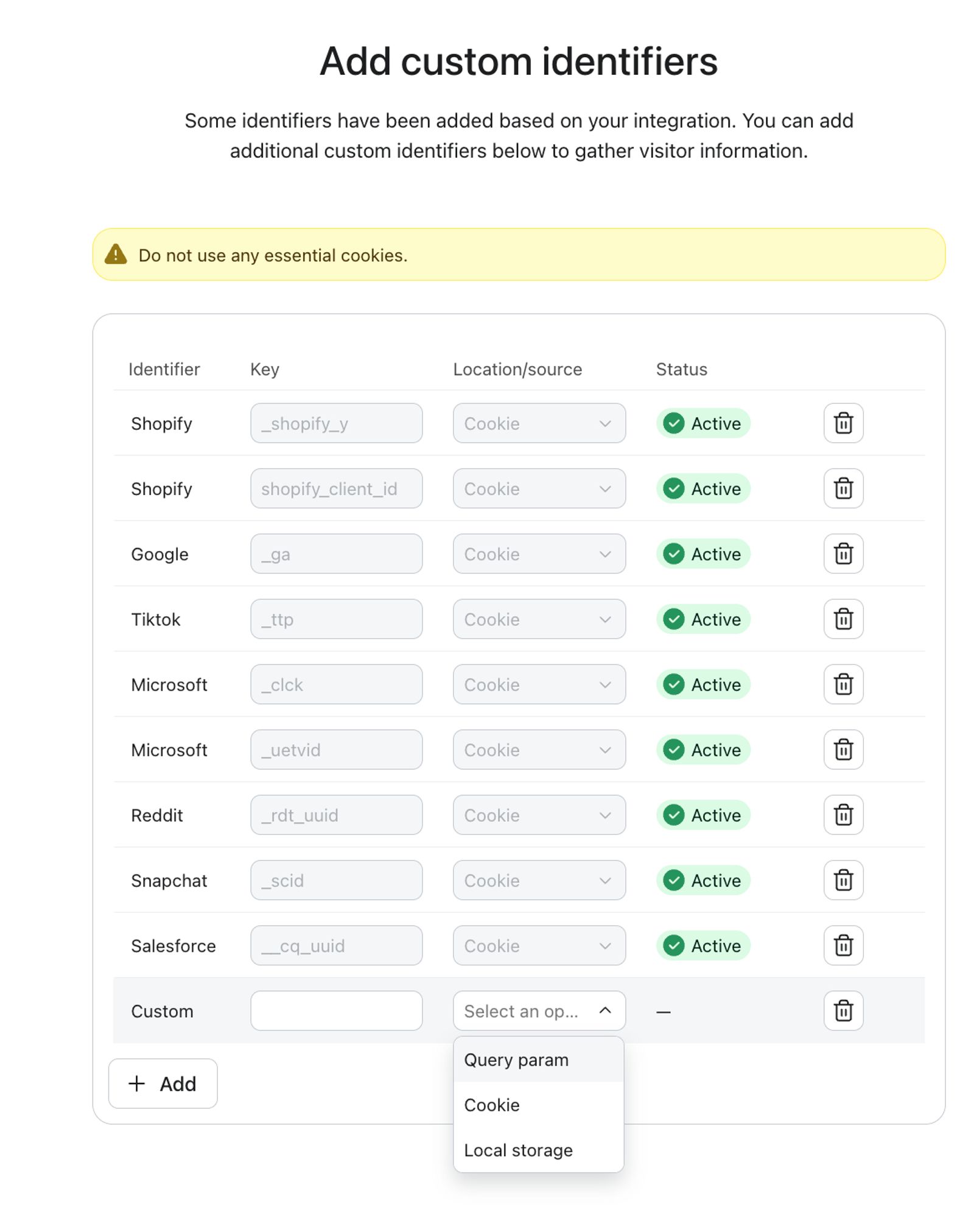
- The identity graph is populated by identifying and storing the identifier values of the existing identifiers set by other platforms - such as the Shopify, TikTok, or Reddit cookie - and using them to re-identify the visitor on future visits. Extended ID does not collect any other information from those cookies.
- For other platforms or solutions, you will need to set up custom identifiers.
- If a user returns after their Klaviyo cookie has expired, and Extended ID is enabled, Extended ID attempts to check the existing identifiers set by other platforms in the user’s browser to re-identify them and refresh the Klaviyo cookie.
It's important to note that while extended ID can help identify shoppers longer, it doesn't automatically create new profiles based on shopper info from other sites. A shopper needs to already have a Klaviyo profile for extended ID to re-identify them and update their Klaviyo identity cookie.
Klaviyo builds these associations whenever a shopper is successfully identified; for example, by clicking an identifying link in a campaign email or SMS. At that moment, it links the identifiers set by other platforms present in their browser to their Klaviyo identity, so a later visit can use those cookies alone to re-identify them and refresh their Klaviyo cookie, even without a fresh link click. No match, no new association; the shopper is treated as anonymous until identified again.
This screenshot shows the identifiers set by other platforms that make up the identity graph.
Learn how to turn on and set up extended ID.
How does First-Party ID work?
First Party ID is a server-side cookie feature that allows you to refresh the Klaviyo cookie directly from your own domain. It uses a dedicated subdomain of your brand, paired with a lightweight Cloudflare worker, to set and refresh the Klaviyo cookie from a web server rather than through browser JavaScript. Server-side cookies are subject to different browser lifetime rules than JavaScript-set cookies, which is why cookie duration differs between the two methods. Currently for First Party ID, traffic to this subdomain is routed through Klaviyo’s infrastructure. Factor this into your privacy notice and any data processing documentation you maintain. Learn how to set up First Party ID.
- The server side cookie is set/updated whenever a visitor is identified so that it's ready for use when the klaviyo cookie expires.
- Should the Klaviyo cookie be expired when a user returns, First Party ID's worker will use the subdomain cookie to reissue and refresh their Klaviyo identity — without relying on a browser-set cookie.
It's important to note that while First Party ID can help identify shoppers longer, it doesn't automatically create new profiles from anonymous traffic. A shopper needs to already have a Klaviyo profile for First Party ID to be able to re-identify them and refresh their Klaviyo identity cookie.
If the worker is ever unavailable, Klaviyo automatically falls back to standard Klaviyo JavaScript cookie behavior, so no tracking data is lost.
Shopify-branded onsite tracking
In addition to Klaviyo’s identification methods as part of standard web tracking, the Shopify's onsite tracking pixel enables identification during checkout if customers submit their information.
For a visitor’s identity to be captured during checkout, they must complete one of the following Shopify events:
- checkout_completed
- payment_info_submitted
- checkout_contact_info_submitted
- checkout_shipping_info_submitted
This will cause anonymous activity to sync over to the associated profile, even if they never submitted a Klaviyo form or clicked a link in a Klaviyo email or SMS.
In order for visitors’ identities to be captured during checkout, the following requirements must be met:
- Anonymous activity tracking must be enabled.
- Shopify behavioral events must be enabled.
- Site visitors must accept marketing and analytics cookies.
These requirements apply to Shopify. Other integrations may not enforce a consent condition automatically. If you use a different platform, confirm how your consent management tool controls Klaviyo’s tracking.
Disabling cookies
There may be instances where you choose to disable Klaviyo cookies from tracking. These reasons may include:
- You don't want to track users because of privacy, GDPR, or other security concerns.
- Customers have asked not to be tracked.
- You have a lean marketing program or want all customers to receive the same marketing, regardless of whether they have interacted with your brand before, bought, etc.
Klaviyo forms, including popups, will continue to appear on your website regardless of whether you have cookies turned off or on. However, you will not be able to personalize different types of forms to different types of users (e.g., they are already subscribed) or will not be able to see what they do on your site after they fill out a form.
If the JavaScript option is off, customers will not be cookied, and you will not have access to web tracking or their specific behaviors on your site. The static-tracking.klaviyo.com domain is used to serve all Javascript related to tracking (e.g., analytics.js). If you wish to block all tracking, this domain can also be blocked using cookie consent management tools (e.g., OneTrust or other domain-level blocking tools).
If you want to maintain Klaviyo JavaScript but remove a cookie, there is one workaround. Toggle the Klaviyo tracking on and off by creating a new cookie, __kla_off, and running document.cookie = "__kla_off=true".
Preference Pages
Klaviyo allows you to create custom Preference pages that allow users to manage their marketing consent. Preference pages control whether a subscriber receives messages from you. They do not control whether tracking cookies are set or read. Cookie consent and withdrawal are handled through your consent management platform, separately from preference pages. Please see this article for more information.
Using API to access cookies
Using API to access cookies is useful to check whether or not Klaviyo can identify a customer. You can do this by running JavaScript and typing in klaviyo.isIdentified(). The response will then either be true or false.
Email to website tracking
When email to website tracking is enabled, Klaviyo identifies individuals that click through a Klaviyo email and browse your website. You can toggle on and off Klaviyo's ability to track email to website activity in your account's email settings.
With the release of iOS15, macOS Monterey, iPadOS 15, and WatchOS 8, Apple Mail Privacy Protection (MPP) changed the way that we receive open rate data on your emails by prefetching our tracking pixel. With this change, it's important to understand that open rates will be inflated.
To see if your opens are affected, we suggest creating a custom report that includes an MPP property. You can also identify these opens in your individual subscriber segments.
For complete information on MPP opens, visit our iOS 15: How to Prepare for Apple’s Changes guide.
To navigate to your email settings page click Account > Settings > Email > Tracking.
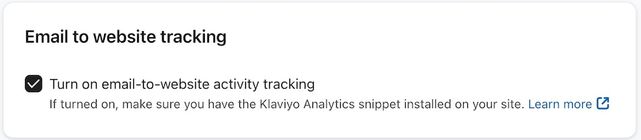
When this is on, we add an additional parameter to all URLs in your emails to track activity. This is called the _kx parameter, and _kx will appear directly in the URL. The unique encrypted value is then decrypted by our web tracking and allows us to identify the user that clicked through the URL.
For Shopify stores: Based on your Customer Privacy settings in Shopify, Klaviyo may not track onsite events for visitors to your Shopify store in the EU, EEA, UK and Switzerland, unless they have provided consent. Thus, email to website tracking will not identify these individuals. This automatic suppression applies only to the regions listed above. Klaviyo does not automatically suppress tracking in other regions. If you serve visitors elsewhere, configure your consent management tool to control Klaviyo’s tracking as needed for your setup.
To learn more, check out our article on Klaviyo onsite tracking.
Additional resources
- Understanding message conversion tracking
Learn how conversion tracking works for email, SMS, and mobile push messaging and how to edit these settings. For each campaign and flow sent, Klaviyo automatically tracks conversions. This allows you to analyze the performance of your marketing channels and their individual success.
- Getting started with Klaviyo onsite tracking
Learn about the different ways that Klaviyo can support onsite tracking on your ecommerce site. There are 2 key types of onsite tracking:
- Understanding UTM tracking in Klaviyo
Learn what UTM tracking is, how it works, and how you can use it in your Klaviyo messages to gain a deeper understanding of your marketing performance.