How to remove spam traps from your account
You will learn
Learn how to reduce the risk of sending to spam traps by identifying and suppressing profiles with no recorded engagement, and why this matters for your deliverability.
Spam traps are email addresses used by mailbox providers (MBPs) and filtering organizations to identify senders who are not following email best practices. Some are created specifically as traps; others are recycled addresses that were once used by real people. Importing an old list, such as one that is 2 years old or more, increases the risk of adding recycled spam traps to your account.
Avoiding sends to spam traps helps protect your sender reputation. Use Klaviyo engagement data to find profiles that have never engaged with your brand, then refine and suppress that segment as described below.
Why you should remove spam traps
Sending to spam traps can cause deliverability issues, including blocklisting. If your sending domain or IP address is blocklisted, inbox providers may reject your emails. On shared sending infrastructure, this can also affect other Klaviyo customers.
The second issue comes from repeatedly emailing unengaged recipients. Doing so will cause MBPs (e.g., Hotmail, Gmail, Outlook, etc.) to re-evaluate where mail from your domain is placed (the inbox, or Junk/Spam folder). If you send many messages to the same addresses and they never engage with that mail from your brand, MBPs will take that as a sign that they do not want to receive your emails and will likely route them to the Junk/Spam folder. In the most extreme cases, they may start to block messages from your domain outright with a bounce reason mentioning that your brand sends "unsolicited mail".
Moreover, filtering companies use spam traps to identify which emails they should place in the spam/junk folder. In their eyes, it’s a sign that you are not obtaining emails legitimately or following email best practices. Even worse, sending to spam traps can lead to Klaviyo IPs being blocklisted, which leads to deliverability issues on our infrastructure, ultimately impacting Klaviyo’s other customers who are making an effort to implement best practices.
Identify profiles to suppress
Spam-trap operators do not publicize their addresses, because senders could avoid those addresses and make the traps ineffective. A segment of profiles with no recorded engagement can help reduce your risk, but it can also include legitimate subscribers and does not guarantee that every spam trap is included. Start by following the instructions to create a never engaged segment. Review its criteria and members before suppressing them, and make sure profiles have had enough opportunities to engage. The standard segment uses a threshold of at least 5 received emails in the last 180 days.
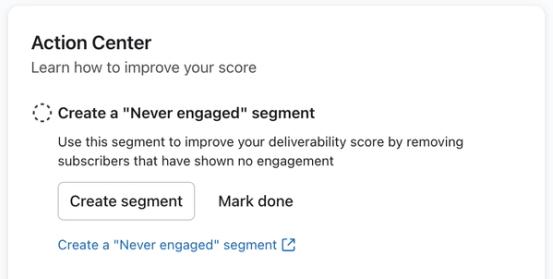
Use the never engaged segment as a starting point, then add conditions that exclude profiles with activity relevant to your business. Useful signals include email opens and clicks, started checkouts, orders, lead-ad submissions, support tickets, product reviews, and password-reset requests. For each additional event you track, add an AND condition requiring 0 occurrences over all time. Opens and clicks can be generated automatically, so they are not proof of human activity.
If you are new to Klaviyo, there may not be as much available data. However, if you sent emails on an ESP that Klaviyo integrates with prior to joining us, you can leverage this data when creating an unengaged segment. For instance, the segment conditions below show a Klaviyo account that is integrated with their prior Email Service Provider, Mailchimp:
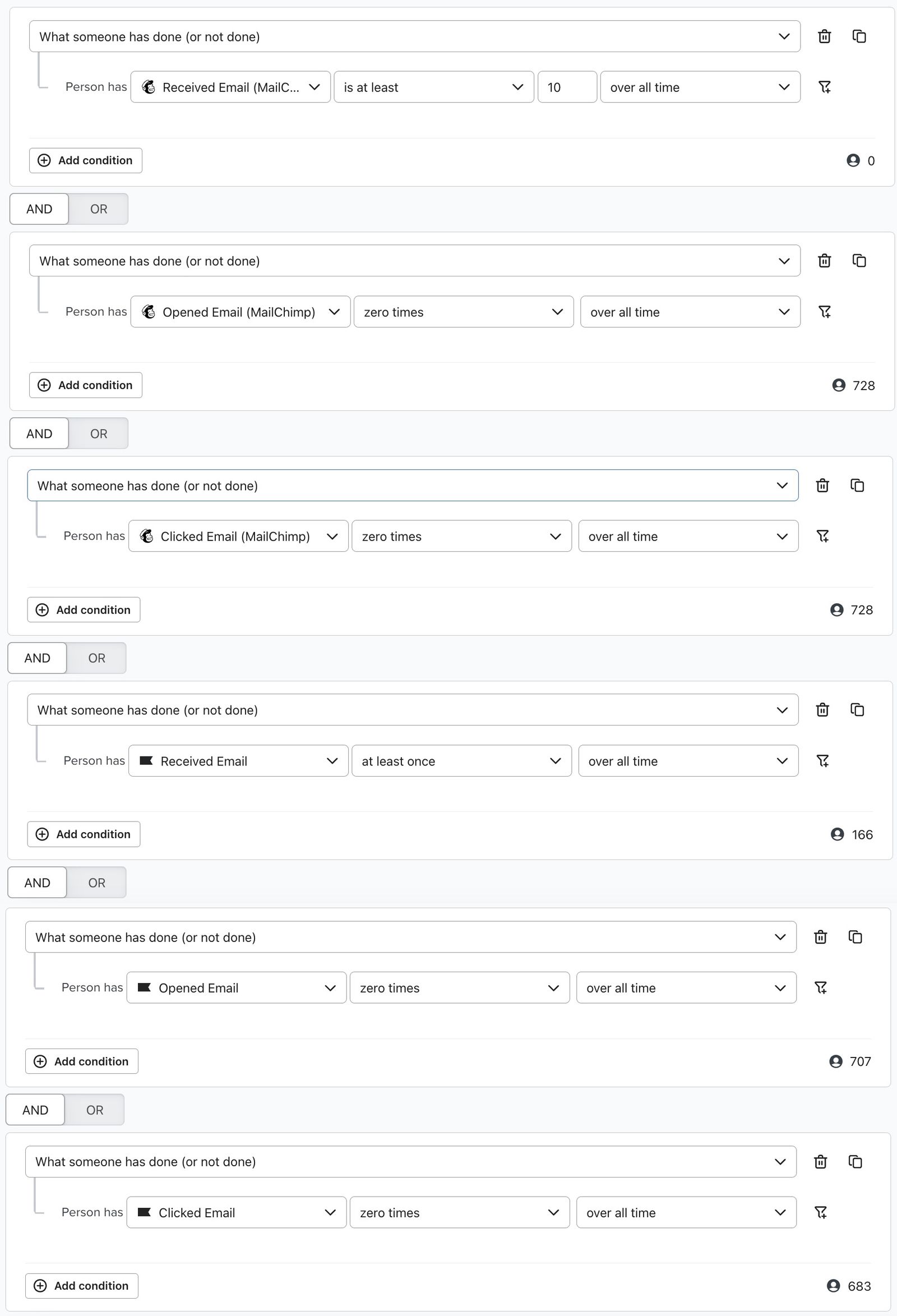
Notice that, in the segment above, someone has to have received at least 10 Mailchimp emails but only 1 Klaviyo email. This would be a good way to find inactive profiles if you are a new sender on Klaviyo, but have existing open/click data from your former ESP.
Use Klaviyo events, integration data, and imported custom properties to refine the segment. For example, a custom property may record a product review or another action someone has taken. Add an AND condition that excludes profiles whose property records that action, so they are not included in the segment you suppress. Save your updated segment before suppressing its members.
Suppress profiles
Review the segment’s members and suppress the profiles you no longer want to email. Suppression prevents email marketing sends; it does not delete the profiles or suppress other channels. To suppress the segment’s current members:
- Navigate to Audience > Lists & segments in Klaviyo.
- Click the 3 dots next to the segment you want to suppress.
- Click Suppress current members
- In the confirmation dialog, review the number of profiles. If suppression options appear, select Suppress everyone to suppress all current members of the segment.
- Click Suppress profiles or Bulk suppress, depending on the button shown, to confirm.
Klaviyo processes bulk suppression in the background, so it may take some time. This action applies to current members; profiles that join the segment later are not automatically suppressed. Review the segment regularly and repeat list cleaning as needed.
Additional resources
- Understanding spam traps
Learn about spam traps and how to prevent sending to them, so you can protect your deliverability.
- How to create a never engaged segment
Learn how to identify your least engaged email subscribers, so you can avoid contacting them to improve and maintain your deliverability. Once you’ve identified them, consider excluding them from your marketing initiatives, sending them one final re-engagement attempt, or suppressing them during list cleaning. In this article, you will learn how to create this segment.
- Understanding email deliverability
Learn about email deliverability, including the steps you can take to establish a strong sender reputation so that your emails are delivered to the inbox.