How to create a segment- or list-triggered flow
Learn how to create a segment- or list-triggered flow and about their re-entry setting.
Segment- and list-triggered flows start whenever someone newly joins a segment or list, respectively. With Klaviyo’s updated flow entry settings, you now have more control over whether (and how often) profiles can enter or re-enter these flows. This makes it easier to support lifecycle messaging, behavior-based automations, and recurring engagement campaigns.
How segment- and list-triggered flows work
A profile triggers a segment or list-based flow when they newly qualify for the segment or list. For segments, this means:
- The profile was previously not in the segment
AND - A data change (such as profile properties or events) causes them to enter the segment organically.
For lists, it's when they first join the list, such as when they join via a form.
List-specific details
Keep in mind that if you import profiles to a list, it will trigger any list-triggered flows. This means that if you set up a welcome series, and import a list of existing subscribers, those subscribers will enter the welcome series.
To avoid this, turn off any list-triggered flows before importing.
Segment-specific details
For segments, there are a few important things to keep in mind:
- Manual edits to a segment’s definition do not trigger flows.
- If you want to push all members of a segment into a connected flow after manually updating the definition, you will need to add past profiles to the flow.
- A flow triggers only when a profile’s data causes them to organically enter the segment.
- Duplicate activity (e.g., repeated events) will not re-trigger the flow unless segment membership actually changes.
- Recipients will only receive messages within a flow if they are still a member of the connected segment at send time.
Create a segment- or list-triggered flow
- Navigate to the Flows tab in Klaviyo.
- Click Create flow and select Build your own.
- Name your flow and click Create flow.
- In the flow builder, select All triggers, then choose Added to segment or Added to list.
- Select the segment or list that should initiate the flow.
- Configure Re-entry criteria in the trigger settings panel.
Click Save, then Confirm and save to finish setting up the trigger.
Re-entry settings
If you don't see this setting in your account, stay tuned! This setting will be available for everyone soon.
A segment- or list-triggered flow begins when a profile meets the definition of a segment or joins a list. Profiles can now enter these flows:
- One time only
- Whenever they re-qualify
- After a minimum time period has passed
These options are controlled by a new Re-entry criteria setting in the flow trigger.
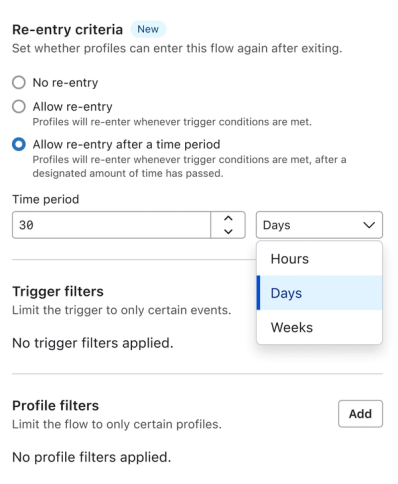
You can control how often profiles can enter the flow by adjusting the Re-entry criteria in the trigger panel. Your options include:
Setting | Description | Use case |
No re-entry | Profiles will enter the flow only once. | Welcome series Legal or compliance notifications |
Allow re-entry | Profiles will re-enter the flow whenever they newly qualify for the list or segment. | Lifecycle flows Behavior-based-segment flows where messaging should repeat over time. |
Allow re-entry after a time period | Profiles will re-trigger the flow when they newly qualify and the selected time period has elapsed since their last entry. | Retention flows Winback flows. |
Re-entry criteria now serves as the single source of truth for flow entry behavior. You no longer need to add “has not been in flow” filters to control frequency.
Default settings for new flows
When you create a new flow, Klaviyo applies default re-entry settings based on the trigger type:
Trigger type | Default re-entry setting | Notes |
Segment | No re-entry | Customer can change to allow re-entry or time-based re-entry |
List | No re-entry | Same defaults as segment |
Metric (e.g., Order Placed, Viewed Product, Price Drop, Low Inventory) | Allow re-entry | Includes Price Drop and Low Inventory |
Date Property | Allow re-entry | Behavior unchanged; repeats when date updates or repeats annually |
You can adjust these defaults at any time.
Paths that do not trigger re-entry
Re-entry only happens when a profile’s data causes segment or list membership to change. The following do not trigger a flow:
- Manual edits to segment rules
- Manually adding profiles to a list or segment
- Merging profiles or lists
- Duplicate subscription or event activity where the profile was already in the segment
- Integrations that intentionally add profiles without triggering flows
FAQs
Does adding past profiles re-trigger the flow?
Adding past profiles is separate from someone newly joining the list or qualifying for the segment. It can queue eligible past profiles for flow actions, but it does not make them newly qualify for the trigger. To learn who can be queued and where they enter, see how adding past profiles works.
Previously I could not re-trigger my flows. What happens with my existing Flows?
Existing flows retain behavior consistent with how they functioned before the new settings were introduced. Their configurations are automatically translated into the new system.
Existing behavior → New re-entry setting
- List or segment flow with no re-entry filters → No re-entry
- Event (metric) flow with no re-entry filters → Allow re-entry
- Metric flow with a “has not been in flow in all time” filter → No re-entry
- Metric flow with a “has not been in flow in X days” filter → Allow re-entry after a time period (X days)
Will this change how often my flow sends?
No, unless you adjust the re-entry criteria.
Can I restrict profiles to entering only once?
Yes. Set the re-entry criteria to No re-entry.
Can I control re-entry for metric-triggered flows?
Yes. Re-entry is now managed the same way for all flow types directly in the trigger settings.
Additional resources
Learn about other flow types:
- How to create a metric-triggered flow
Learn how to create a metric-triggered, also called event-triggered, flow that is used to email subscribers when they take a certain action. These actions correspond with "metrics," or events, in Klaviyo. Available metrics are found under Metrics in the Analytics tab in your account and are typically synced through your ecommerce integration or as custom events. However, it's important to note that clicks, opens, and received email metrics are not available for selection to trigger a flow.Some common examples of metric-triggered flows include:
- How to create a date property-triggered flow
Learn how to set up a date property to trigger a flow, which is a great way to set up a flow sequence around key dates you collect from subscribers. Common examples of date property-triggered flows include:
- How to create a price drop flow
Find out how price drop flows work and how to set them up in Klaviyo. Price drop flows work for either a catalog from an ecommerce integration or a custom catalog. Price drop flows will not send to anyone who has already purchased the item, regardless of whether they bought it at full price or when it was discounted. Additionally, price drop flows will not send if inventory is 0 or negative or the variant is not published.