How to calculate average order value (AOV)
You will learn
Learn how to calculate your average order value (AOV) or the total monetary value of your conversions (orders) divided by the number of conversions (orders that took place). Calculating your average order value (AOV) can be helpful when you want to add a condition to your segments to target high value or low value customers.
To use AOV in segments, Klaviyo needs order data, such as a Placed Order metric from your ecommerce integration. You can use your ecommerce reports for the manual calculation below.
Calculating average order value
1. Use the calculation for AOV as follows:
Total store revenue / total number of orders
2. If you want to calculate AOV for a certain time period, limit the timeframe for the numbers above to only capture revenue and orders within that period. If there are no orders in that period, AOV cannot be calculated.
It's recommended to use the revenue and order values in your ecommerce site to calculate AOV. While Klaviyo does track this information, returns and cancellations can cause discrepancies between reports. For Shopify, Klaviyo's Refunded Order metric only tracks fully refunded orders, so partial refunds can also cause differences.
Here is an example of where to look for revenue and order information in a Shopify store.
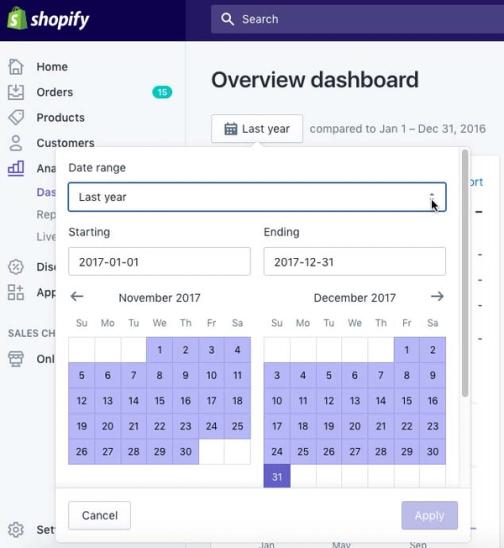
1. Start from your store admin and click into Analytics > Dashboards. This page provides a list of report preview cards.
2. Set the calendar dropdown to the time period you want to calculate for.
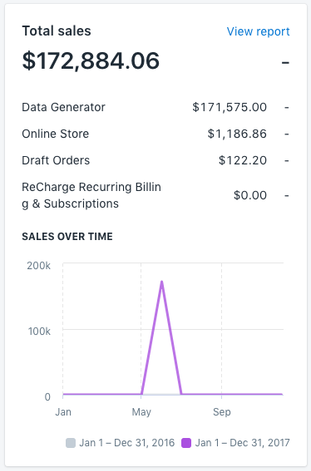
3. On the Total Sales card find your total store revenue and save this locally.
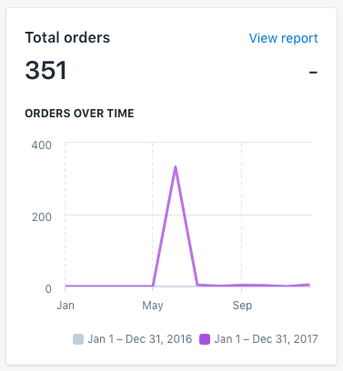
4. On the Total Orders card find your total orders amount and save this locally.
5. Use the numbers from these 2 cards, along with the AOV equation above, to calculate your AOV. Use the value of your conversions (orders) divided by the number of conversions (orders that took place).
Also, note that some ecommerce platforms may include a report that specifically captures AOV. Before comparing it with your calculation, check that both use the same date range and definitions of revenue and orders.
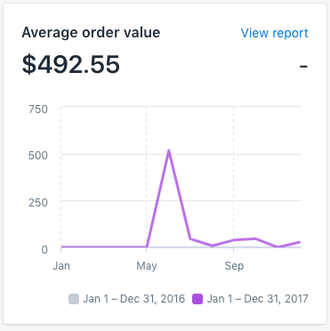
6. Once you have your store-wide AOV, you can use it as a benchmark to create segments based on each customer's AOV. Use these segments to analyze trends and send targeted messages based on your customers' shopping behavior. Learn how to segment using average order value (AOV).
Additional resources
- How to segment using average order value (AOV)
Learn how to segment using average order value (AOV). AOV is the total monetary value of your conversions (orders) divided by the number of conversions (orders that took place). You can use AOV to create segments for high and low value customers. Then, use these segments to create targeted messaging based on your subscribers' shopping habits.
- How to segment by customer lifetime value (CLV)
Learn how to create a customer lifetime value (CLV) segment and export any key CLV information. CLV is part of Klaviyo's predictive analytics and can be a powerful tool to use in segmentation. It is the total amount, both past and predicted, that a customer will purchase from your brand over time. CLV segments allow you to group customers based on this amount so that you can send them relevant content and trigger segment-based flows. For example, you can use historic CLV to build a VIP welcome flow or use predicted CLV to send targeted campaigns to customers who will likely spend a certain amount over the course of a year.
- Using customer lifetime value data in Klaviyo