Mindbody data reference
You will learn
Learn what data syncs from Mindbody to Klaviyo and where to view it. This includes customer profiles and data related to appointments, classes, membership, and purchases.
If you have not already, read our guide on getting started with Mindbody for step-by-step instructions on integrating, before continuing with this article.
Email subscription syncing requires Collect email subscribers to be enabled and a Klaviyo list to be selected. Only clients who have opted in to promotional emails in Mindbody sync as email subscribers. Email opt-outs and SMS consent are not synced.
How data syncs
When you enable the Mindbody integration, the historical sync imports active clients who are not prospects and have an email address. This client import has no date limit and does not include event history. The historical sync does not import objects (memberships, appointments, classes, contracts).
After setup, client updates, most events, and objects sync as they occur. Completed Appointment is checked every 30 minutes. Its first sync looks back 24 hours.
How to view your data
Metrics
To view your Mindbody data:
- Click the Analytics dropdown in the left-hand navigation sidebar.
- Select Metrics. Here, you can view all of the metrics in your account. The metrics with a Mindbody icon represent all of the metrics synced from your Mindbody integration.
- Select Mindbody from the Integration filter to see only Mindbody metrics.
- Click a metric name to view its data.
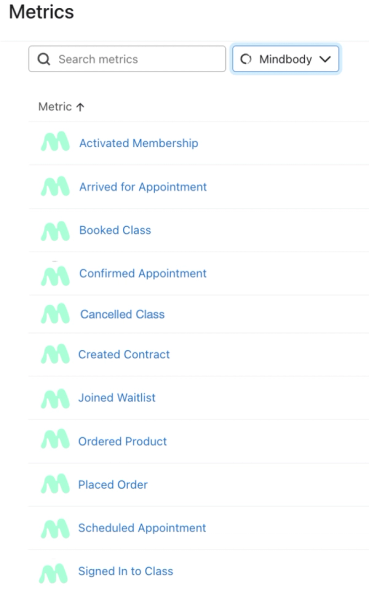
Mindbody metrics appear after Klaviyo receives the corresponding events, so you may not see every metric listed below in your account. Events only sync for clients with a valid email address.
Objects
To view your Mindbody objects:
- Click the Content dropdown in the left-hand navigation sidebar.
- Select Objects. Here, you can view all of the objects in your account. The objects with a Mindbody icon represent all of the metrics synced from your Mindbody integration.
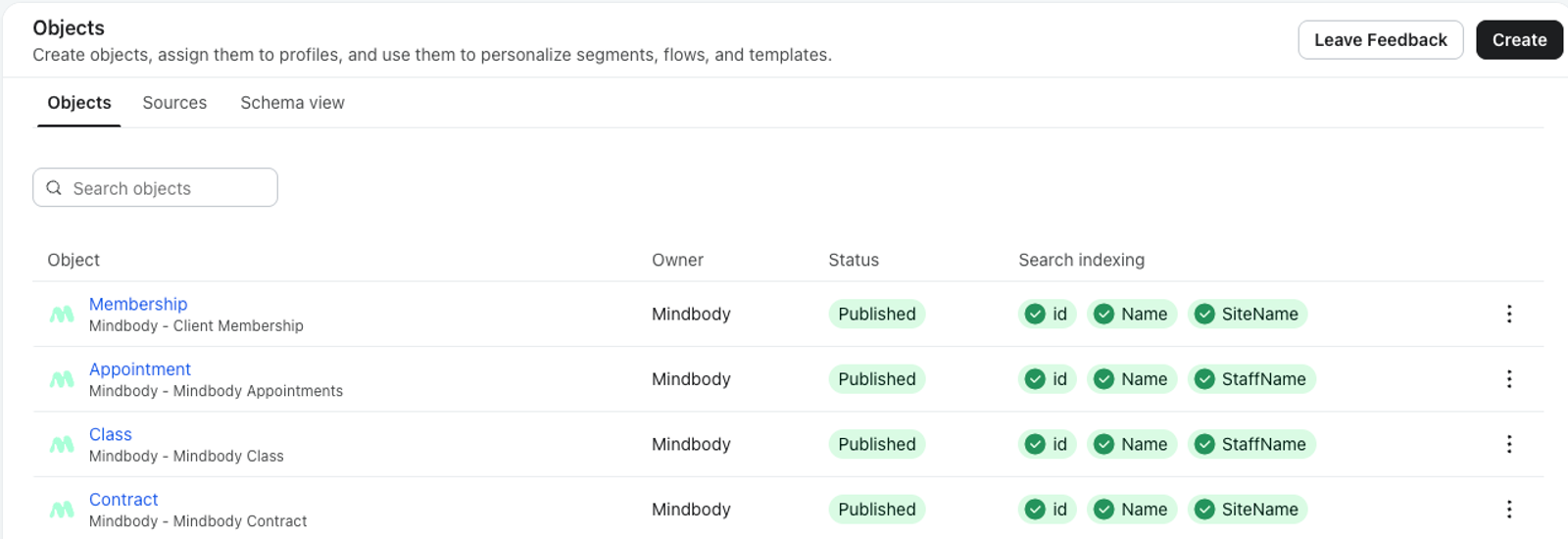
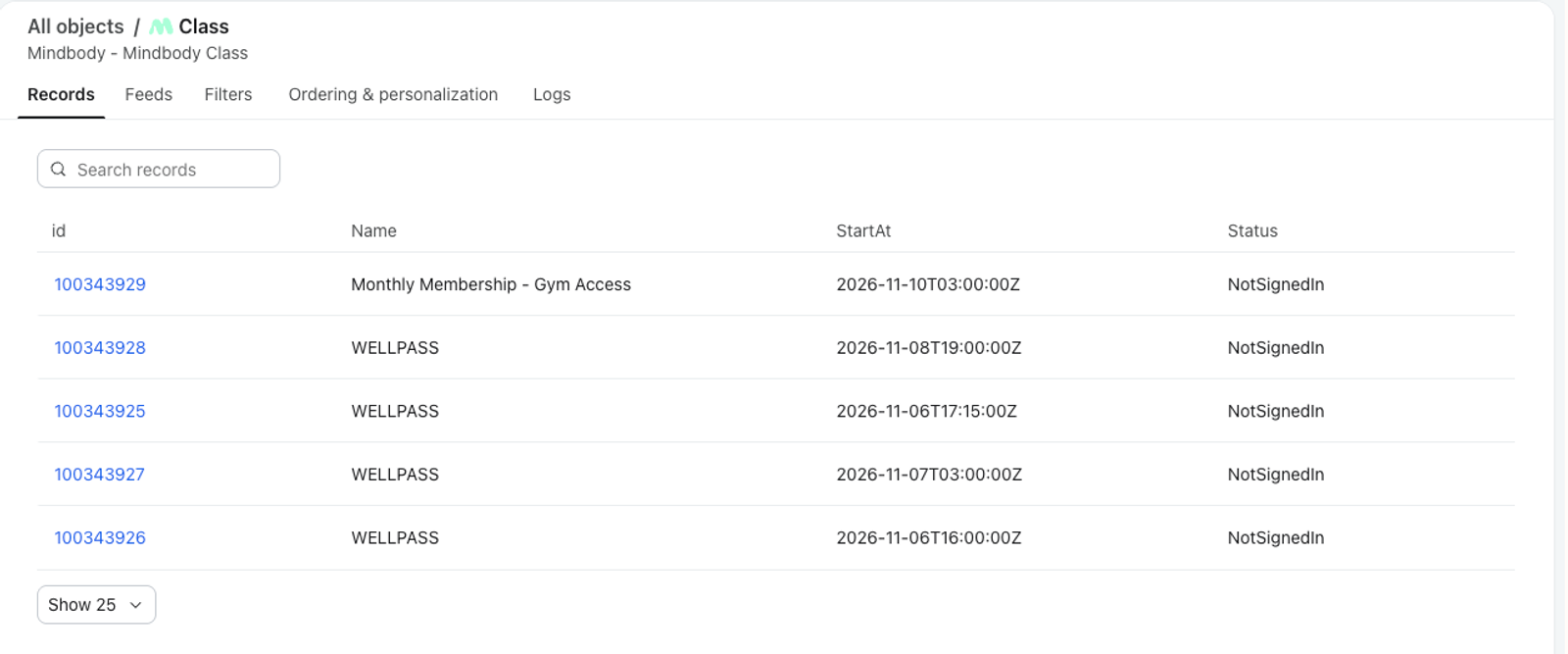
- Click an object name to view its data
Appointment metrics
The following appointment metrics are tracked:
- Scheduled Appointment
When a customer schedules an appointment through Mindbody. - Confirmed Appointment
When a staff member confirms an appointment with a customer through Mindbody. - Arrived for Appointment
When a customer arrives for an appointment and a staff member checks them in. - Cancelled Appointment
When an appointment is marked as cancelled in Mindbody.
For each of these metrics, the following information is included:
- Site ID
The Mindbody site ID associated with the appointment. - Site Name
The name of the Mindbody site. - Location ID
The location ID of the appointment. - Staff ID
The ID of the staff member or team associated with the appointment. - Staff Name
The name of the staff member or team associated with the appointment. - Start Time
The timestamp of when the appointment begins in UTC format; i.e., YYYY-MM-DDThh:mmTZD. - End Time
The timestamp of when the appointment ends in UTC format; i.e., YYYY-MM-DDThh:mmTZD. - Duration
The duration of the appointment in minutes. - Resources
A list of any additional information associated with the appointment. - Staff Provider ID
The ID of the staff provider. - Name
The name of the appointment.
Completed Appointment
This event is tracked when an appointment has a Completed status in Mindbody. It includes the following information:
- Appointment ID
The ID of the appointment. - Program ID
The ID of the program associated with the appointment. - Staff ID
The ID of the staff member associated with the appointment. - Start Time
The start date and time supplied by Mindbody. - End Time
The end date and time supplied by Mindbody. - Duration
The duration of the appointment in minutes. - Resources
The resources associated with the appointment. - Staff Provider ID
The ID of the staff provider. - Notes
Notes associated with the appointment. - SessionType ID
The ID of the session type associated with the appointment. - Remaining Sessions
The sessions remaining on the pass the appointment was booked with.
Completed Appointment also includes the full Mindbody appointment record, which you can reference in templates, for example the appointment's location or gender preference.
Class metrics
Booked Class
This event is tracked when a customer books a class through Mindbody.
- Site ID
The Mindbody site ID associated with the class booking. - Site Name
The name of the Mindbody site. - Location ID
The location ID of the class. - Staff ID
The ID of the staff member or team associated with the class. - Staff Name
The name of the staff member or team associated with the class. - Item ID
The ID of the customer’s pass or membership. - Item Name
The name of the customer’s pass or membership, i.e., Day Pass. - Client Pass Activation Time
The time when the client’s pass that was used for the class was activated. - Client Pass Expiration Time
The time when the client’s pass that was used for the class will expire. - Class ID
The ID of the class. - Class Start Time
The start date and time of the class. - Class End Time
The end date and time of the class. - Signed In Status
The customer’s sign-in status for the class. - Client Pass ID
The ID of the customer’s pass used for the class. - Client Pass Sessions Total
The total number of sessions on the customer’s pass. - Client Pass Sessions Remaining
The number of sessions remaining on the customer’s pass. - Booking From Waitlist
Whether the booking originated from the waitlist (true/false). - Visits At Site
The customer’s number of visits at the site.
Signed In to Class
This event is tracked when a customer signs into a class through Mindbody.
- Site ID
The Mindbody site ID associated with the class. - Site Name
The name of the Mindbody site. - Staff ID
The ID of the staff member or team associated with the class. - Item ID
The ID of the customer’s pass or membership. - Item Name
The name of the customer’s pass or membership; e.g., Day Pass.
Cancelled Class
This event is tracked when a customer cancels a class through Mindbody.
- Site ID
The Mindbody site ID associated with the class. - Site Name
The name of the Mindbody site. - Staff ID
The ID of the staff member or team associated with the class. - Item ID
The ID of the customer’s pass or membership. - Item Name
The name of the customer’s pass or membership; e.g., Day Pass. - Cancel Type
The type or reason of the cancellation; e.g., Late Cancelled.
Joined Waitlist
This event is tracked when a customer joins the waitlist for a class through Mindbody.
- Site ID
The Mindbody site ID associated with the waitlist. - Site Name
The name of the Mindbody site. - Start Time
The timestamp of when the class begins in UTC format, i.e., YYYY-MM-DDThh:mmTZD. - End Time
The timestamp of when the class ends in UTC format, i.e., YYYY-MM-DDThh:mmTZD. - Class ID
The ID of the class associated with the waitlist. - Waitlist Max Size
The maximum amount of people that can be added to the waitlist.
Membership metrics
Activated Membership
This event is tracked when a customer activates their membership through Mindbody.
- Site ID
The Mindbody site ID associated with the membership. - Site Name
The name of the Mindbody site. - Membership ID
The ID associated with the membership plan, represented by a string of numbers. - Membership Name
The name of the membership plan; e.g., All Access Month-to-Month Membership. - Client Membership ID
The ID of this client’s membership. - Membership Type ID
The Mindbody ID of the membership type. - Current
Whether the membership is active. - Start Date
The membership’s start date, in UTC. - Expiration Date
The membership’s expiration date, in UTC. - Payment Date
The membership’s payment date, in UTC. - Total Count
Total sessions on the membership. - Remaining
Remaining sessions on the membership. - Program
The program the membership belongs to. - Restricted Locations
The locations where the membership can be used. - Account Balance
The client’s account balance.
Other metrics
Placed Order
This event is tracked when a customer completes the checkout process and creates an order.
- Site ID
The Mindbody site ID associated with the order. - Site Name
The name of the Mindbody site. - Sold By
The name of the sales staff member who made the sale. - Location
The ID of the location associated with the order. - Items
The list of items associated with the order including the following fields:- itemId
The ID of the purchased item. - type
The type of purchased item; i.e., product or service. - name
The name of the purchased item. - amountPaid
The cost of the item inclusive of any applied discounts. - amountDiscounted
The amount discounted from the cost of the item. - quantity
The quantity of the purchased item. - recipientClientId
The ID assigned to the customer. - paymentReferenceId
The ID assigned to the payment event. - giftCardBarcodeId
The ID of the gift card if one was used.
- itemId
- $value
The total monetary value of the order inclusive of shipping and any applied discounts. - Remaining Sessions
The total sessions the client has remaining across all their passes and packages when the order was placed.
Ordered Product
This event is also tracked when a customer places an order, but a separate event is tracked for each item someone purchases.
- Item ID
The ID of the purchased item. - Type
The type of purchased item; e.g., product or service. - Name
The name of the purchased item. - Price
The price of the purchased item. - Discount
The amount discounted from this item. - Quantity
The quantity of the purchased item. - Remaining Sessions
The sessions remaining on the pass, package or contract that this item gave the client.
Created Contract
This event is also tracked when a customer creates a contract through Mindbody.
- Site ID
The Mindbody site ID associated with the contract. - Site Name
The name of the Mindbody site. - Sales Staff ID
The ID of the sales staff member associated with the contract. - Sales Staff Name
The name of the sales staff member associated with the contract. - Origination Location
The ID of the location where the contract was created, represented as a number. - Contract ID
The ID of the contract, represented as a string of numbers. - Contract Start
The timestamp of when the contract goes into effect in UTC format, i.e., YYYY-MM-DDThh:mmTZD. - Contract End
The timestamp of when the contract ends in UTC format, i.e., YYYY-MM-DDThh:mmTZD. - Auto Renewal
Whether or not the contract is set to automatically renew (true/false).
Mindbody objects
Klaviyo syncs Mindbody memberships, appointments, class bookings, and contracts as objects on each client’s profile. You can use these objects in segments and flows, for example to reach clients whose membership expires within the next 7 days.
Each object represents one Mindbody membership, appointment, booking, or contract. Klaviyo updates the object as its details change in Mindbody.
Mindbody accounts connected before November 6, 2026 must reauthorize Klaviyo before objects will sync.
Objects sync going forward only. Klaviyo creates a record the next time Mindbody sends an update for that membership, appointment, booking, or contract. Historical records do not sync.
Membership, Appointment, and Class records link to profiles by email or phone number. Contract records link by email only.
Membership
- Name
The name of the membership. - Current
Whether the membership is currently active. - StartAt
When the membership started, in UTC. - ExpiresAt
When the membership expires, in UTC. - PaymentDate
The date of the membership payment, in UTC. - TotalCount
The total number of sessions included. - Remaining
The number of sessions remaining. - AccountBalance
The client’s account balance. - ProgramCategory
The program the membership belongs to. - RestrictedLocations
The locations where the membership can be used. - MembershipTypeID
The Mindbody ID of the membership type. - SiteID / SiteName
The Mindbody site the membership belongs to.
Appointment
- Name
The name of the appointment’s session type. - StartAt
When the appointment starts, in UTC. - EndAt
When the appointment ends, in UTC. - Duration
The length of the appointment in minutes. - Status
The current status of the appointment, such as booked, confirmed, arrived, or cancelled. - IsConfirmed
Whether the appointment has been confirmed. - HasArrived
Whether the client has arrived. - StaffName
The staff member assigned to the appointment. - StaffProviderID
The staff member’s provider ID. - Resources
The resources booked for the appointment, such as rooms or equipment. - SessionTypeID
The Mindbody ID of the session type. - LocationID
The ID for the appointment location. - SiteID / SiteName
The Mindbody ID for the site of the appoitnment.
Class
- Name
The name of the class. - StartAt
When the class starts, in UTC. - EndAt
When the class ends, in UTC. - Status
The current status of the booking, such as booked, signed in, or cancelled. - StaffName
The instructor. - BookedFromWaitlist
Whether the client was booked from the waitlist. - PassID
The ID of the pass used for the booking. - PassSessionsTotal
The total sessions on the pass. - PassSessionsRemaining
The remaining sessions on the pass. - PassSessionsDeducted:
The sessions used by this booking. - PassActivationAt
When the pass was activated, in UTC. - PassExpiresAt
When the pass expires, in UTC. - VisitsAtSite
The client’s total number of visits at the site. - MaxCapacity
The maximum capacity of the class. - TotalBooked
The number of clients who booked the class. - TotalWaitlisted:
The number of clients on the waitlist. - WebCapacity
The number of spots available for online booking . - WebBooked
The number of spots already booked online. - ClassID
The ID for the class. - ItemID
The ID for the item. - LocationID
The ID for the location. - SiteID / SiteName
The Mindbody ID of the site.
Contract
- Name
The name of the contract. - Status
The current status of the contract. Changes to Cancelled when the contract is cancelled. - StartAt
When the contract starts, in UTC. - EndAt
When the contract ends, in UTC. - AutoRenewal
Whether the contract renews automatically. - AgreementDate
When the client agreed to the contract. - SalesStaffName
The staff member who sold the contract. - OriginationLocation
The location where the contract was sold. - ContractTypeID
The Mindbody ID of the contract type. - SiteID / SiteName
The Mindbody ID of the site.
Synced client data
Klaviyo creates or updates profiles for Mindbody clients with an email address. The profile information includes the following fields when they are provided by Mindbody:
- First name
- Last name
- Phone number
- Address (street address, city, region, postal code, and country)
- Birthday
- Mindbody Account Balance
- Mindbody Active
- Mindbody ClientID
- Mindbody Creation Date
- Mindbody First Appointment Date
- Mindbody First Class Date
- Mindbody Gender
- Mindbody Home Location (Number)
- Mindbody Home Location Name
- Mindbody Liability Released
- Mindbody Number of Visits
- Mindbody Pass ID
- Mindbody Referral
- Mindbody Referral Source
- Mindbody Send Promotional Emails
- Mindbody Send Schedule Emails
- Mindbody Send Account Emails
- Mindbody Send Promotional Texts
- Mindbody Send Schedule Texts
- Mindbody Send Account Texts
- Mindbody Status
- Email subscribers sync when email subscription syncing is enabled and a Klaviyo list is selected. Email opt-outs are not synced. Mindbody text preferences sync as profile properties, not as SMS consent in Klaviyo.
Additional resources
- Getting started with Mindbody
Learn how to integrate with Mindbody, a tool that assists health and wellness brands with booking, scheduling, marketing, payments, reporting, and more.
- How often integrations sync reference
Learn what data syncs from a particular Klaviyo integration and how often the sync runs. We've organized these integrations by ecommerce platforms, email service providers, and other data integrations.