How to review your A/B test results for campaigns
You will learn
Learn what data you can find on the A/B test results page and what each of these indicators means. The information in this guide applies to both A/B testing with email campaigns and SMS campaigns.
A/B testing campaigns can provide valuable insight into your audience by making it simple to determine what changes to make to your sending strategy. Not only will you know the winning variation for an A/B test, but also other important factors, like the win probability and winning metric details.
A/B test results
To see the results of an A/B test:
- Navigate to the campaign you are testing.
- Select the A/B test results tab of the main campaign report.

Test overview
For a standard A/B test, the Test overview section shows the following:
- Winning variation
Once a test is complete, the variation with the highest winning metric for the results you’re viewing. - Status
Whether the A/B test is ongoing (i.e., collecting analytics) or complete. - Win probability
How likely it is that the winning variation truly had the highest open, click, or placed order rate after taking random chance into account, and whether this probability is considered statistically significant. - Lift
How much better the winning variation performed over the other variation. Calculated based on the winning metric (i.e., open rate, click rate, or placed order rate). For tests with 3+ variations, the second-best performing test is used for comparison. - Winning metric
The winning variation's results for the metric that was used for the test. For example, if open rate was chosen as the winning metric, the open rate percentage would be shown.
Below these results, you can review each variation’s open and click rates for email, or click rate for SMS. The table also shows conversion results when a conversion metric is available; this is not always Placed Order.
For a completed standard A/B test with a test group smaller than the full audience, use the tabs in Test overview to compare:
- Test period results shows interactions during the test period from recipients in the test group.
- Continuous results includes later interactions from the same test group. The leading variation can change as more results come in.
Review the Winning send summary below for interactions with the winning variation sent to the remaining recipients after the test period.
How lift is calculated
The lift percentage is different than the percentage shown for your winning variation. This is because the percentage shown next to each variation is the percentage of people who interacted with the message (open, click, placed order) whereas the lift is the percentage of improvement that the winner had over the other variation.
For example, if you are using click rate as your winning metric and Variation A has 5/100 (5%) recipients click and Variation B has 4/100 (4%) recipients click, the difference is 1 percentage point. Lift compares that difference with Variation B’s click rate: (5% − 4%) / 4% × 100 = 25%. Variation A therefore has a 5% click rate and a 25% lift over Variation B.
Personalized variation results
The option to choose a test strategy requires at least 400,000 total profiles. If the option is not available in your account, Klaviyo uses the winning variation test strategy.
If you chose Personalized variations for each recipient, select Test period results once the test is complete to see the following metrics:
- Total A/B test lift
The estimated improvement from personalized variations compared with the second-best variation in a standard A/B test, based on the winning metric (open rate or click rate). - Personalization lift
The estimated improvement from personalized variations compared with sending everyone the winning variation from a standard A/B test. - Personalization open rate or Personalization click rate
The estimated open or click rate for personalized variations, based on test recipients who received the variation Klaviyo predicted they would prefer. The metric shown depends on the winning metric you selected. - Profile characteristics derived by Klaviyo AI
Characteristics associated with recipients who were more likely to engage with a specific variation. Expand each variation to see its characteristics, which can differ between variations.
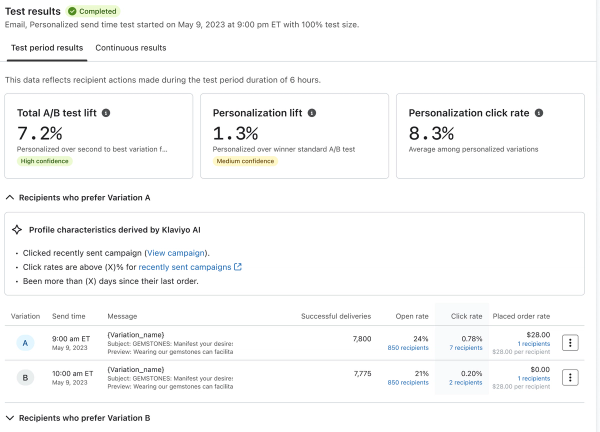
Review the Personalized send summary for interactions with the personalized variations sent after the test period.
Understanding win probability and statistical significance
Say, for instance, you want to see if adding emojis to your subject line impacts your open rate with your email list. If you only send the test to 2 subscribers and the emojis have a better open rate, you can’t say conclusively that the rest of your email list will feel the same way. If instead you tested with 100 people in your email list and found that emojis have a substantially higher open rate, you would feel much more confident that using emojis in your subject lines is better for your audience.
Under Win probability, a completed standard A/B test can show a statistical significance label. A result is statistically significant when its win probability is above 90% and each variation has more than 50 successful email deliveries or attempted SMS deliveries. A test might also be promising, inconclusive, or not statistically significant. For promising results, repeat the test to confirm the finding. Inconclusive results do not show a significance label. Learn more about statistical significance in Klaviyo.
Additional resources
- Best practices for A/B testing reference
Learn best practices for using Klaviyo's A/B testing features to help optimize your communication with customers.
- How to A/B test a sign-up form
Learn how to use A/B testing to evaluate the performance of various elements of your sign-up forms. By effectively analyzing the results, you can ensure that your forms resonate with site visitors and contribute to list growth.
- How to A/B test a flow email
Learn how to use Klaviyo’s A/B testing experience to test individual emails in a flow, including things like subject line, discounts, and email content, etc. You can even use A/B tests to determine if plain-text emails perform better than image-heavy HTML emails.
- How to A/B test an email campaign
Learn how to set up and run an A/B test for a campaign, how to read the test results, and a few use cases for A/B testing campaigns. Klaviyo's A/B testing feature for campaigns allows you to easily test different subject lines, message content, and send times so you can better understand what works best for your audience.