Understanding the absolute flow timeline and joining paths
You will learn
Learn why the timeline may not appear when a split's paths are joined, through an example.
A flow's timeline is how long it will take a person to complete the flow. For instance, if you have a flow with a time delay of two days followed by an email, the absolute timeline hint will show two days, since that is how long it will take the flow to complete. However, this timeline may not always appear, particularly when a flow contains a split with joined paths.
Timing and joining paths
There may be instances in which paths have different time delays. In this case, when you join the paths, recipients coming from different paths will experience different absolute timelines from the trigger.
In the below example, there are three paths that come together at a join. The two paths highlighted in green receive the final discount email two days after the join, while those coming from the yellow highlighted path receive the same email after four days due to the additional time delays set on that path.
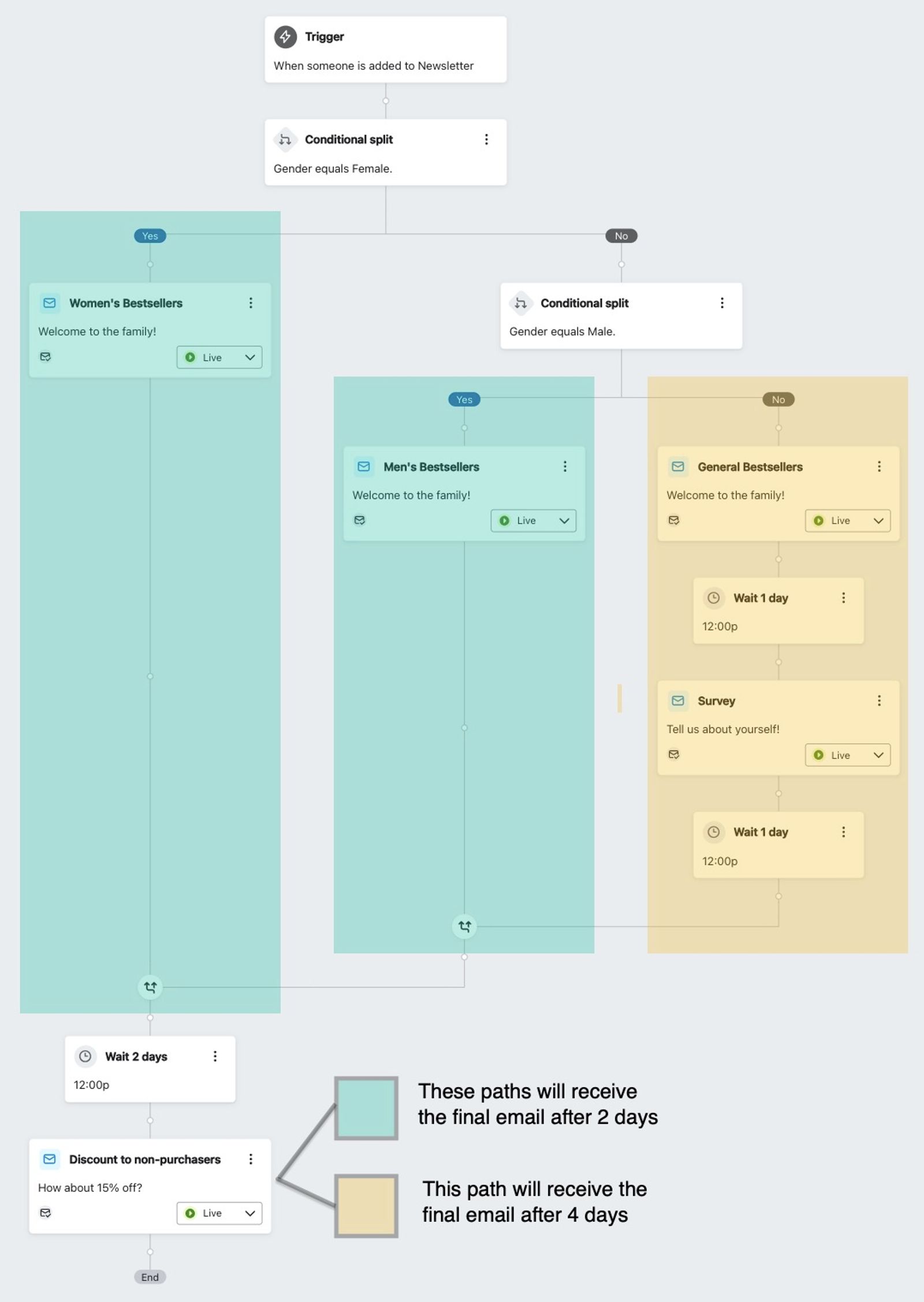
Since the timeline is different for the yellow path, you will not see an absolute timeline hint below the lower right-hand corner of the email card.
Additional resources
- How to join and disconnect flow paths
Learn how to join and disconnect flow paths in the flow builder to create targeted customer journeys stemming from the same initial trigger. However, as you start to branch your flows, there may be instances when you'd like to bring these separate journeys back together down the same path.
- Understanding time delays near splits
Learn when to place time delays before a split, and when to place them after.