How to calculate retention rate
You will learn
Retention rate calculations provide useful insights into how loyal your customer base is and where you may need to improve to increase purchase behavior. Retention rate goes beyond finding out who your recent customers are; rather, it takes into account purchases over a set window of time to gauge long-term customer behavior.
Calculate retention rate
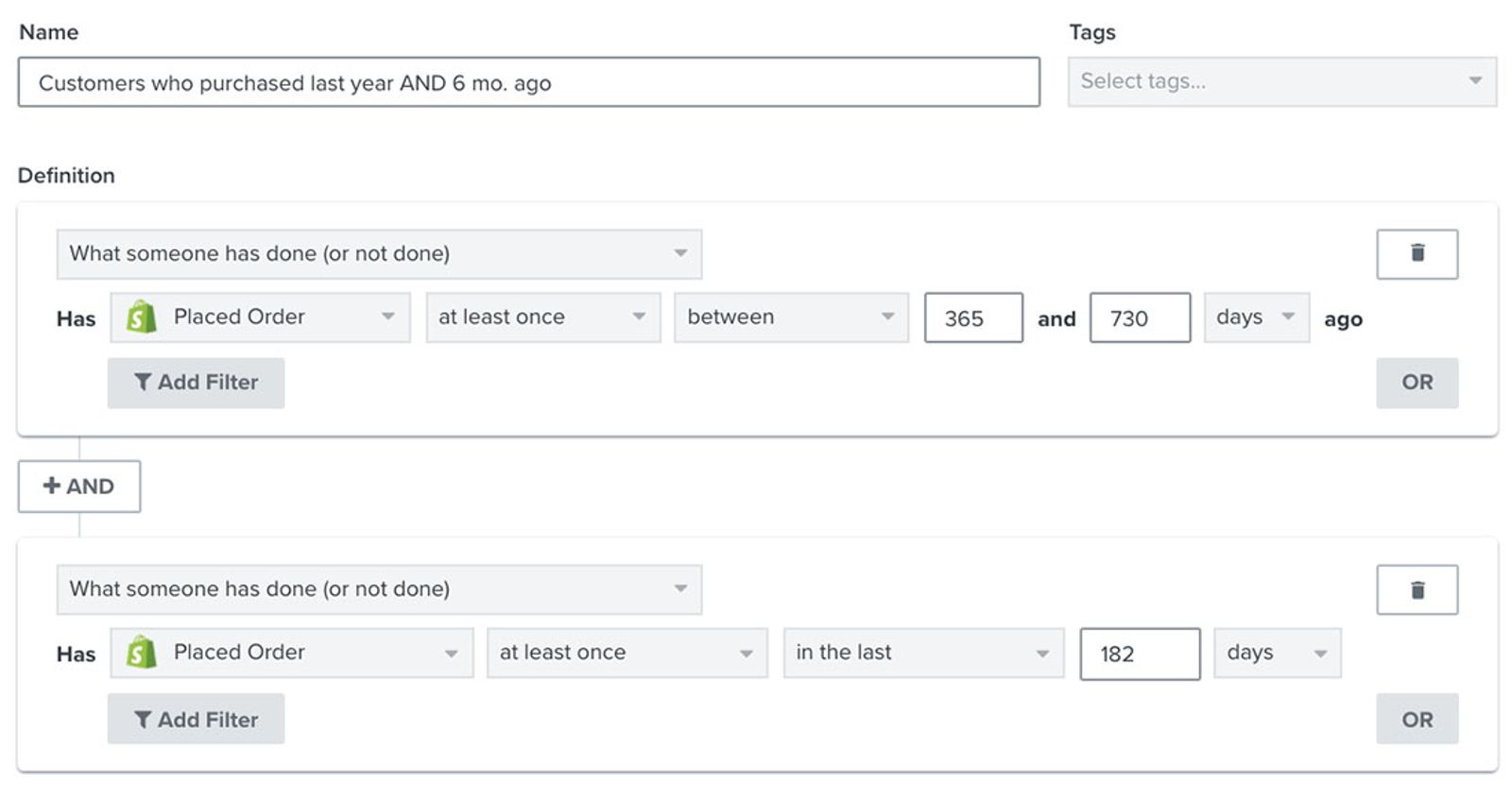
There are 3 steps to calculate retention rate using 2 segments. In this example, “last year” means between 365 and 730 days ago, not the previous calendar year. The recent purchase window is the last 182 days, or about 6 months.
- Create a segment of customers who purchased between 365 and 730 days ago AND within the last 182 days
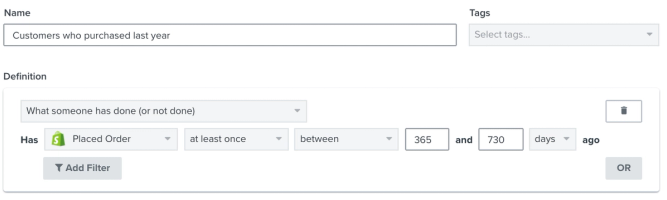
- Create a segment of all customers who purchased between 365 and 730 days ago
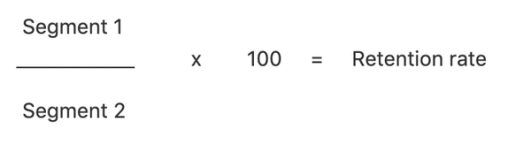
- Divide the first segment’s profile count by the second segment’s profile count, then multiply by 100
Note that you can craft your own custom timeframe if the one above does not work for your business model. For example, if you are a subscription business, you can cater to this timeline in a way that makes the most sense for your customer’s purchasing timelines.
Before you begin, make sure your order data is synced to Klaviyo for both purchase windows. Use the same Placed Order metric from the same integration in both segments.
To start each segment, navigate to Audience > Lists & segments and select Create > Segment. If a name panel opens, enter a name and click Create segment to open the builder. Otherwise, enter the name in the builder.
1. Create a segment of customers who purchased between 365 and 730 days ago and again within the last 182 days. Select What someone has done (or not done) for each condition, and join the conditions with AND:
- Placed Order > at least once > between 365 and 730 days ago
- Placed Order > at least once > in the last 182 days
Click Create segment to save the first segment. These are repeat customers who purchased in both periods.
For the second segment, use What someone has done (or not done) > Placed Order > at least once > between 365 and 730 days ago. Keep the purchase metric and earlier date range identical to the first segment, and leave out the recent purchase condition. Click Create segment to save it.
3. Wait for both segments to finish populating. Return to Audience > Lists & segments and record each segment’s Members count at the same time. Use the number of profiles in each segment, not the number of orders, in this formula:
Retention rate (%) = (profiles in the first segment ÷ profiles in the second segment) × 100
If the second segment has 0 profiles, you cannot calculate a retention rate for these purchase windows. Check your order data and segment conditions before proceeding.
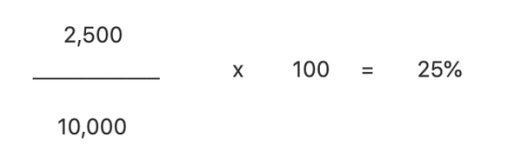
For example, if the first segment has 2,500 profiles and the second has 10,000, the calculation is (2,500 ÷ 10,000) × 100 = 25%. This means 25% of customers who purchased between 365 and 730 days ago also purchased within the last 182 days.
Additional resources
- How to calculate average order value (AOV)
Learn how to calculate your average order (AOV) or the total monetary value of your conversions (orders) divided by the number of conversions (orders that took place). Calculating your average order value (AOV) can be helpful when you want to add a condition to your segments to target high value or low value customers.
- How to segment by customer lifetime value (CLV)
Learn how to create a customer lifetime value (CLV) segment and export any key CLV information. CLV is part of Klaviyo's predictive analytics and can be a powerful tool to use in segmentation. It is the total amount, both past and predicted, that a customer will purchase from your brand over time. CLV segments allow you to group customers based on this amount so that you can send them relevant content and trigger segment-based flows. For example, you can use historic CLV to build a VIP welcome flow or use predicted CLV to send targeted campaigns to customers who will likely spend a certain amount over the course of a year.
- How to calculate revenue per recipient
Learn how to calculate revenue per recipient (RPR) and understand how each of your marketing channels is performing. RPR helps you to determine the success of a campaign or flow and is a great way to review individual channel performance and opportunities for growth.
- Understanding Klaviyo's predictive analytics
Learn more about the different types of predictive analytics data displayed in your account, the various ways Klaviyo computes this, and guidelines for how you can utilize this data.