How to use the Klaviyo extension for Sidekick in Shopify
The Klaviyo extension for Sidekick lets you view and analyze your Klaviyo data directly inside your Shopify Admin. You can check campaign and flow performance to know if your marketing is working without having to open another tool. The integration leverages Shopify’s Sidekick extension framework to securely bring your Klaviyo data into the Sidekick assistant.
Before you begin
Before you start:
- You must have the Klaviyo integration with Shopify.
- The Sidekick extension supports read-only analytics operations. Sidekick will not be able to modify your Klaviyo data or create new assets.
Connect Klaviyo to Sidekick
There are two ways to enable Sidekick
From Klaviyo:
- Visit the Shopify integration settings
- Toggle on “Enable Shopify access”
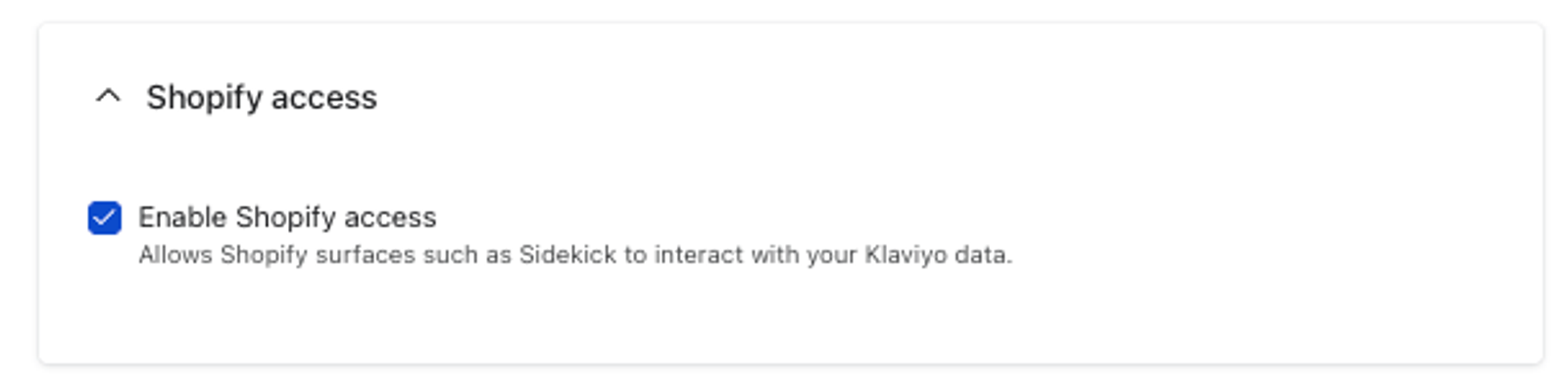
- Select “Update Settings”
- Approve Shopify to use Klaviyo data
From Shopify:
- Start a conversation with Sidekick that references Klaviyo
- Sidekick will respond with a URL to enable the feature. Click the URL
- Approve Shopify to use Klaviyo data
What you can do with the Klaviyo Sidekick Integration
View campaign performance You can ask Sidekick how your recent email campaigns are performing. Sidekick will return data that includes:
- Recent campaigns and their sending status.
- Number of recipients.
- Revenue.
- Basic KPIs (like open, click, and conversion rates).
Deep dive into campaigns If you want to know why a specific campaign underperformed, Sidekick fetches individual campaign stats from Klaviyo. This provides in-depth insights into channels and messages. Sidekick will also offer a deep link suggesting you "Open this campaign in Klaviyo" for full reporting.
View flow performance and coverage You can ask for flow performance data to see how your automated messages are doing. Sidekick will query Klaviyo for key flows, such as your welcome, abandoned cart, browse abandonment, and winback flows. It will return simple metrics and tell you what your flow coverage looks like.
Example questions
- “How are my Klaviyo email campaigns doing?”
- “Why did my holiday campaign underperform?”
- “Do I have a welcome and winback flow set up?”
- "How are my Klaviyo flows doing?"
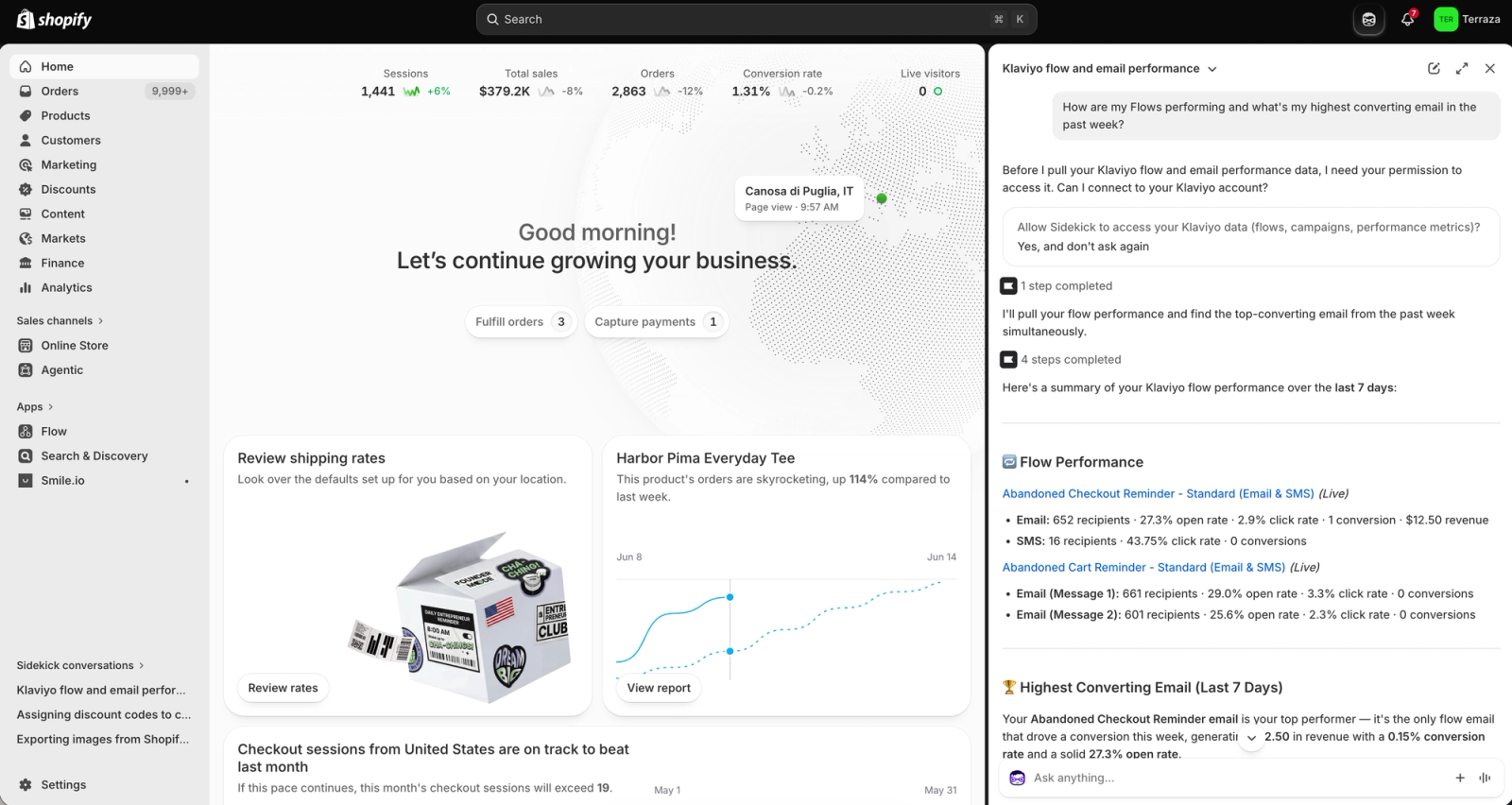
What the Sidekick extension cannot do
The Klaviyo app is currently read-only. The integration cannot:
- Send or edit campaigns.
- Build or generate new flows (such as an abandoned cart or checkout recovery flow).
- Generate Klaviyo segments or customer lists.
Best practices
Get reliable insights
- Use clear prompts such as “How are my Klaviyo email campaigns doing?” or "What flows am I missing?".
- Ask for performance explanations, such as why a specific campaign dropped in engagement.
Mitigate hallucinations
- Validate key metrics in Klaviyo before making large strategic decisions.
- Keep your Klaviyo data up to date to ensure accurate results.
Use deep links for action
- Because Sidekick cannot generate campaigns or flows for you, use the provided deep links. Clicking these links will take you directly into Klaviyo so you can act fast on Sidekick's insights.
Outcome
After launching Sidekick in your Shopify Admin, you can review Klaviyo campaign and flow performance in real time, check your flow coverage, and access deep links to execute your next steps—all without leaving the Shopify dashboard.
Additional resources
- Getting started with Shopify
Learn how to integrate Klaviyo with Shopify in order to bring your customer profile and order data into Klaviyo and reach customers with targeted messaging. Additionally, enable Klaviyo onsite tracking and sign-up forms, and sync data from Klaviyo to Shopify.