How to set up First-Party ID
You will learn
Learn how to set up First-Party ID to improve your ability to identify returning visitors. First-Party ID uses a server-side cookie to extend identification, helping you recognize more returning shoppers, attribute more onsite events, and power more targeted marketing automation.
If you choose to turn on First-Party ID, it is strongly suggested that you re-issue your cookie notices to your customers, and that you review your Terms of Service and/or Privacy Notice to ensure that your customers are notified of re-identification processes. The Klaviyo cookie will expire, but First-Party ID provides re-identification through a server-side cookie feature that allows you to refresh the Klaviyo cookie directly from your own domain.
Please read more about Privacy Notice, Cookie Notice, and Consent in the Understanding cookies in Klaviyo article.
How does First-Party ID work?
Klaviyo's standard tracking sets a cookie called __kla_id in the visitor's browser using JavaScript (read more here). On browsers like Safari and Firefox, privacy protections cap how long that cookie persists. Once it expires, Klaviyo can no longer recognize the visitor as a known profile until another identification event.
First-Party ID addresses this by running a Cloudflare worker on a subdomain of your own domain. This worker sets a long-lived, server-set cookie called __kle_id. When your existing __kla_id expires, Klaviyo uses __kle_id to restore it through JavaScript, re-identifying the visitor and attributing their onsite activity to the correct known profile. If the worker is unavailable, standard Klaviyo tracking continues, but visitors who need First-Party ID to restore their identity may not be recognized.
- Note: First-Party ID does not identify net new visitors. A shopper must already have a Klaviyo profile — created through a signup, tracked email click, or other identification event — before First-Party ID can re-identify them on a return visit. Their browser must also have a First-Party ID cookie saved during a visit after you enabled the feature.
Cookie lifetime
When a visitor is identified, Klaviyo's JavaScript sets the __kla_id cookie to last up to 2 years, subject to the browser's cookie policies. Extended ID and First-Party ID can restore this cookie when they recognize the visitor. First-Party ID uses a separate server-set cookie, __kle_id, to do this; it does not change __kla_id into a server-set cookie. Learn how to set up Extended ID.
The standard __kla_id cookie lifespan — how long it lasts before First-Party ID needs to refresh it — varies by browser. More detailed information can be found on CookieStatus.
Cookie lifetime depends on the browser, how the cookie is set, and whether tracking requests are blocked. The table compares the JavaScript-set __kla_id cookie with the server-set __kle_id cookie.
Browser | Standard __kla_id (JavaScript-set) | First-Party ID __kle_id (server-set) |
|---|---|---|
Safari | 24 hours after arriving from a known tracking domain when the landing URL contains query parameters or fragments. Otherwise, script-writable storage is deleted after 7 days of Safari use without interaction with the site. | Up to 7 days |
Brave | Up to 7 days for JavaScript-set cookies. Shields can block tracking requests. | Up to 6 months for server-set cookies. Shields can also block requests to subdomains that point to blocked domains. |
Firefox | Firefox clears storage from known tracking origins during daily checks if those origins have had no top-level user interaction in the last 45 days. | Firefox clears storage from known tracking origins during daily checks if those origins have had no top-level user interaction in the last 45 days. |
Chrome | 400 days | Up to 1 year, subject to browser restrictions. |
Edge | Up to 2 years (Klaviyo's own setting — not an Edge restriction) | Up to 1 year, subject to browser restrictions. |
Safari's 24-hour restriction applies to JavaScript-set cookies when the visitor arrives from a known tracking domain and the landing URL contains query parameters or fragments. Safari also deletes script-writable storage after 7 days of browser use without interaction with the site. Server-set cookies on subdomains that point to another site's infrastructure can be capped at 7 days.
Enabling First-Party ID
These steps configure First-Party ID using a dedicated subdomain that points to Klaviyo's Cloudflare account. You need access to your domain's DNS settings, and Klaviyo's onsite tracking must be installed on your storefront. Klaviyo provides the DNS record needed. You can configure 1 domain per Klaviyo account, and each domain can only be connected to 1 account at a time.
- Click the account menu in the lower left of your Klaviyo account.
- Select Settings from the menu.
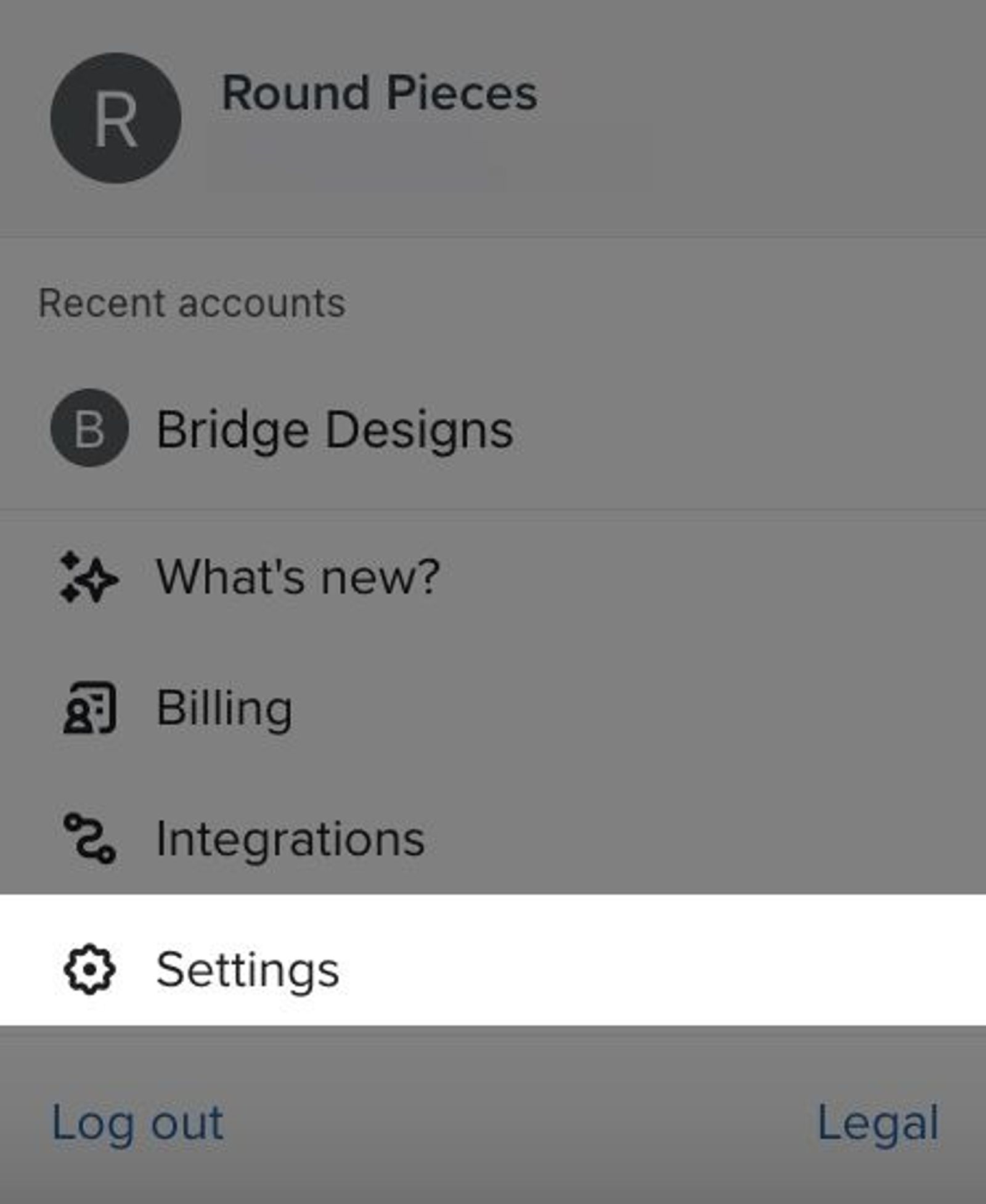
- Navigate to the Data tab.
- Under Onsite identification, find First-party ID and click Configure.
- Confirm that the pre-filled domain is correct. If not, enter the root domain of your storefront, such as example.com, without https:// or www. Click Next.
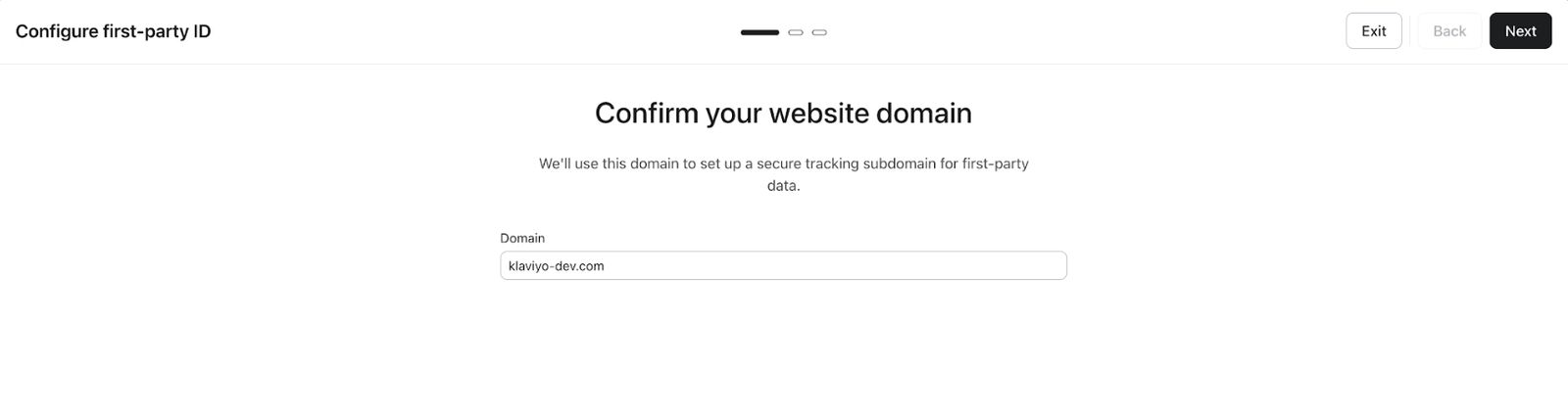
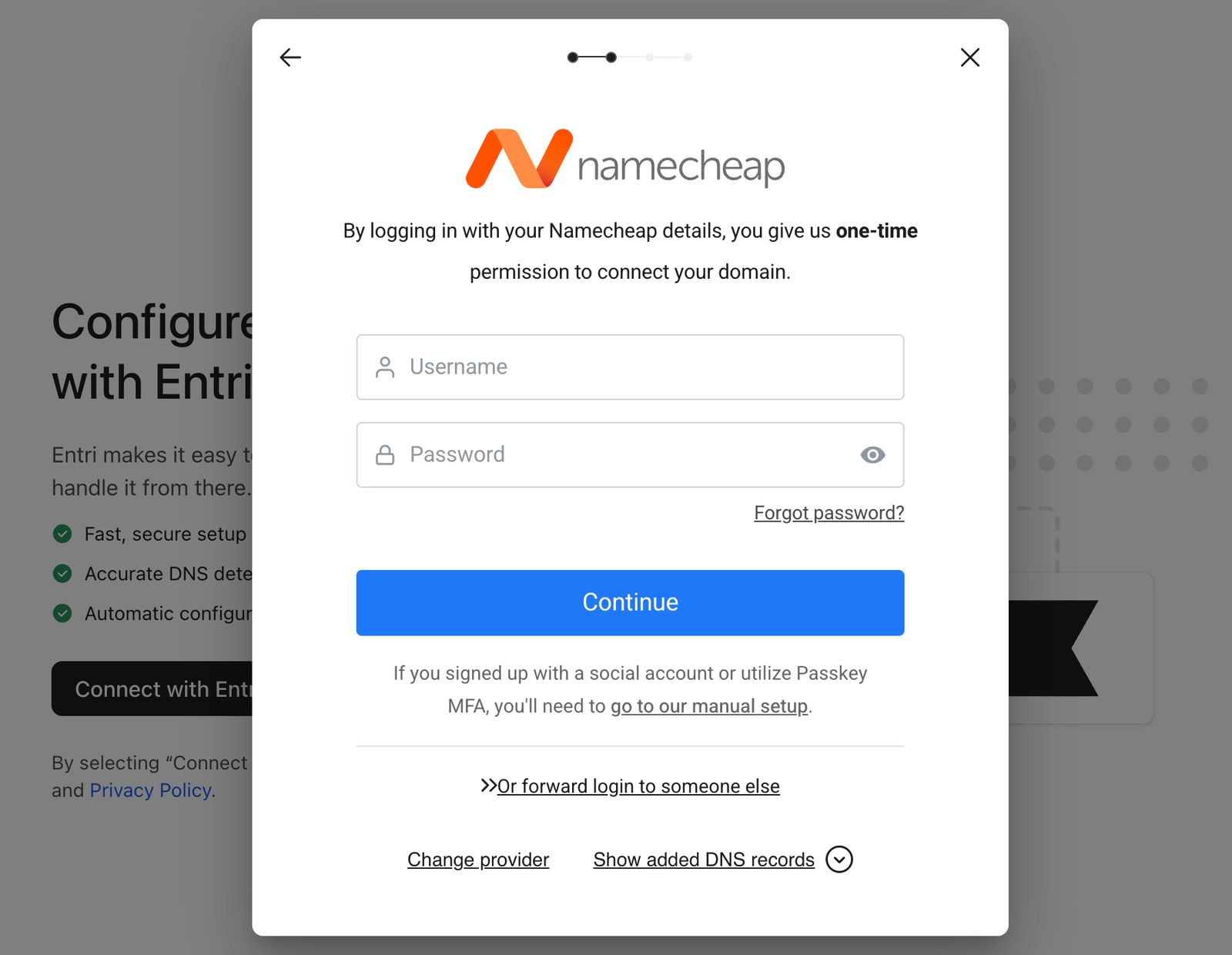
You can use Connect with Entri for automatic configuration or Set up manually to add the DNS record yourself. Follow the matching instructions below.
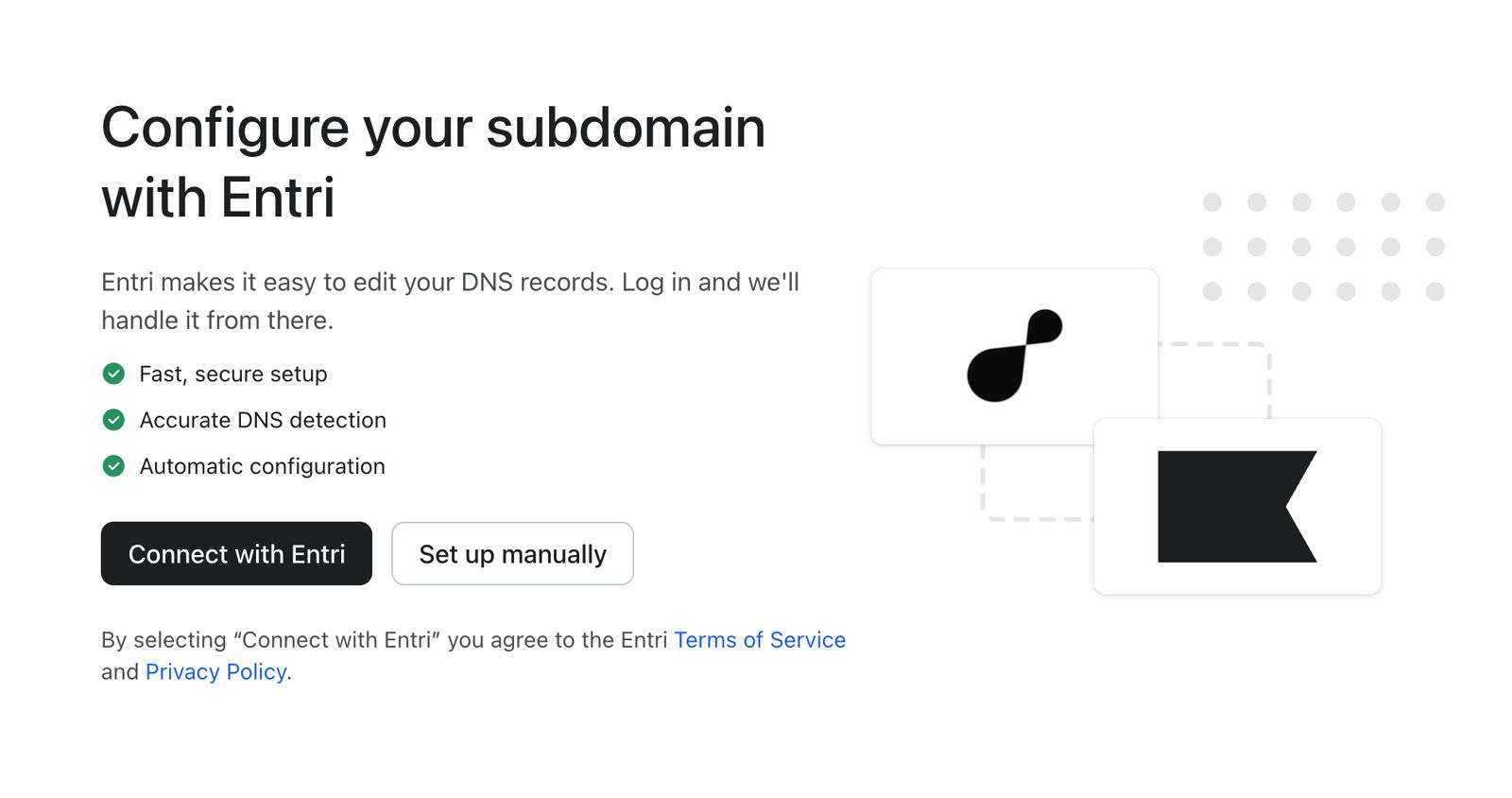
Set up with Entri
- Click Connect with Entri.
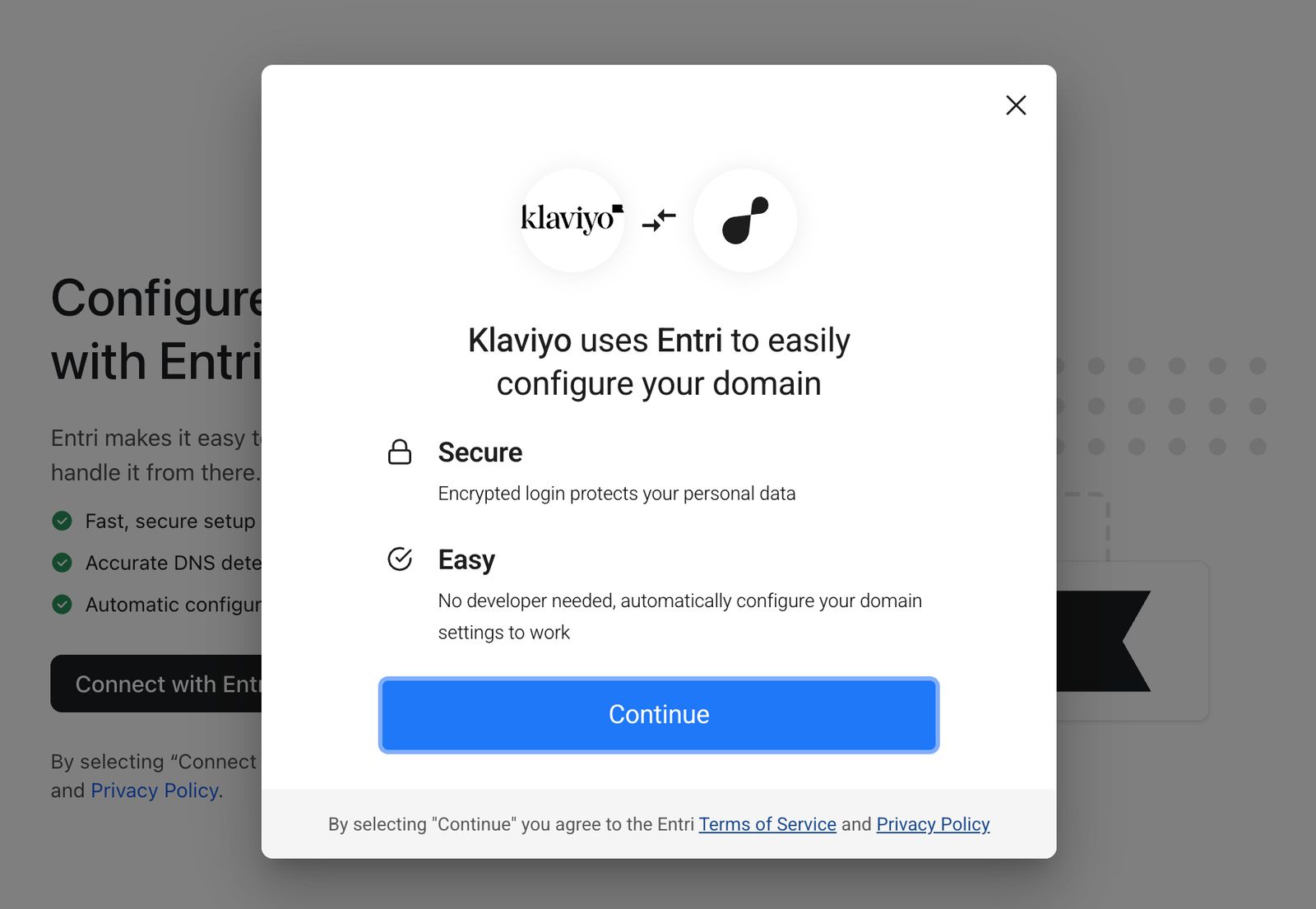
- Entri detects your domain's DNS provider. Follow the on-screen instructions to sign in and let Entri add the DNS record. When Entri finishes successfully, Klaviyo starts verification automatically.
Set up manually
- Click Set up manually. In your DNS provider, add a CNAME record using the Host and Points to values shown in Klaviyo.
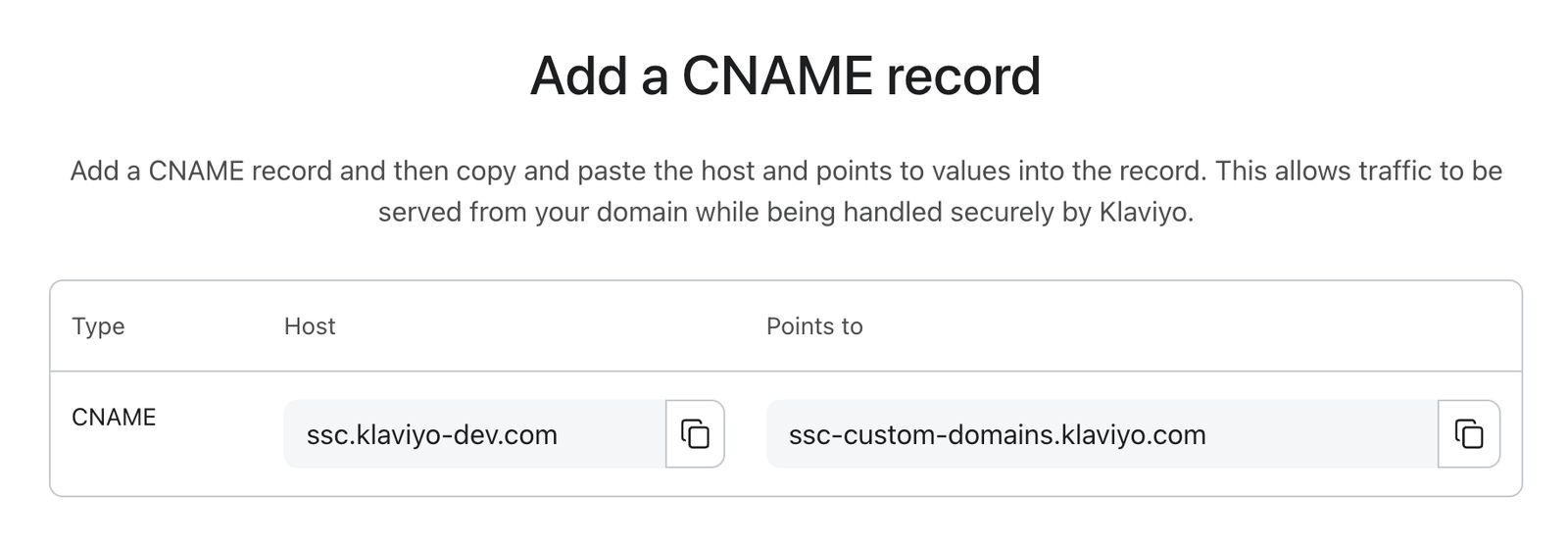
- Return to Klaviyo and click Verify.
After either setup method, Klaviyo shows This change is being verified. Click Exit to close setup. Verification usually takes a few minutes but can take up to 48 hours. The account owner receives an email when verification finishes successfully.
Each domain can only be connected to 1 Klaviyo account at a time, even if multiple portfolio accounts share the same URL. Check the status under First-party ID in Settings > Data. Once it is Active, Klaviyo's onsite tracking starts using the subdomain.
Subdomain statuses
In App Status | Email Status | What it means |
|---|---|---|
Verifying | N/A | Klaviyo has created the subdomain configuration and is waiting for your DNS records to be added and detected. |
Active | Once active, the account owner receives an email confirming that First-Party ID is set up. | Setup is complete. First-Party ID can use the saved server-set cookie to recognize returning visitors. |
Error | If verification fails, the account owner receives an email with next steps. | This can occur for a few reasons including the inability to connect to your subdomain. The email will contain instructions on how to resolve the issue. |
Error | The account owner receives an email asking them to check the DNS configuration. | The subdomain was previously Active, but Klaviyo's connection checks are now failing. Check your DNS configuration and follow the email's instructions. Use Re-configure in First-party ID settings to repeat setup. |
My subdomain status shows Error
An Error status means Klaviyo could not verify your subdomain or a previously active connection is no longer responding correctly. Common causes:
- CNAME record is missing or pointing to the wrong target.
- DNS record was added but did not fully propagate (can take up to 48 hours in rare cases).
- The CNAME target provided by Klaviyo was entered incorrectly.
Follow the instructions in the email and check that your DNS record matches the values shown during setup. In First-party ID settings, click Re-configure and complete setup again. If the issue persists, contact Klaviyo support.
Tip: If the setup is stuck in Verifying for more than 60 minutes, verify that your CNAME record has propagated using a tool like dnschecker.org. DNS propagation times vary by provider.
Disabling First-Party ID
Deactivating First-Party ID turns off its identity restoration and removes the saved subdomain configuration from Klaviyo. Standard Klaviyo tracking continues, and Extended ID can still work if it is enabled. To use First-Party ID again, repeat setup. To deactivate it:
- Click the account menu in the lower left of your Klaviyo account.
- Select Settings from the menu.
- Navigate to the Data tab.
- Under Onsite identification, find First-party ID and click Deactivate. In the confirmation dialog, click Deactivate again.

Measuring the Impact of First-Party ID
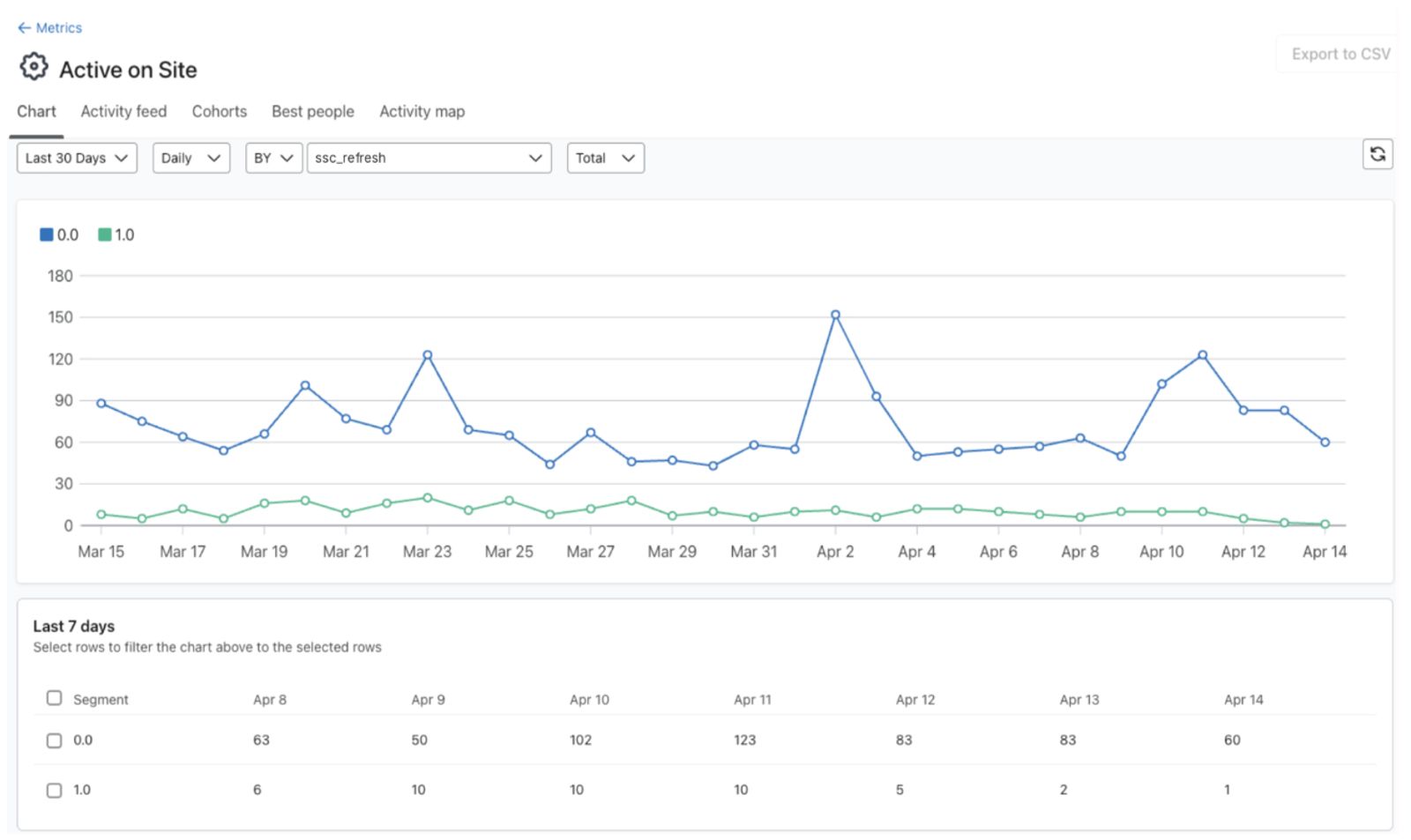
To view the impact of First-Party ID on your brand's ability to identify visitors, you can leverage the Active on Site event.
- Navigate to Analytics > Metrics > Active on Site.
- Select a Date range and set Measurement to Total. In Filter, select BY, then choose ssc_refresh.
The 1.0 (true) group shows Active on Site events marked as coming from an identity restored by First-Party ID. This marker can remain on later visits while the restored cookie is still present, so the count is not the number of new cookie restorations or proof of additional sessions. Events without ssc_refresh are not marked as First-Party ID.
- There is also
sscRefreshed, a profile property indicating whether a profile has been re-identified by First-Party ID at least once. Whilessc_refreshmarks events,sscRefreshedreflects unique profiles, useful if you want to know how many distinct customers First-Party ID has reached rather than how many sessions it's affected.
Comparing the share of re-identified sessions
Active on Site sessions are already identified sessions (this metric excludes anonymous browsing), so what this calculation actually shows is: of the sessions you already know were identified, what share came specifically from Extended ID or First-Party ID, rather than from a standard identification event like a signup or checkout using Klaviyo's regular cookie. This isolates how much First-Party ID and Extended ID are contributing, but it isn't a measure of your overall site-wide identification rate, since Klaviyo doesn't have visibility into anonymous browsing sessions that never trigger an Active on Site event in the first place.
The Active on Site metric doesn't calculate this automatically, but you can put it together using two equal-length time periods: one before enabling First-Party ID and one after.
- For each period, select the Date range, set Measurement to Total, and clear any Filter. Record the total Active on Site count.
- For each period, select Filter > BY > ssc_refresh and record the 1.0 (true) count for First-Party ID.
- For each period, select Filter > BY > extended_id and record the 1.0 (true) count for Extended ID.
- Because First-Party ID takes priority when both are enabled, these two filters are mutually exclusive, so add the totals from steps 2 and 3 together. This is your total Re-identified Sessions for each period (sessions identified specifically via Extended ID or First-Party ID, as opposed to a standard identification event).
- The remainder, total Active on Site sessions minus Re-identified Sessions, is the count not attributed to either feature.
- Divide Re-identified Sessions by total Active on Site sessions for each period to get your Re-identification Rate.
- To get the relative change, divide the post-period rate by the pre-period rate, subtract 1, then multiply by 100. If the pre-period rate is 0, relative change cannot be calculated; compare the rates directly instead.
Example:
Pre-period (60 days before enabling First-Party ID): 10,000 total Active on Site sessions, 500 identified via Extended ID (First-Party ID wasn't yet enabled, so this is the full Re-identified Sessions total). Re-identification Rate: 500 ÷ 10,000 = 5%.
Post-period (60 days after enabling First-Party ID): 10,000 total Active on Site sessions, 700 identified via First-Party ID and 300 identified via Extended ID, for 1,000 total Re-identified Sessions. Re-identification Rate: 1,000 ÷ 10,000 = 10%.
Relative change: ((10% ÷ 5%) − 1) × 100 = 100%.
First-Party ID is Active but I'm not seeing the ssc_refresh property in Active on Site
The ssc_refresh property is added to events after First-Party ID successfully restores a visitor's identity. It can remain on later events while that restored identity is in use. If no returning visitor has needed and successfully completed restoration, you may not see this property yet.
Understanding First-Party ID attribution
Klaviyo marks onsite events with ssc_refresh when they use an identity restored by First-Party ID. The marker can persist across visits, so an attributed event does not necessarily mean the cookie expired on that visit. The initial restoration works as follows:
- The visitor previously had a Klaviyo profile (created via signup, email click, form submit, etc.).
- Their regular Klaviyo identity is missing, for example because __kla_id expired.
- They returned to your site and the worker returned their stored identity from __kle_id.
- Klaviyo restored __kla_id and tagged the session with ssc_refresh = 1.0.
- The restored identity retains the First-Party ID marker, which is added to subsequent tracked events while that identity is in use.
- All subsequent onsite events in that session (page views, added to cart, etc.) are attributed to the known profile.
A visitor who was identified yesterday - not by First Party ID - and returns today (while their __kla_id is still valid) will not show a First-Party ID attribution event — the worker was not needed for re-identification on that visit.
Common Questions about Setting Up First-Party ID
Answers to what customers most often ask while getting First-Party ID running:
- Does First Party ID use fingerprinting, and can it re-identify across multiple devices?
- First-Party ID does not use fingerprinting, probabilistic identifiers, IP addresses, device data, click IDs, or user agent strings.
- Re-identification across multiple devices or browsers is not supported.
- Does First party ID integrate with CAPIs?
- First-Party ID does not integrate with conversion APIs (CAPIs).
- Would a cookie management platform (CMP) detect First-Party ID or Extended ID running?
- The network requests First-Party ID and Extended ID make are visible in a browser's network tab. Whether your cookie management platform detects or blocks them depends on its configuration. The __kla_id cookie is Base64-encoded; the identifying information in its exchange ID is encrypted and can only be decrypted by Klaviyo. Extended ID reads configured identifier values, such as those in TikTok's cookies, without decrypting other data those cookies may contain.
- Can you use more than one domain on a Klaviyo account with First Party ID?
- No. You can configure 1 domain per Klaviyo account. To use a different domain, deactivate the existing configuration and set up First-Party ID again.
- How long does DNS setup take?
- Usually just a few minutes once your CNAME record is added, but it can take up to 48 hours depending on your DNS provider. If you're stuck in Verifying for more than 60 minutes, confirm propagation with a tool like dnschecker.org.
- Can I use the same domain on more than one Klaviyo account?
- No. A domain can only be assigned to First-Party ID on a single Klaviyo account, and can't be reused across other portfolio accounts — even if two accounts share the same URL (for example, a US and CA storefront on the same domain).
- Do I need to update my privacy policy before enabling First-Party ID?
- If you choose to turn on First-Party ID, it is strongly suggested that you re-issue your cookie notices to your customers, and that you review your Terms of Service and/or privacy notice to ensure that your customers are notified of re-identification processes. The Klaviyo cookie will expire, but First-Party ID provides re-identification through a server-side cookie feature that allows you to refresh the Klaviyo cookie directly from your own domain.
- Please read more about Privacy Notice, Cookie Notice, and Consent in the Understanding cookies in Klaviyo article.
- Do I still need Extended ID if I set up First-Party ID?
- The two work together rather than replacing each other. First-Party ID takes priority when both are enabled, and Extended ID continues to catch visitors First-Party ID hasn't reached yet.
- Will this break my tracking if something goes wrong during setup?
- Standard Klaviyo tracking continues if the worker is unreachable. Visitors whose regular Klaviyo cookie has expired may remain unidentified unless another method, such as Extended ID or a new identification event, recognizes them.
- How soon after enabling will I see First-Party ID attributed events?
- It depends on the browser mix of your traffic. First-Party ID restores a missing Klaviyo identity when a visitor returns with a saved First-Party ID cookie. Check back in 3 weeks for an early indication, and then again in about 2 months for a more established view.
- I just enabled First-Party ID. Why am I not seeing any attributed events yet?
- First-Party ID needs a returning visitor whose regular Klaviyo identity is missing and whose First-Party ID cookie is still present. The timeline depends on the browser. Check back in 3 weeks for an early indication, particularly from Safari traffic. Attribution builds gradually as visitors need re-identification and return to your site.
- I have Extended ID enabled, and I turned on First-Party ID. Why are First-Party ID attributed events lower than Extended ID attributed events?
- This is expected, especially in the early weeks. Extended ID may have recently refreshed __kla_id for many shoppers, meaning those cookies still have time remaining on their TTL before First-Party ID can take over.
- For the first restoration, a visitor needs a saved First-Party ID cookie, an expired or missing __kla_id identity, and a return visit. Allow time for these conditions to occur.
- Compare the combined share of Active on Site sessions attributed to First-Party ID or Extended ID before and after setup. First-Party ID taking priority can shift attribution away from Extended ID. A higher combined share shows a change in tracked attribution, but does not by itself prove additional visitors were identified.
- Can website visitors opt out of First-Party ID or Extended ID specifically?
- Not directly. Visitor opt-out for both features is managed through your cookie consent tool, since Klaviyo doesn't provide a separate visitor-facing toggle for either feature. If your tool blocks Klaviyo's tracking script or the features' requests before consent, the blocked features cannot run. Clearing all cookies removes the First-Party ID cookie too. A visitor then needs another identification event, or an eligible identifier already associated with their profile through Extended ID, before First-Party ID can save their identity again. A newly created external cookie alone does not guarantee a match.
- Does First-Party ID or Extended ID share data with other platforms?
- No. For First-Party ID, data flows from the visitor's browser to your subdomain to Klaviyo, which is already your data processor for this identifier; nothing is shared beyond that. For Extended ID, Klaviyo reads existing cookie values that other platforms (e.g., Shopify, Google Analytics, TikTok) already placed in the visitor's browser, but doesn't send data back to those platforms. Neither feature integrates with conversion APIs (CAPIs).
Additional resources
- How to set up extended ID cookie tracking
Learn how to set up extended ID to compliantly capture and track subscriber interactions with your brand for longer. Extended ID is a first-party identity graph feature that allows you to track and hold cookies for up to 1 year. Thus allowing you to identify these interactions and behaviors longer to target, segment, and automate marketing messages.
- Understanding cookies in Klaviyo
Learn more about how Klaviyo uses cookies as a part of our web tracking to gather information and help improve conversion rates and email performance. This article explains the specific cookie we use and its purposes so that you understand how customers are tracked. This information helps you understand how Klaviyo gathers data, and how this may impact customer privacy and compliance laws.