How to improve SEO with Klaviyo Reviews
You will learn
Learn how to boost your site’s SEO and overall online presence using Klaviyo Reviews. Customer reviews can offer SEO benefits by improving your rankings in search results, adding keyword-rich content to your product pages, and helping you understand the language your customers use to find what they need.
About reviews and SEO
Search engines are built to help searchers find the content they’re looking for. To do this, search engine algorithms consider myriad factors to determine which sites are trustworthy and relevant. Collecting and featuring customer reviews on your site can help with many of these factors, including:
- Keywords
Reviews are keyword-rich, which helps search engines know what queries to rank your pages for. - Internal linking
Highlighting reviews across your site creates a network of links among your site pages. - Content recency
Because customers regularly submit new reviews, your content is continually updated. - Reputation
A history of primarily positive reviews demonstrates the legitimacy of your business.
Do negative reviews hurt my SEO?
The short answer: no. All businesses will receive at least a small percentage of negative reviews. In fact, a smattering of negative reviews sprinkled among many glowing, positive reviews helps visitors feel assured that your reviews are legitimate.
Search engines won’t penalize you for a handful of poor reviews. Instead, they’ll look at the overall themes and sentiment of your reviews over time, and use that to determine your site’s trustworthiness.
How to improve your SEO with reviews
To improve your SEO using Klaviyo Reviews:
- Add the SEO / All reviews widget to your site
- Sync reviews to Google Shopping
- Enable rich snippets
The SEO widget
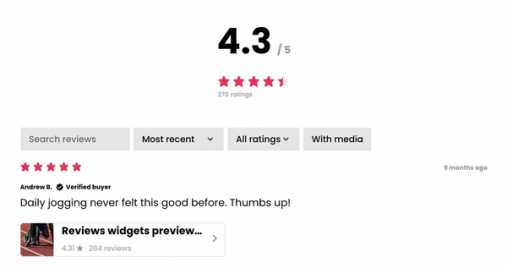
The SEO / All reviews widget displays reviews across your products and can also include store reviews when you enable them. Search engines can crawl this page to read your most recent reviews. Create a standalone All reviews page on your site to feature this widget.
Learn how to add the SEO / All reviews widget on:
To include store reviews in this widget:
- Navigate to Reviews > Reviews settings > Onsite widgets, then select SEO / All reviews.
- Select Store reviews, then turn on Show store reviews.
- Choose A single list with product reviews or A separate tab for store reviews.
- Click Publish changes.
Sync reviews to Google Shopping
Klaviyo provides a product review feed that you submit to Google Merchant Center. Once Google approves the feed, eligible product ratings can appear in Google Shopping results. Google requires at least 50 reviews in your feed.
Learn how to sync reviews to Google Shopping.
Enable rich snippets
Rich snippets allow Google to highlight product details, including a product’s star rating, directly within search results. This can make your product pages more visually appealing in search results, and gives browsers key information before they even land on your site. Enabling rich snippets does not guarantee that Google will display ratings or review counts.

Klaviyo adds rich-snippet data when a product’s reviews widget loads and the product has at least 1 review. To enable rich snippets:
- Navigate to Reviews > Reviews settings > Syndication.
- In the Google section, turn on Enable Rich Snippets.
- Click Save changes.
Learn how to enable rich snippets.
Additional resources
- How to collect, import, and display store reviews
Learn about store reviews, also called site reviews, which reflect your entire brand rather than a single product, and how to feature them in your store.
- How to sync reviews to Google Shopping
Learn how to sync reviews with Google Shopping so shoppers from across the web can see your customer ratings. This process can take upwards of 2 weeks to complete, so start the process early. However, if you've previously synced reviews to Google Shopping through another provider, they will continue to display in search results throughout the migration process.