How to find a list ID
Estimated 1 minute read
|
Updated Oct 6, 2025, 12:00 AM EST
You will learn
Learn how to locate the unique ID assigned to every list in Klaviyo. In addition to lists, every user, flow, campaign, segment, and more.
Find your list ID
To find the list ID for an existing Klaviyo list:
- Navigate to the Lists & Segments tab of your account.
- Click on a particular list.
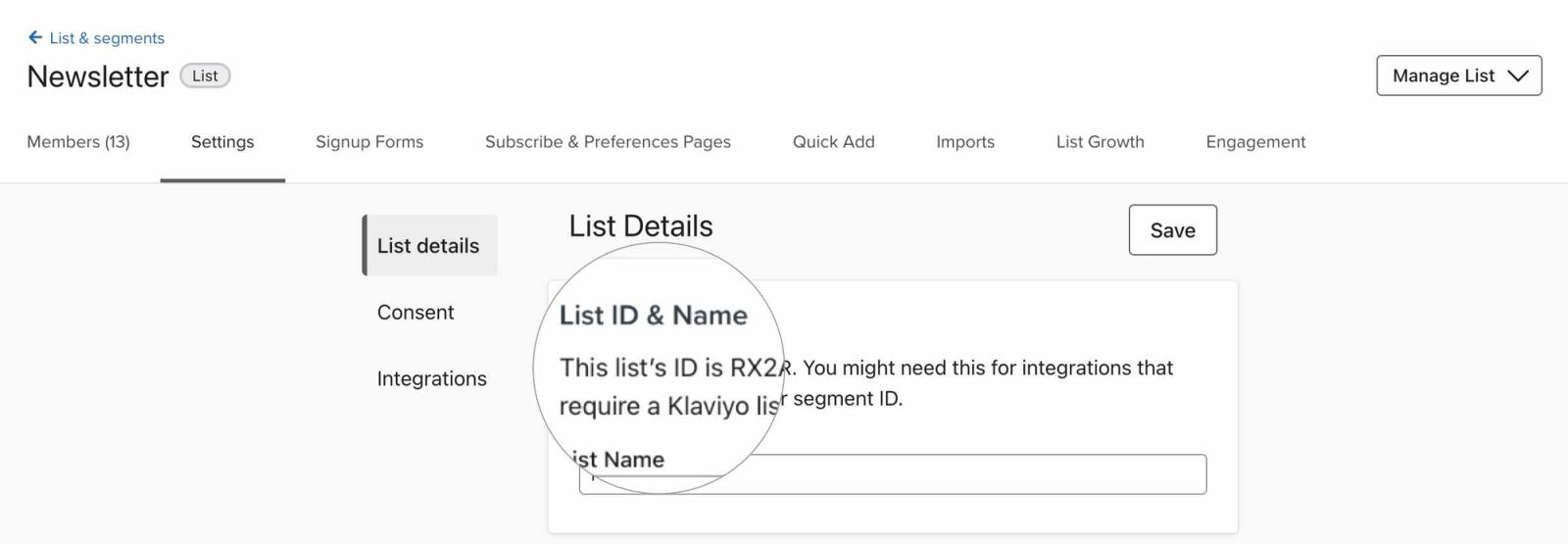
- Click into the Settings tab.
- Here, you will find your list ID near the top of the page.
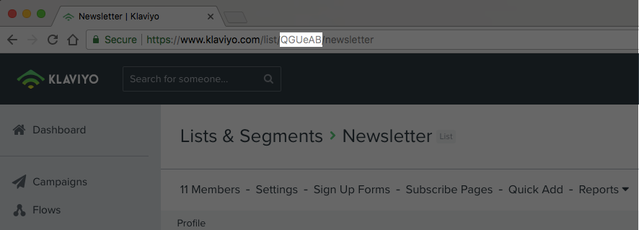
Additionally, you can find a list's ID in the URL in your browser when viewing this list. In the URL, you will see a short series of numbers and letters — this is the list ID.
Additional resources
- Getting started with segments
Learn how to create and use segments in Klaviyo, which are a powerful tool for understanding your audience and sending targeted messages.
- How to create customer persona segments based on activity
Learn how to use segmentation to create customer persona segments based on the actions they have taken. This allows you to send more relevant marketing communications so you can gain the most value from your audience.
Was this article helpful?
Use this form only for article feedback. Learn how to contact support.