How to analyze revenue by source
You will learn
Learn how to analyze revenue by source to better understand and use this data in your account. Revenue is one of the most important metrics to measure the success of a marketing campaign.
Analyze revenue by source
1. Navigate to the Analytics > Metrics.
2. From your list of metrics, select Placed Order. You will see a graph of the number of orders placed over an adjustable time period.
3. Toggle the view from Total to Value to view revenue associated with these orders.
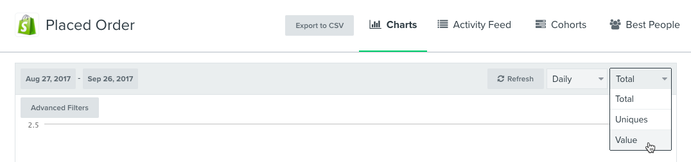
4. Once you toggle this view, the metric title will change to Revenue. To see precisely what this revenue is attributed to, select Advanced Filters.
5. To see which signup source has given you the best leads, filter the graph by $source. You will then see the revenue associated with each signup method you implement.
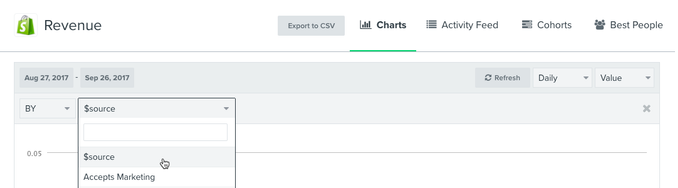
To learn more about applying $source to a hidden field of a form, head to the designated example in our Klaviyo profile properties reference guide.
Additional resources
- How to change the conversion metric for flow and campaign reports
Learn how to change the metric for flow and campaign conversions when analyzing results across your account.Different marketing efforts have different calls-to-action (CTAs), and as a result, some messages may be revenue-driven while others are meant to drive a different type of conversion. When you send a campaign or set an automated flow live, Klaviyo automatically tracks attributions across all metrics in your account. This means you can easily see how your messages perform across different activities (e.g., placed orders, checkouts started, website activity, etc.).
- How to calculate revenue per recipient
Learn how to calculate revenue per recipient (RPR) and understand how each of your marketing channels is performing. RPR helps you to determine the success of a campaign or flow and is a great way to review individual channel performance and opportunities for growth.
- Profile properties reference
Learn about the difference between custom and Klaviyo properties, how to use them to track information about your subscribers, how to remove them, best practices, and more.