FAQ 7/13 Mobile Messaging Update
FAQ: Mobile Messaging per-message pricing (2026)
Starting July 13, 2026, Klaviyo is moving Mobile Messaging pricing from credits to per-message, dollar-based rates. This article answers common questions about what's changing, when it takes effect for your account, and whether your bill will change.
What is Mobile per-message pricing?
Mobile per-message pricing replaces Klaviyo's credit-based system with clear, dollar-based rates for mobile messaging. Instead of converting sends into credits, you'll see exactly what each message costs in dollars, based on channel and region. This makes mobile spend easier to understand, forecast, and compare.
What’s changing:
- Credits replaced by dollar-based rates: Mobile plans are moving from credit-based tiers to dollar-based tiers, and messaging activity will be displayed in dollars instead of credits — making costs easier to understand and forecast.
- More plan tiers: We are adding over 70 new plan tiers with smaller gaps between them, making it easier to find a plan that fits your usage as your business grows. If your current tier is being retired, we'll automatically move your account to the closest available tier at or below your current plan price.
- Updated rates by channel and region: Rates reflect a variety of factors, including current carrier fees and market costs. Depending on your channel mix and sending regions, your rates may increase or decrease. Review your specific rates anytime inside the Klaviyo App.
- Separate toll-free and short code pricing: US and Canada SMS and MMS pricing distinguishes between toll-free and short code sending.
What isn’t changing:
- You still purchase a plan upfront before sending, same as today.
- Carrier fees remain included in your rates — no separate carrier fee line items.
Why is Klaviyo making these changes?
We’ve heard the feedback that credits may make it confusing to plan your current and future mobile usage, so we're making mobile pricing clearer and easier for you. You'll see clear dollar-based rates that will make it easier for you to plan your mobile marketing effectively.
Will this affect all my mobile channels?
Yes. This change applies to all mobile channels, message types, message formats, and geographies.
What will I see now instead of credits?
Once your account transitions, current mobile usage and costs are shown in dollars. Historical credit usage remains available. For example:
In Billing Overview
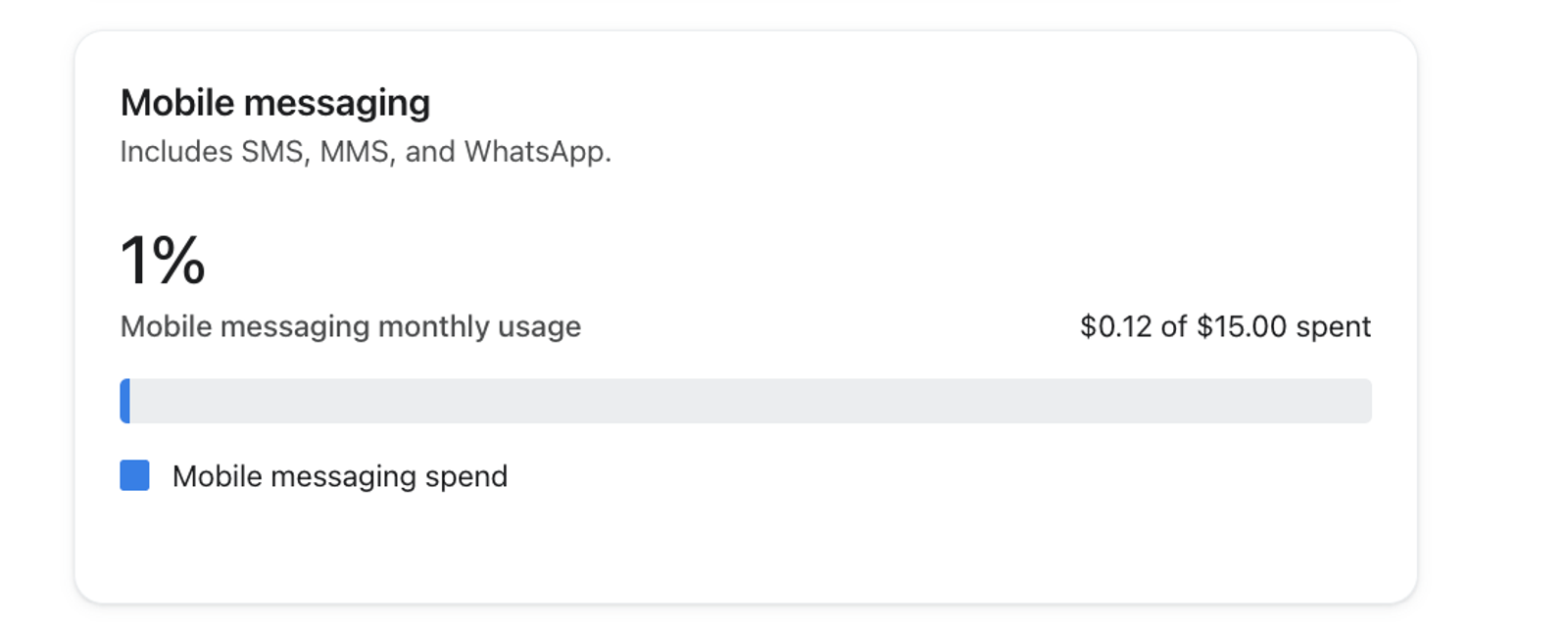
Go to Settings > Billing > Overview to see current mobile spend against your available spend for the billing cycle (your plan amount), instead of credits used against a credit total.
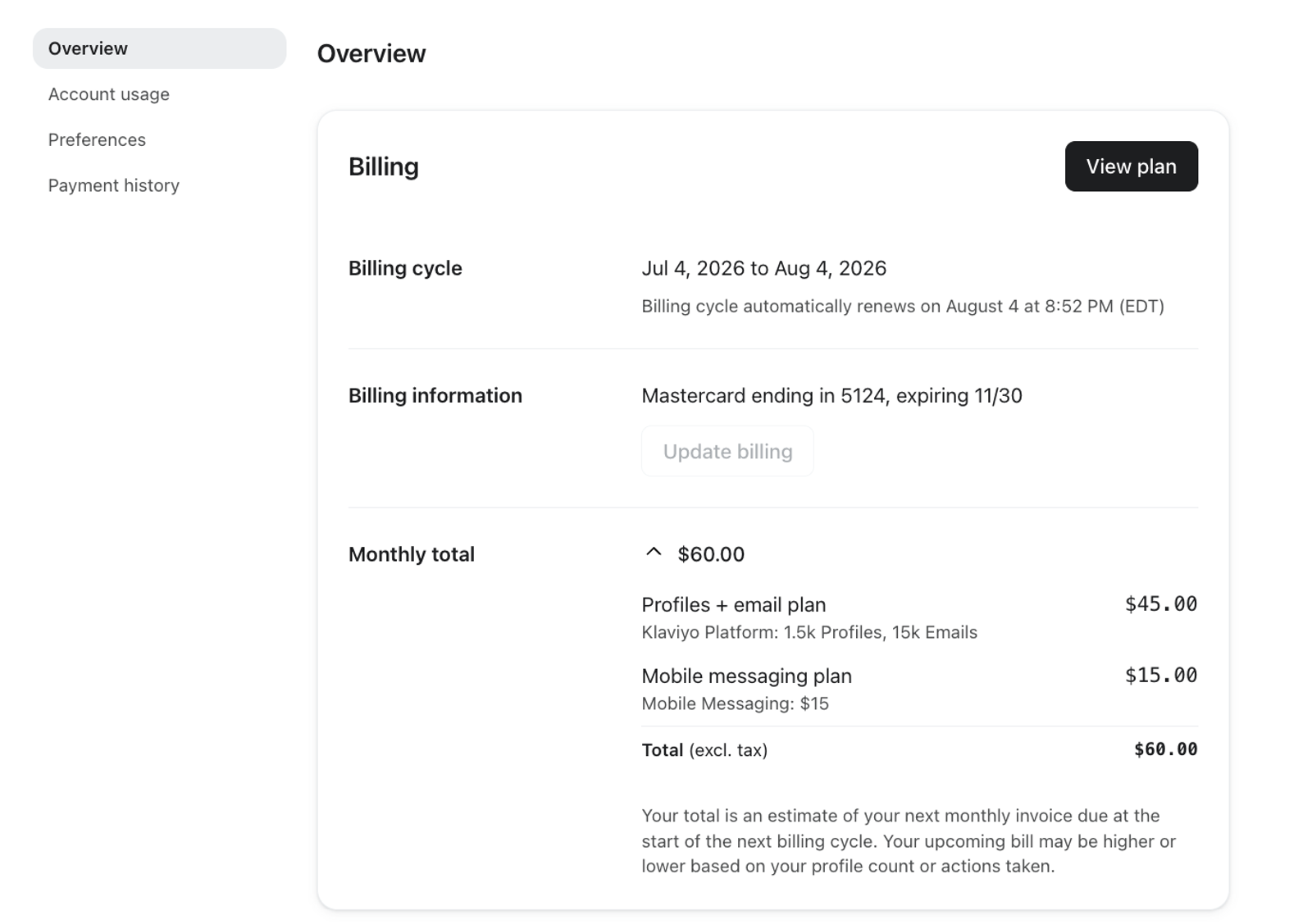
Current Usage
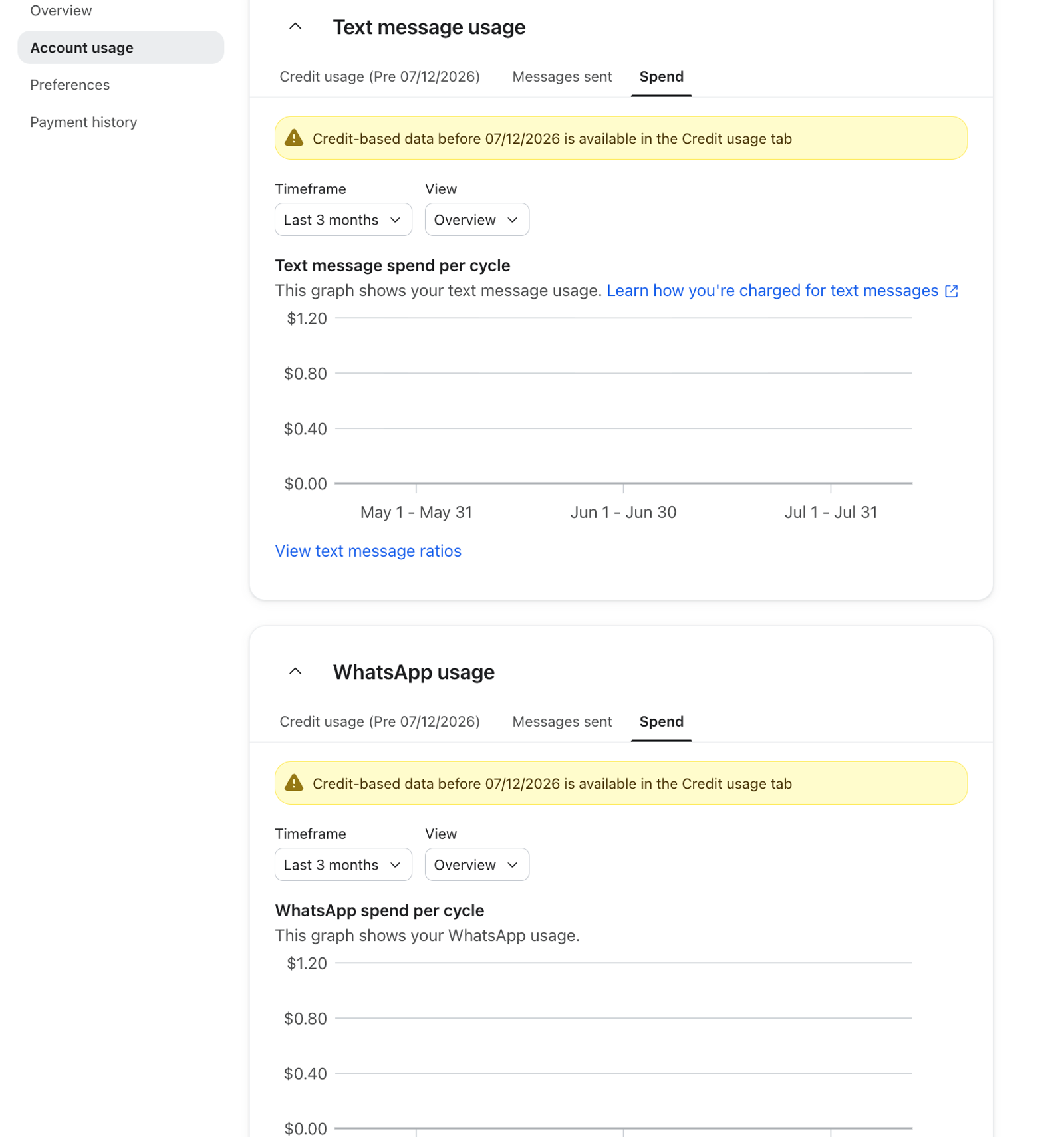
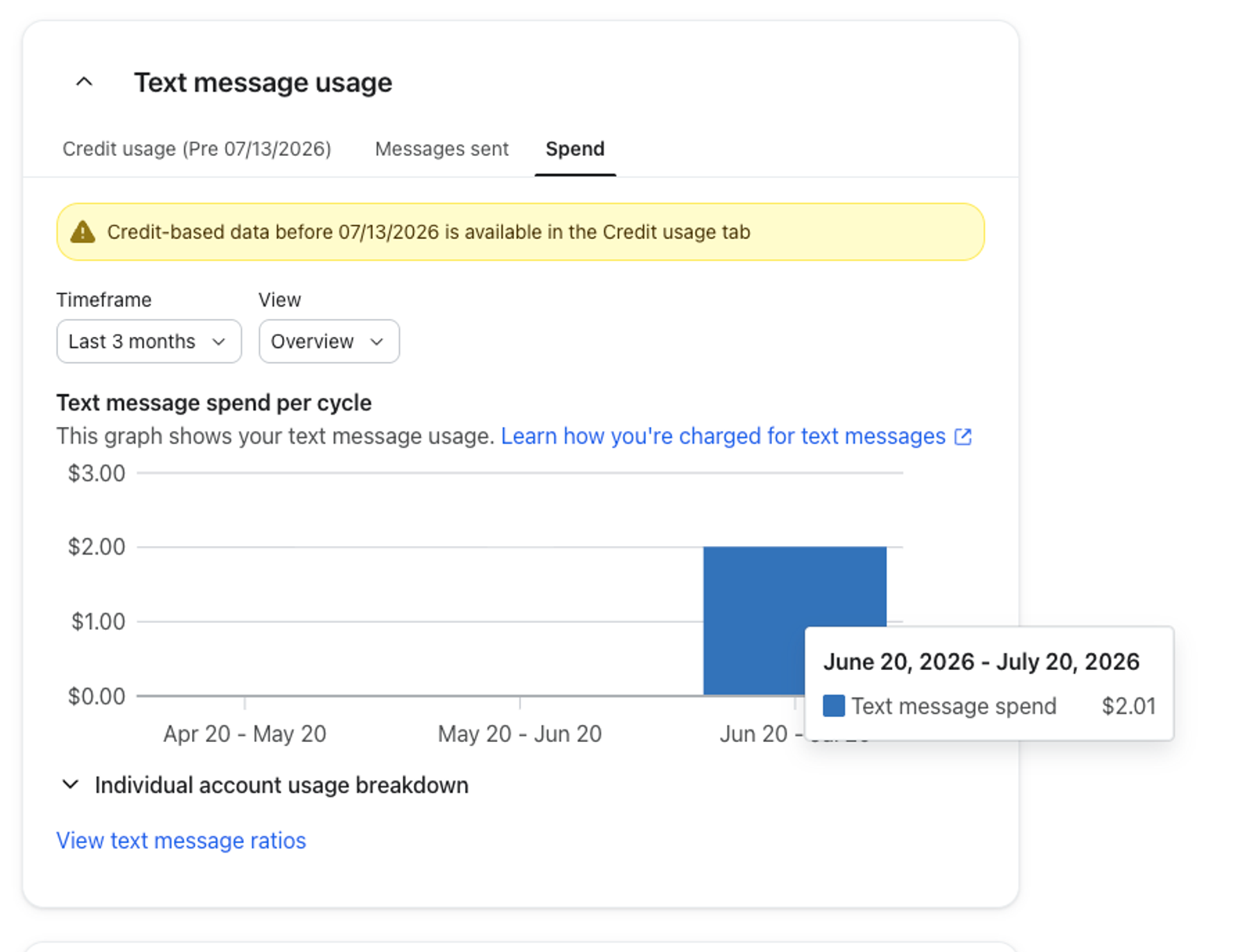
Historical Usage
Historical usage after your transition is shown in dollars in the Spend tab. Usage from before your transition remains available in the Credit usage tab. To view or download usage history:
- Go to Settings > Billing > Overview. Click View on the Mobile messaging card. If your Billing page has an Account usage tab, open that tab instead.
- Select Spend to see usage after your transition, or Credit usage to see earlier usage.
- To download a report, click Download in the Historical section or at the top of Account usage.
Scheduling a flow or campaign
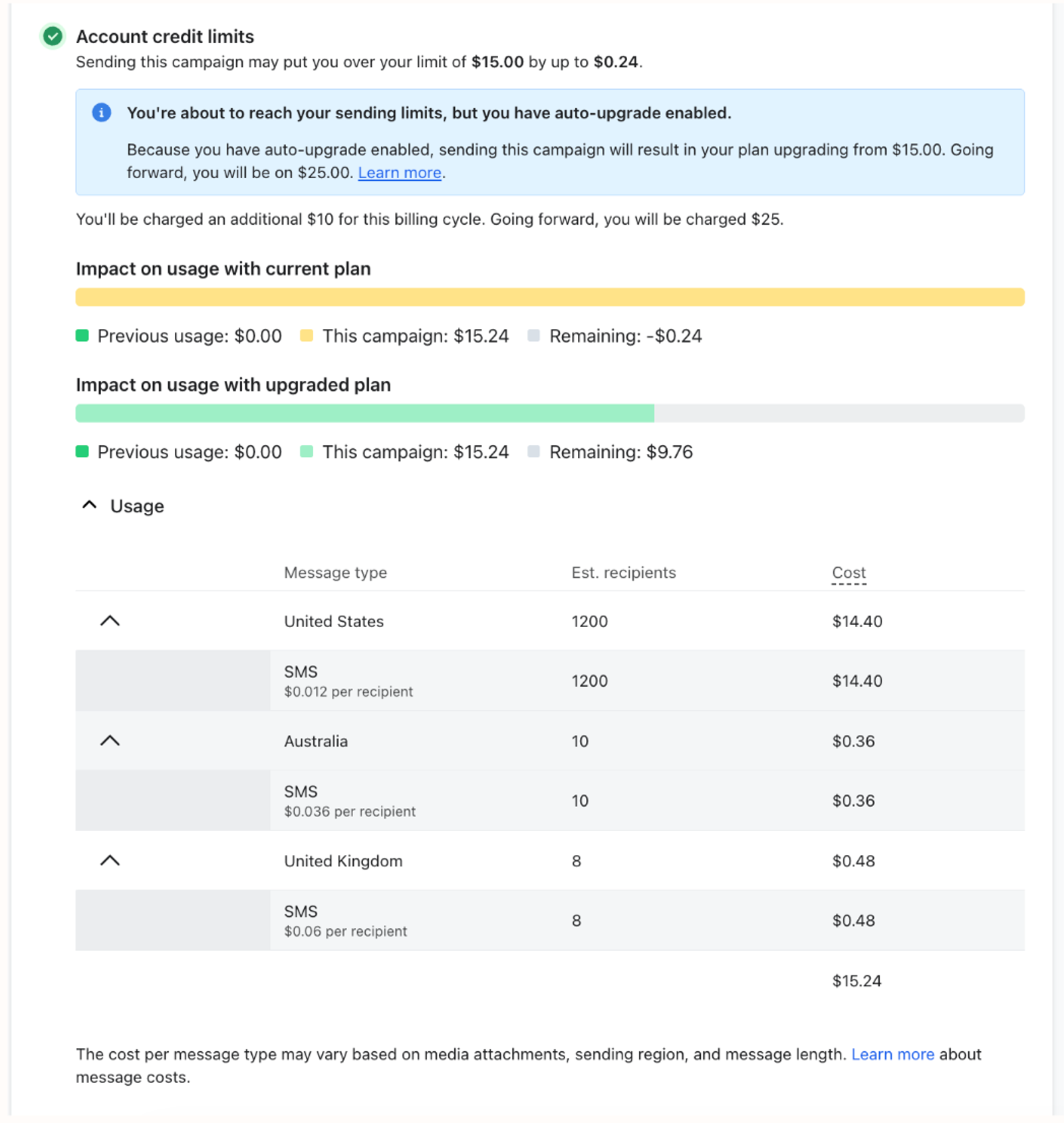
When scheduling a campaign or flow, you'll see the estimated cost of the send in dollars, along with the rate per country, instead of an estimated credit cost.
Purchasing a plan
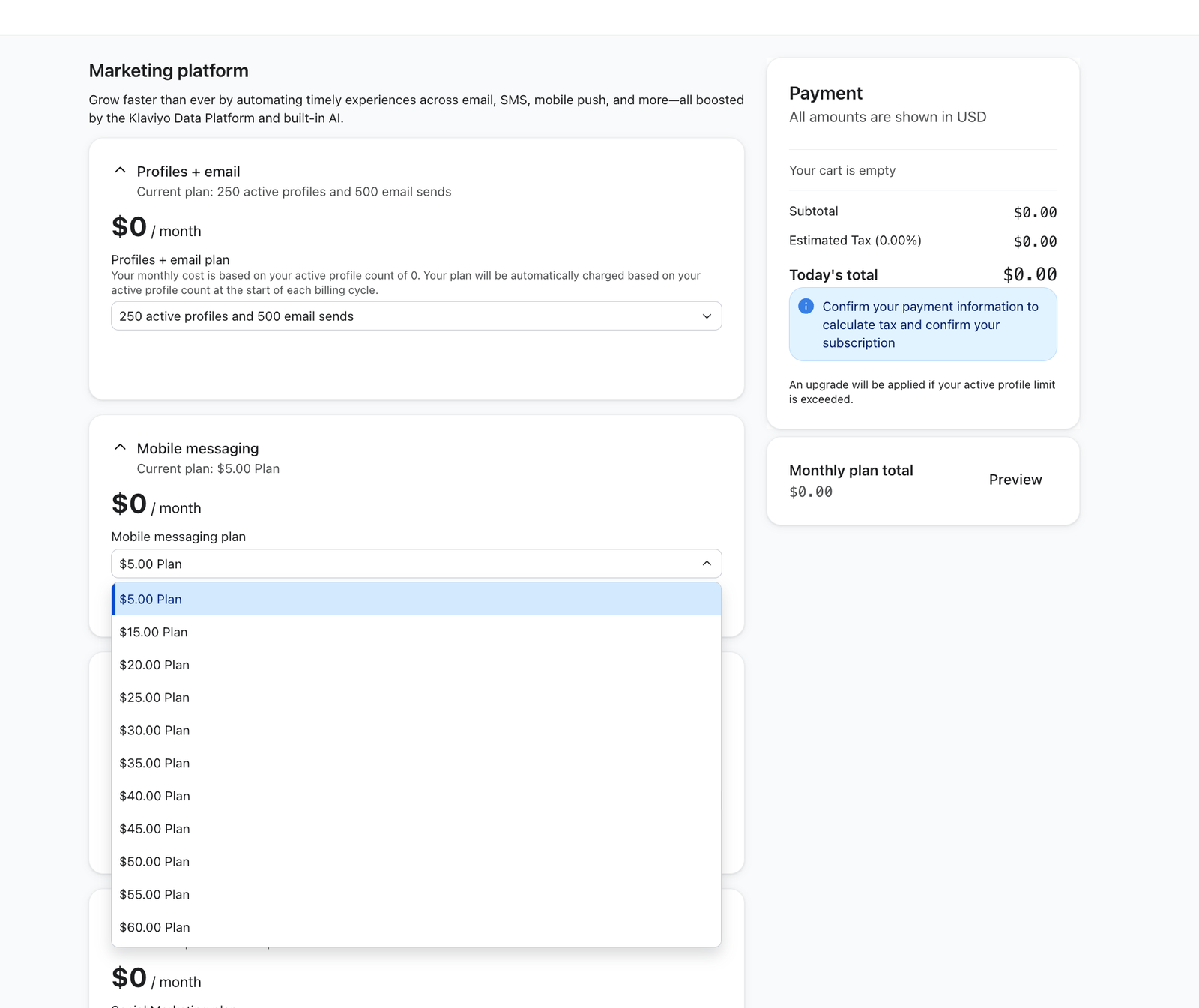
You still purchase your plan upfront, but your plan is now a dollar amount (for example, a "$115 Mobile Messaging plan") rather than a set number of credits.
Carrier fees stay included in your rate, so there are no separate carrier fee line items to account for.
What is a "rate," and what makes up my rate?
Your rate is the dollar price per message. For SMS, the rate applies to each message segment: an SMS with 2 segments uses 2 times the per-segment rate. Rates also vary by message type or format, such as WhatsApp marketing and utility messages. Each rate reflects a combination of factors:
Factor | What it reflects |
Channel | SMS, MMS, WhatsApp, or RCS |
Country or region | Where the message is sent (Recipient location) |
Number type (US and Canada SMS and MMS only) | Toll-free vs. short code |
Carrier and provider costs | Built into the rate. |
Because rates vary by channel, region, and number type, your account can have several different rates depending on how and where you send.
How should I interpret my rate?
Your rate is the list (standard) price per message for a given channel, country, message type or format, and number type. Mobile Messaging plans have built-in volume discounts, so larger monthly plans have lower per-message rates. If an account discount applies, the rates table shows your discounted rate alongside the standard rate.
Where can I see my rates?
- Go to Settings > Billing > Overview. Click View on the Mobile messaging card. If your Billing page has an Account usage tab, open that tab instead.
- On the usage details page, click See rates in the Historical section. On Account usage, click View text message ratios or View WhatsApp ratios to open the rates table.
- Select the channel and country or region you want to review. For US and Canada SMS or MMS, check the Toll-free or Short code row for your sending number.
Do my rates change over time?
Mobile message rates by country, channel, and number type can be updated periodically to reflect changes in carrier and provider costs.
When will this change happen?
This update is effective immediately as of July 13, 2026. If you are a new Klaviyo customer or an existing customer with a free Klaviyo Mobile Messaging plan, you will see this change effective immediately. No action required.
If you are an existing Klaviyo customer with a paid Mobile Messaging subscription, this change takes effect on your next billing cycle date after August 13, 2026. You can see your billing cycle date in Settings > Billing > Overview.
You'll receive advance notice by email and in the app before your account transitions, with plenty of time to review your new rates and plan accordingly.
Will my bill change?
You still pay upfront for a monthly Mobile Messaging subscription. For most accounts, typical monthly spend stays about the same. Whether your bill changes depends on your specific sending mix (channels, volume, and regions):
- Some rates are increasing and some are decreasing, reflecting real changes in carrier and provider costs since rates were last set in 2022.
Note: With this change, we have introduced approximately 70 new plan tiers and retired other tiers. If your current plan tier no longer exists under the new structure, you'll move to the closest available tier at or below your current plan price. The pricing transition will not move you to a higher-cost tier. Separately, if Automatically upgrade is selected in your billing preferences, exceeding your plan's capacity can move you to a higher tier.
- Any existing discounts on your account carry over and apply to your new rate.
- You'll continue to purchase your plan upfront. Your billing preferences determine whether you upgrade, buy temporary capacity through Flex, or stop sending when you reach your limit.
We recommend reviewing your specific rates and current plan ahead of your transition date to confirm it still fits your sending needs.
How do overages work?
If your mobile sending goes over your plan's available spend for the billing cycle, what happens next depends on your billing preferences. Charges and capacity are now shown in dollars. Check your selection in Settings > Billing > Preferences:
- Auto-upgrade: If Automatically upgrade is selected, your account moves to a higher subscription tier to cover your sending needs during the current billing cycle. You can review this preference at Settings > Billing > Preferences.
- Flex: If Flexible overages is selected, Klaviyo charges a one-time fee for additional capacity without changing your ongoing subscription tier. You can review this preference at Settings > Billing > Preferences.
- Contract customers: overages are billed according to your contract's overage terms.
- None: Sending stops when you reach your available spend until you add capacity, upgrade, or your billing cycle renews.
For steps to change and save your billing preferences, see How to choose your upgrade preference.
You'll be notified if your account approaches or goes over its plan limit, so you can decide to adjust your plan based on your needs.
What is Auto-upgrade?
When Automatically upgrade is selected and your sending exceeds your plan's capacity, Klaviyo moves your account to a higher tier during the current billing cycle. You are charged for the upgrade, and the higher tier becomes your ongoing subscription until you downgrade.
You'll be notified before and when this happens. Klaviyo will never move you to a higher tier without you being able to see the change coming.
What is Flex, and am I eligible?
Flexible overages (Flex) lets you temporarily send beyond your plan's spend limit during a high-volume month without changing your subscription tier. Flex is available for self-service Mobile Messaging plans with a monthly list price of $490 or more. Contract customers use their contract's overage terms.
Here's how it works:
- When Flexible overages is selected, Klaviyo automatically adds extra capacity when you exceed your available spend during the cycle.
- Flex purchases additional capacity in blocks up to another plan tier. The fee is the price difference between your available tier and the tier needed to cover your sending. You pay for the full block even if you use only part of it. If you use that capacity, Flex can add another block during the same cycle.
- At the start of your next billing cycle, the extra capacity resets and your subscription stays on its original tier. Flex doesn't change your ongoing plan the way Auto-upgrade does.
Example: You're on a $900/month plan with Flex turned on. After using your full $900 of plan spend, you send $112.50 worth of additional messages before your billing cycle ends. Flex charges for the capacity blocks needed to cover those messages, so the charge depends on the tier gaps, not just the $112.50 you used. At the start of your next cycle, your capacity resets to your $900 plan.
To see your Flex invoice, go to Settings > Billing > Payments & Invoices. If your Billing page has a Payment history tab, use that tab instead. The Amount column on the invoice shows your Flex Overage charge. Quantity and Unit price do not apply.
Where can I get more help?
If anything on your account doesn't match what you expect, reach out to Klaviyo Support.