Oracle OPERA data reference
Overview
Learn what data syncs from Oracle OPERA Cloud to Klaviyo and where to view it. This includes reservations, room nights, guest profiles, loyalty memberships, on-property purchases, and email and text message consent. If you have not already, read our guide on getting started with Oracle OPERA for step-by-step instructions on integrating, before continuing with this article.
Oracle OPERA reservation email data now includes tax and resort fee information to support richer reservation personalization. This update also resolves an issue with SMS consent collection from OPERA.
Sync frequency
When you integrate with Oracle OPERA, Klaviyo will sync up to the last 3 years of reservation and on-property purchase data for each hotel you select, along with all active guest profiles and loyalty memberships in your chain. Going forward, all data syncs every hour.
Note: Guest profiles and loyalty memberships sync for your whole OPERA chain, while reservations sync only for the hotels you added during setup. Only individual guest profiles sync. Company, travel agent, and group profiles don't.
How to view your Oracle OPERA data
To view your Oracle OPERA metrics:
- Navigate to Analytics > Metrics. The metrics with an Oracle OPERA icon are synced from your OPERA integration.
- Use the All integrations dropdown and select Oracle OPERA to view only OPERA metrics.
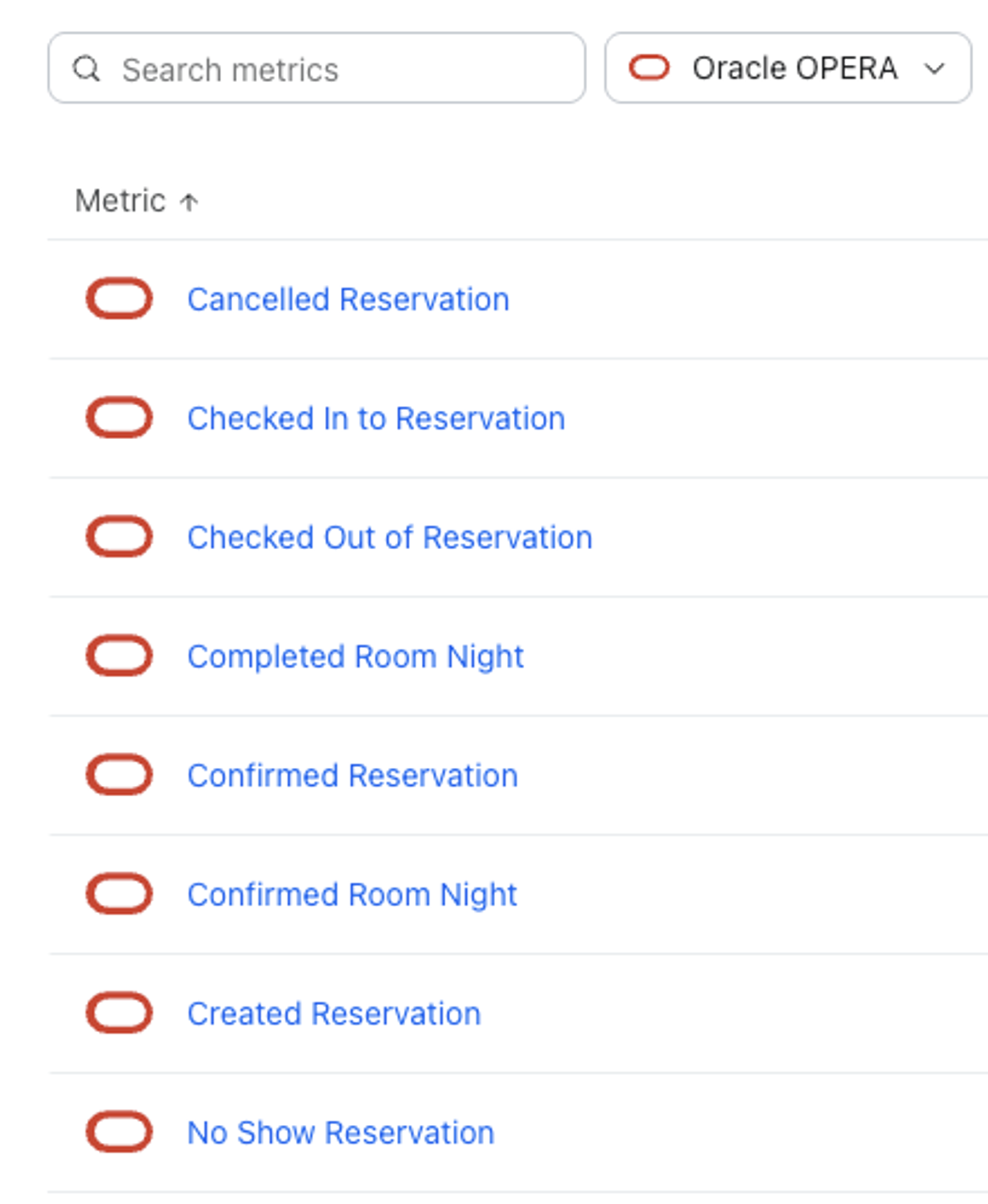
To view your Oracle OPERA objects:
- Navigate to Content > Objects. The Reservation and Loyalty Account objects with an Oracle OPERA icon are synced from your OPERA integration.
Room Night metrics
When a guest confirms a reservation in Oracle OPERA, we create 1 Confirmed Room Night event per room night (e.g., a reservation with 2 rooms for 2 nights will have 4 events).
When a guest checks out in Oracle OPERA, we create 1 Completed Room Night event per room night (e.g., a reservation with 2 rooms for 2 nights will have 4 events).
Top-level properties synced:
- ValueThe rate of the room for a given night
- StartDateThe date and time a night begins (3:00 PM in the hotel's time zone)
- EndDateThe date and time a night ends (11:00 AM the next day in the hotel's time zone)
- DayOfWeekThe day of the week (e.g., Monday) when the night begins
- AdultCountNumber of adults on the reservation
- ChildCountNumber of children on the reservation
- RoomTypeNameThe room type code as stored in Oracle OPERA
- PropertyIDThe Oracle OPERA Hotel ID of the property
- PropertyNameName corresponding to the hotel property
- SourceThe source code the reservation was booked through
- MarketCodeMarket code for the reservation
Reservation metrics
Metrics synced:
- Created Reservation: When a guest's reservation is created in Oracle OPERA
- Confirmed Reservation: When a guest's reservation is confirmed in Oracle OPERA
- Checked In to Reservation: When a guest checks in to their reservation
- Checked Out of Reservation: When a guest checks out of their reservation
- Cancelled Reservation: When a guest or admin cancels a guest's reservation
- No Show Reservation: When a guest does not show up to a reservation
Top-level properties synced:
- Value: The total monetary value of the reservation
- ReservationID: The reservation ID from Oracle OPERA
- ConfirmationNumber: The confirmation number shared with the guest
- ReservationStatus: The status of the reservation (e.g., "RESERVED")
- ArrivalDate: The arrival date for the reservation
- DepartureDate: The departure date for the reservation
- Nights: The number of nights of a reservation
- NumberOfRooms: The number of rooms booked on a reservation
- RoomTypeName: The room type code as stored in Oracle OPERA
- RoomTypeDescription: The description of the room type
- RoomClass: The room class of the booked room
- RoomNumber: The room number assigned to the reservation
- RoomInfoURL: The image URL for the booked room type
- RatePlanCode: The rate code used to book the reservation
- RatePlanDescription: The description of the rate code
- RateAmount: The base rate of the reservation
- Currency: The currency of the reservation (e.g., "USD")
- TotalAmount: The total cost of the stay
- Balance: The outstanding balance on the reservation
- AdultCount: The total number of adults included on a reservation
- ChildCount: The total number of children included on a reservation
- PropertyID: The Oracle OPERA Hotel ID of the property the reservation was booked at
- PropertyName: The name of the property the reservation was booked at (e.g., "Boutique Hotel in Maine")
- Source: The source code the reservation was booked through
- MarketCode: The market code assigned to the reservation
- BookingChannel: The channel the reservation was booked through
- Promotion: The promotion code used on the reservation
- BlockCode: The group block code used on the reservation
- CancellationPolicy: The cancellation policy for the reservation
- CancellationDateTime: The date and time the reservation was cancelled
- TotalFolioAmount: The total revenue on the reservation
- RoomRevenue: The room revenue on the reservation
- FoodAndBevRevenue: The food and beverage revenue on the reservation
- OtherRevenue: The revenue on the reservation outside of room and food and beverage (e.g., spa)
- ActualArrivalTime: The time the guest checked in (Checked In to Reservation only)
- ActualDepartureTime: The time the guest checked out (Checked Out of Reservation only)
- CancellationReason: The cancellation reason code (Cancelled Reservation only)
- CancellationNumber: The cancellation number (Cancelled Reservation only)
- DaysBeforeArrival: The number of days before arrival the reservation was cancelled (Cancelled Reservation only)
Purchase Metrics
Klaviyo syncs on-property purchases that are posted to a guest’s folio in Oracle OPERA, such as food and beverage, minibar, banquet, and other charges. Room charges, taxes, payments, and refunds are not synced.
Metrics synced:
- Placed Order: When a purchase is posted to a guest’s folio. We create 1 Placed Order event per posting.
- Ordered Product: We create 1 Ordered Product event per unit purchased (e.g., a posting for 3 glasses of wine will have 1 Placed Order event and 3 Ordered Product events).
Both events are timestamped with when the purchase was posted in Oracle OPERA.
Top-level properties synced:
- Value: The total value of the purchase (Placed Order), or the price of a single unit (Ordered Product)
- Description: The name of the item or charge as set up in Oracle OPERA (e.g., “Room Service Dinner”)
- ItemType: The type of purchase, i.e., Food and Beverage, Minibar, Banquet, or Other
- Category: The revenue group the hotel assigned to the item
- CategoryCode: The code for the revenue group
- Subcategory: The revenue subgroup the hotel assigned to the item
- SubcategoryCode: The code for the revenue subgroup
- TransactionCode: The Oracle OPERA transaction code for the item
- ArticleDescription: The name of the specific article purchased, if the hotel uses articles
- Quantity: The number of units purchased (Placed Order), or 1 (Ordered Product)
- OrderID: The posting’s transaction number in Oracle OPERA
- ReservationID: The ID of the reservation the purchase was posted to
- ConfirmationNumber: The confirmation number of that reservation
- PropertyID: The Oracle OPERA Hotel ID of the property
- PropertyName: The name of the property
- RoomNumber: The guest’s room number
- FolioNumber: The folio the purchase was posted to
- CheckNumber: The POS check number, if the purchase came from a point of sale system
- Covers: The number of guests on the check
- PackageName: The package the purchase was included in, if any
- IsPackageInclusive: Whether the purchase was included in a package
- MarketCode: The market code of the reservation
- MarketDescription: The description of the market code
- MarketGroupCode: The market group code
- MarketGroupDescription: The description of the market group
- SourceCode: The source code of the reservation
- SourceGroupCode: The source group code
- RateCode: The rate code of the reservation
- Supplement: Any additional detail entered on the posting
- TransactionPostingDate: The hotel business date the purchase was posted on
Reservation objects
The Oracle OPERA integration syncs Reservation objects from Oracle OPERA.
- ReservationID: The reservation ID from Oracle OPERA. Used as the object ID
- ConfirmationNumber: The confirmation number shared with the guest
- ReservationStatus: The current status of the reservation
- ArrivalDate: The arrival date for the reservation
- DepartureDate: The departure date for the reservation
- Nights: The number of nights of a reservation
- NumberOfRooms: The number of rooms booked on a reservation
- RoomTypeName: The room type code as stored in Oracle OPERA
- RoomTypeDescription: The description of the room type
- RoomClass: The room class of the booked room
- RoomNumber: The room number assigned to the reservation
- RoomInfoURL: The image URL for the booked room type
- RatePlanCode: The rate code used to book the reservation
- RatePlanDescription: The description of the rate code
- RateAmount: The base rate of the reservation
- Currency: The currency of the reservation
- TotalAmount: The total cost of the stay
- Balance: The outstanding balance on the reservation
- AdultCount: The total number of adults included on a reservation
- ChildCount: The total number of children included on a reservation
- PropertyName: The name of the property the reservation was booked at
- Source: The source code the reservation was booked through
- MarketCode: The market code assigned to the reservation
- BookingChannel: The channel the reservation was booked through
- CancellationPolicy: The cancellation policy for the reservation
- CancellationDateTime: The date and time the reservation was cancelled
- TotalFolioAmount: The total revenue on the reservation
- RoomRevenue: The room revenue on the reservation
- FoodAndBevRevenue: The food and beverage revenue on the reservation
- OtherRevenue: The revenue on the reservation outside of room and food and beverage
Loyalty Account objects
The Oracle OPERA integration syncs Loyalty Account objects for guests with a loyalty membership in Oracle OPERA.
- MembershipCardNumber: The membership number the guest sees on their card or account. Used as the object ID
- MembershipID: The internal Oracle OPERA ID for the membership
- MembershipType: The loyalty program code
- MembershipTypeDesc: The name of the loyalty program
- MembershipLevel: The guest's tier code
- MembershipLevelDesc: The guest's tier name (e.g., "Gold")
- MembershipLevelRank: The rank of the guest's tier within the program
- CurrentPoints: The guest's current points balance
- PointsLabel: What the loyalty program calls its points (e.g., "Points")
- EffectiveDate: The date the guest joined the program
- ExpireDate: The date the membership expires
- EnrollmentSource: Where the guest enrolled
- EnrollmentCode: The enrollment code
- IsPrimary: Whether this is the guest's primary membership
Guest data
Klaviyo syncs guest data from Oracle OPERA. Please note that we do not sync email addresses generated by online travel agencies (OTAs), such as Booking.com or Expedia. If a guest who booked through an OTA has a valid phone number, Klaviyo creates their profile with the phone number only.
If a guest later provides their real email in Oracle OPERA (for example, at check-in), Klaviyo creates their profile and backfills their past reservations as reservation objects and their past on-property purchases as Placed Order and Ordered Product events, so they can be used in date-based segments and flows. Upcoming reservations continue to sync as usual.
Guest data synced to profiles:
- Phone number
- First name
- Last name
- Address 1
- Address 2
- City
- State
- Zip
- Country
- OPERA Profile ID
- OPERA Birthday
- OPERA Nationality
- OPERA VIP Status
- OPERA Profile Status
- OPERA Profile Source
- OPERA Last Stay Date
- OPERA Last Stay Property
- Email consent
- SMS consent
Please note that guests are subscribed to email when the email marketing, email opt-in, and mailing list opt-in settings are all enabled on their Oracle OPERA profile, and to SMS when the SMS marketing and SMS opt-in settings are both enabled.