Sign-up forms and subscribe pages reference
You will learn
Learn how to use Klaviyo's list growth tools, including various types of sign-up forms and subscribe pages, or a third-party integration to collect and engage with new subscribers.
This guide covers the various options for adding sign-up forms or subscribe pages with Klaviyo:
- Sign-up forms
Create and style popup, flyout, full page, embedded, and banner forms inside your Klaviyo account to publish on your website. - Subscribe pages
Share a subscribe page URL in an email or social media channel post, or embed a subscribe page on your site so shoppers can sign up to hear more from your brand. - Custom sign-up forms
If you're using a custom integration, you can custom code a sign-up form and attach that to Klaviyo.
Klaviyo cannot assist with custom coding, so we recommend reaching out to a developer for further assistance with custom-built forms. If you do not have a developer, Klaviyo has a vast network of partners in our Partner Directory.
- Third-party list growth tools
There are a number of third-party tools that integrate with Klaviyo, which you can use to build sign-up forms and sync the information they collect into your Klaviyo account.
Want to learn more about acquisition strategies in Klaviyo? Head to our Academy course on creating strategic sign-up forms.
The sign-up form editor
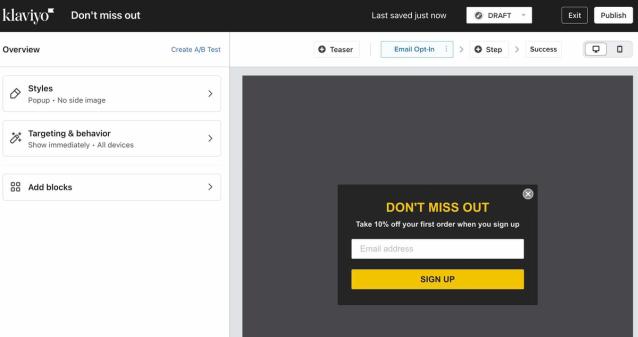
The sign-up form editor allows you to build forms within Klaviyo to grow your lists and collect information from your shoppers. Navigate to Website > Sign-up forms to build a form or browse our templates, and check out our guide to getting started with sign-up forms.
Custom sign-up forms
You can custom code your own sign-up form and add it directly to your site. Use the Create Client Subscription API to send sign-ups from your website to Klaviyo. Build and configure the form outside Klaviyo, then add it to the specific pages where you want it to appear.
Because custom-built forms use custom HTML and CSS, Klaviyo Support is unable to assist with troubleshooting them. We recommend reaching out to a developer for assistance.
If you're using an ecommerce platform that natively integrates with Klaviyo (e.g., Shopify, BigCommerce, WooCommerce, Magento 1 or 2, etc.), we recommend using the built-in sign-up form editor referenced above to streamline the process of adding a sign-up form to your website.
Subscribe pages
A subscribe page is a Klaviyo-hosted sign-up page that is automatically created for every list in your Klaviyo account. You can customize the style of your subscribe pages, and use them when running contests or special promotions, or share the page's direct link in your emails or other marketing channels as an alternative way to grow your lists.
Each list that you create will default to using your account's subscribe page. To find your account's default consent pages:
- Navigate to Audience > Growth tools.
- Under Customize subscribe and preference pages, click Customize.
- Select Account default pages.
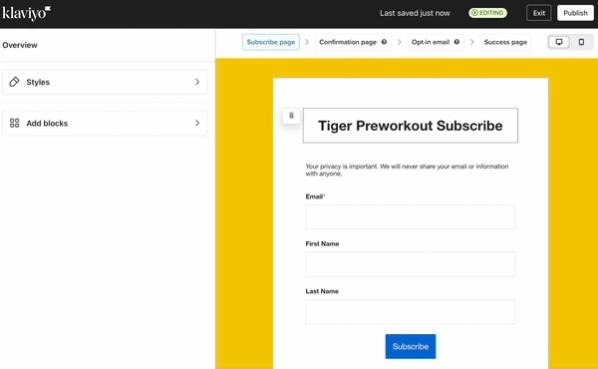
You can also choose to customize a unique set of consent pages, including a subscribe page, for a particular list. To customize that list's subscribe page:
- Navigate to Audience > Lists & segments and choose your list.
- Select Consent pages. If the list is using your account defaults, click Customize for this List.
- Under Subscribe page, click Edit Page.
- Customize the page, then click Publish and confirm publication if prompted.
Learn more by heading to our guide for using subscribe pages on your website.
Note that you can also create and share an SMS subscribe link in your marketing channels to grow your SMS lists. Mobile visitors can subscribe by sending a pre-filled text message, while desktop visitors go to a subscribe page. Make sure that page includes a phone number field to collect SMS consent. Include SMS opt-in disclosure language wherever you share the link.
Third-party list growth tools
While Klaviyo allows you to design and use a number of different built-in sign-up forms, there are also many third-party list growth tools that offer additional features and integrate easily with Klaviyo. Contacts collected through any of the listed third-party tools can be set up to flow directly into whatever list you choose in Klaviyo.
Search for list growth tools in Klaviyo App Marketplace.
Additional resources
- Getting started with sign-up forms
Learn how to create and customize sign-up forms in Klaviyo to publish on your website so you can engage shoppers, collect emails and phone numbers, and build long-lasting customer relationships.
- How to use a subscribe page on your website
Learn how to create and customize a subscribe page so that your customers can easily sign up to hear more from your brand.
- Getting started with consent pages
Learn about the different consent pages related to Klaviyo lists, including the preferences, subscribe, and unsubscribe pages, and how to customize them.