How to export the HTML for an email template
Estimated 1 minute read
|
Updated Oct 16, 2026, 12:00 AM EST
You will learn
Learn how to export the HTML for an email designed in Klaviyo's drag-and-drop editor. You can copy a template's HTML to perform accessibility testing, edit the code to add custom elements, or import the template into another email marketing program.
Exporting a template built in Klaviyo's drag-and-drop editor and importing it back into Klaviyo is not recommended, as it can cause problems with the template's functionality. Learn how to import a custom HTML template.
Export the HTML for an email template
You need permission to edit templates to export their HTML.
- Navigate to Content > Templates.
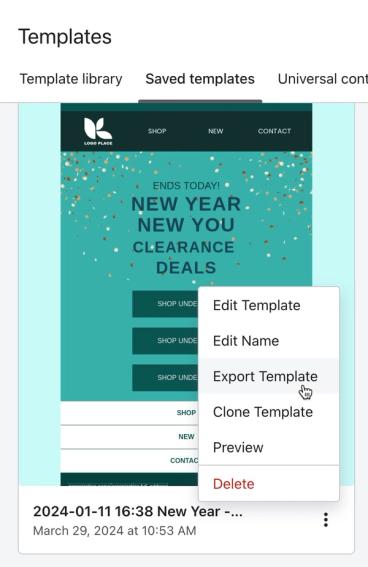
- Select the Email: saved tab, then locate the template you want to export.
- Click the options menu (3 dots) on the template's card.
- Click Export.
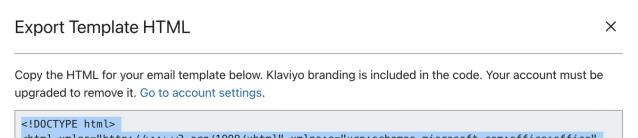
- Click the copy icon in the modal that appears, then paste the HTML into a program of your choice.
Additional resources
- How to import a custom HTML template
Learn how to import a custom HTML template into Klaviyo.
- Troubleshooting custom CSS, JavaScript, and HTML in Klaviyo
Learn how to troubleshoot custom code when importing a custom HTML template or building your own custom coded template.
Was this article helpful?
Use this form only for article feedback. Learn how to contact support.