How to change the currency for a specific template
You will learn
Learn how to update a single email template to use a different currency symbol than your global setting. This will impact product blocks and other elements that dynamically display a product price.
Update currency formatting for a specific template
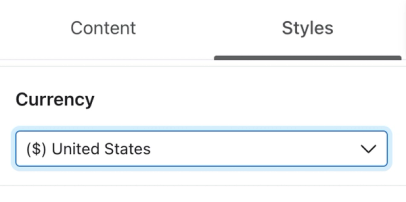
- Open your template's Styles tab.
- Choose a new currency symbol from the Currency menu.
How the default currency setting impacts a template
When you update the currency format on the template level, the display of any values dynamically populated into your template will be updated to reflect the conventions of the new currency:
- The currency symbol
- The placement of the currency symbol (i.e., prefix or suffix)
- The punctuation used in formatting the value (i.e., commas or periods)
This setting overrides the default currency setting in your account, but only for the current template. This is useful if you are segmenting based on geographical region and are targeting your campaign content based on different locations.
Additional resources
- How to change the currency for your account
Learn how to change the default currency symbol in your Klaviyo account from the dollar sign ($) to another currency. This change is useful if you conduct business in a different currency, as it can help save you time and minimize the risk of using an incorrect symbol.
- How to translate consent pages into different languages
Learn how to translate the text in your consent pages (i.e., subscribe, unsubscribe, and manage preferences pages) into the language that your subscribers use.
- Understanding when and how Klaviyo sets a profile's location
Learn where to find location information for a profile, how it is used and updated, and more. When syncing or creating a new profile, Klaviyo determines the location and timezone information based on the profile's billing address. If a profile hasn't purchased, location and timezone are determined based on IP geolocation.