How to find the subscribe link for a list
You will learn
Learn how to locate a list's subscribe link, which you can share with potential email subscribers to enable them to sign up for your email marketing.
A subscribe page is a Klaviyo-hosted sign-up page that is automatically created for every list in your account. While you may choose to leverage popups, flyouts, or embedded forms on your website, you can also share a link to this subscribe page in emails or social media posts as an alternative way to grow your email list.
Find the subscribe link for your list
To find the subscribe link for a list:
- Click the Audience dropdown in the left hand navigation.
- Select the Lists & Segments tab.
- Click into a list. Check the Type column to ensure you're selecting a list, not a segment.

- Navigate to the Signup Forms tab.

- Scroll down to the Subscribe Page section at the bottom of the page.
- If you see a list of consent pages, click Subscribe page.

- On the following page, in the modal to the left of the subscribe page editor, click Copy URL.
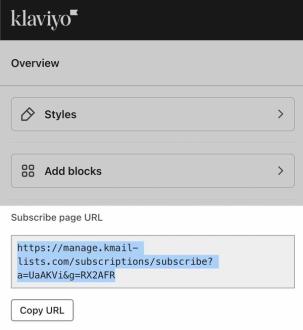
- If you don't see a list of consent pages, click Copy Subscribe Page URL.

After following these steps, the URL will be copied to your clipboard and you can paste it wherever you’d like.
Additional resources
- Advanced segmentation reference
Learn effective advanced segmentation strategies that provide insights into your customer base and create highly personalized experiences for your subscribers.
- Understanding unsubscribes and resubscribes
Learn about unsubscribes in Klaviyo, and how to manually unsubscribe contacts yourself.
- How to collect consent via Instagram
Learn how to collect email and SMS subscribers on Instagram through a link that opens up a subscribe page when a user taps on it. When someone views one of your Instagram stories and clicks on the link, it will bring them to a form where they can subscribe to hear more from your brand.