Add Custom Questions to your Social Auto-reply
Premium feature. Available on the paid Klaviyo Social Marketing plan.
Custom Questions extend the Social Auto-reply flow beyond email and phone collection. Before or after an Instagram user submits their contact information, you can ask them custom questions and store their answers as Klaviyo profile properties. You can then use those properties in segments and flows just like any other profile data.
This article walks through adding Custom Questions to an Auto-reply, where answers land on the profile, and how to put those answers to work.
When to use Custom Questions
Custom Questions are useful any time you want richer zero-party data on a subscriber, going beyond their email or phone alone. Common patterns:
- Size, fit, or style preferences for apparel brands
- Pet name and breed for pet brands
- Goals or use cases for fitness and wellness brands
- Birthday month
Add a Custom Question to your Social Auto-reply
- In Klaviyo, open Social in the left navigation and select Auto-replies.
- Open the Auto-reply you want to add questions to (or create a new one following the steps in Create a Social Auto-reply).
- Click Add custom question. If you see Add message, open that menu and select Add custom question.
- Configure the question:
- Customer response: Quick reply (the customer picks from options you define) or Open-ended (the customer types their own response)
- Custom question: Enter the question shown in the Instagram direct message (DM), for example, "Are you a dog or cat person?"
- Profile property: Select an existing Klaviyo profile property or create a new one to store the answer.
- For Quick reply, add 2–5 options. Set a Label (what the customer sees in the DM, emojis allowed) of up to 20 characters and an optional Value (what's saved to the profile property). If you leave the value blank, Klaviyo saves the label. Use distinct labels and values for your options.
- For example, show "Dog 🐶" as the label, but save "dog" as the value.
- Add additional Custom Questions in sequence if needed, up to a maximum of 3 Custom Questions per Auto-reply. Each question runs after the previous one is answered.
- Use the up and down arrows on the question cards to arrange the message sequence.
- To accept responses, select Ready or Live under Status, then click Save. Select Draft instead to save without activating the Auto-reply.
- After activating the Auto-reply, send your Instagram account a DM with its trigger keyword and answer the questions. Find the customer's profile in Klaviyo and confirm that the answers appear under the properties you selected.
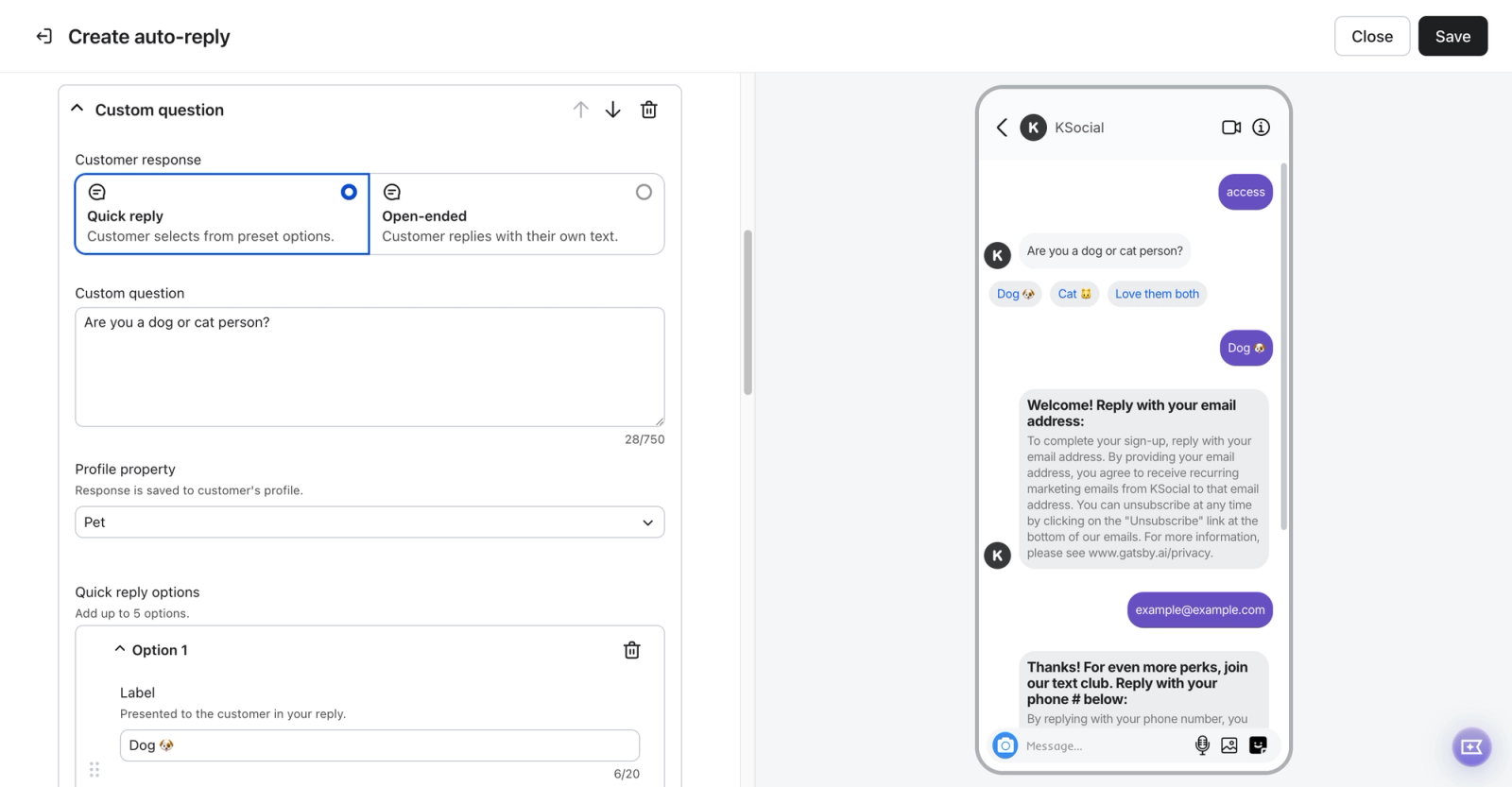
How customers experience Custom Questions
- For Quick reply questions, Klaviyo presents the options in the Instagram DM and the customer picks one.
- Note: Quick reply options only appear to mobile Instagram users because of Instagram-enforced restrictions. To gather answers from desktop users, make your question text more specific by asking them to respond with one of the options directly in their message.
- For Open-ended questions, Klaviyo accepts whatever the customer types as their answer.
- There's no built-in skip option. Customers move through the sequence by responding to each question.
- If a customer's Instagram account is not yet linked to a Klaviyo profile, their answers are saved to the profile only after they share their email address or phone number through an Auto-reply. If they leave before sharing either, their answers are not saved to a Klaviyo profile. Once their Instagram account is linked, answers are saved as they respond, even if they leave before completing the sequence.
Where answers land on the profile
Each Custom Question maps to a Klaviyo profile property under the Custom Properties section of the profile. You can create a new profile property or select an existing profile property during the Auto-reply configuration. When a customer answers the custom question, Klaviyo saves their answer to that property on their profile.
Quick reply questions save the configured value, or the label if no value is set. Open-ended answers are saved in lowercase. A new answer to the same property replaces its previous value.
Custom Question properties behave the same as any other profile property in Klaviyo. You can:
- Filter segments by them
- Reference them in flow conditional splits
- Use them as personalization tokens in email and SMS content
- Export them with the rest of your profile data
Use Custom Questions in segments
A few example segments built on Custom Question data:
- Fitness goals. Targeted product launches or content based on the goals of your audience.
- Birthday in the next 30 days. Use this segment for a birthday discount campaign. This requires a birthday saved in a supported date format (for example, MM/DD/YYYY). A birthday month alone is not enough.
- Product preferences. Targeted promotions based on product preferences, e.g., dressy vs. casual.
To build a segment, create a new segment with the condition Properties about someone and choose the profile property your Custom Question writes to. Set the condition to match the saved answer. For Quick reply questions, use the value you configured, or the label if you left the value blank.
Use Custom Questions in flows
Custom Question answers can drive flow logic. A few patterns:
- Conditional split: branch a welcome flow based on the customer's answer (for example, send different product picks to "Pet: dog" vs. "Pet: cat").
- Personalization: use the answer as a personalization token in the email body, subject line, or SMS message.
- Filter the flow: prevent customers from entering a flow unless they've answered a specific question.
If a welcome flow starts when someone joins your list, it can start before they answer Custom Questions placed after contact collection. Add a time delay before a split or message that uses those answers to give customers time to respond, and decide what profiles without an answer should receive. An entry filter that requires an answer can prevent a profile from entering before that answer is saved. A time delay inside the flow does not change that entry requirement.
You can update the property later through other channels (forms, profile updates, additional auto-replies). Later flow conditions and personalized messages that use the property will use its updated value. Keep the property name and values consistent with your flow conditions.
Things to know
- If a customer's Instagram account is not yet linked to a Klaviyo profile, their answers are not saved to a profile until they share an email address or phone number through an Auto-reply.
- You can add up to 3 Custom Questions per auto-reply.
- Answer types are Quick reply or Open-ended. Dedicated number, date, and multi-select answer types are not available.